Trigger 43
6.6 Noise Rejection
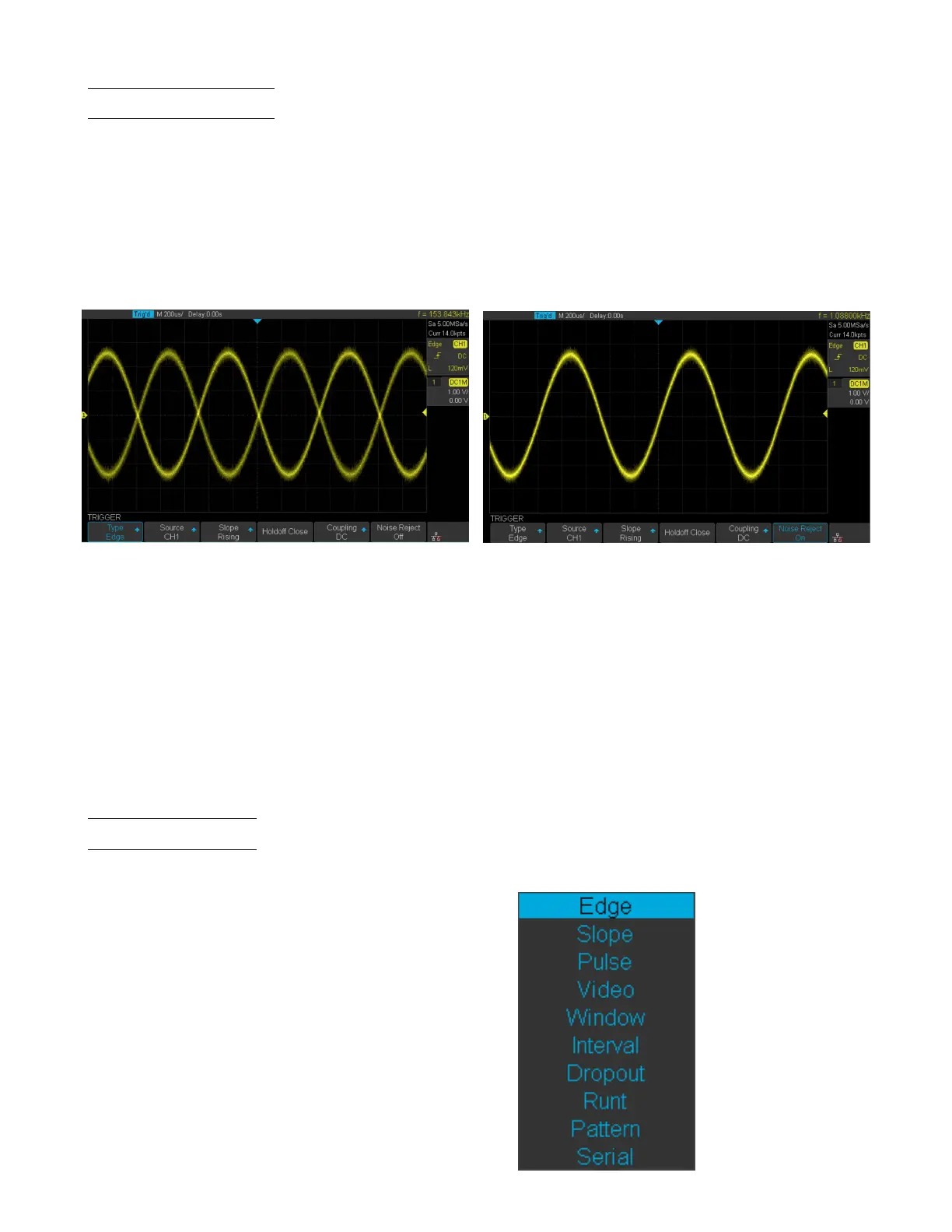
Noise Rejection adds additional hysteresis to the trigger circuitry. By increasing the trigger hysteresis band, the possibility
of triggering on noise is decreased, however the trigger sensitivity is also decreased. A larger signal is required to trigger
the oscilloscope when Noise Rejection is enabled.
To enable Noise Rejection:
1. Press the Setup key to enter the Trigger menu.
2. Press the Noise Reject softkey to toggle between On and O.
Disabled Enabled
Figure 6.6 Noise Reject
If the signal being probed is noisy, set up the oscilloscope to reduce the noise in the trigger path and on the displayed
waveform. First, stabilize the displayed waveform by removing the noise from the trigger path. Second, reduce the noise
on the displayed waveform.
• Obtain a stable display.
• Remove the noise from the rtigger path setting Trigger coupling to LF Reject, HF Reject, or enabling Noise Reject.
• Set the Acquisition mode to Average to reduce noise.
6.7 Trigger Types
The 2194 provides the following trigger types :
• Edge Trigger • Slope Trigger
• Pulse Trigger • Video Trigger
• Window Trigger • Interval Trigger
• Dropout Trigger • Runt Trigger
• Pattern Trigger • Serial Trigger
Figure 6.7 Trigger Type













 To Next Page