Trigger 60
6.7.9 Pattern Trigger
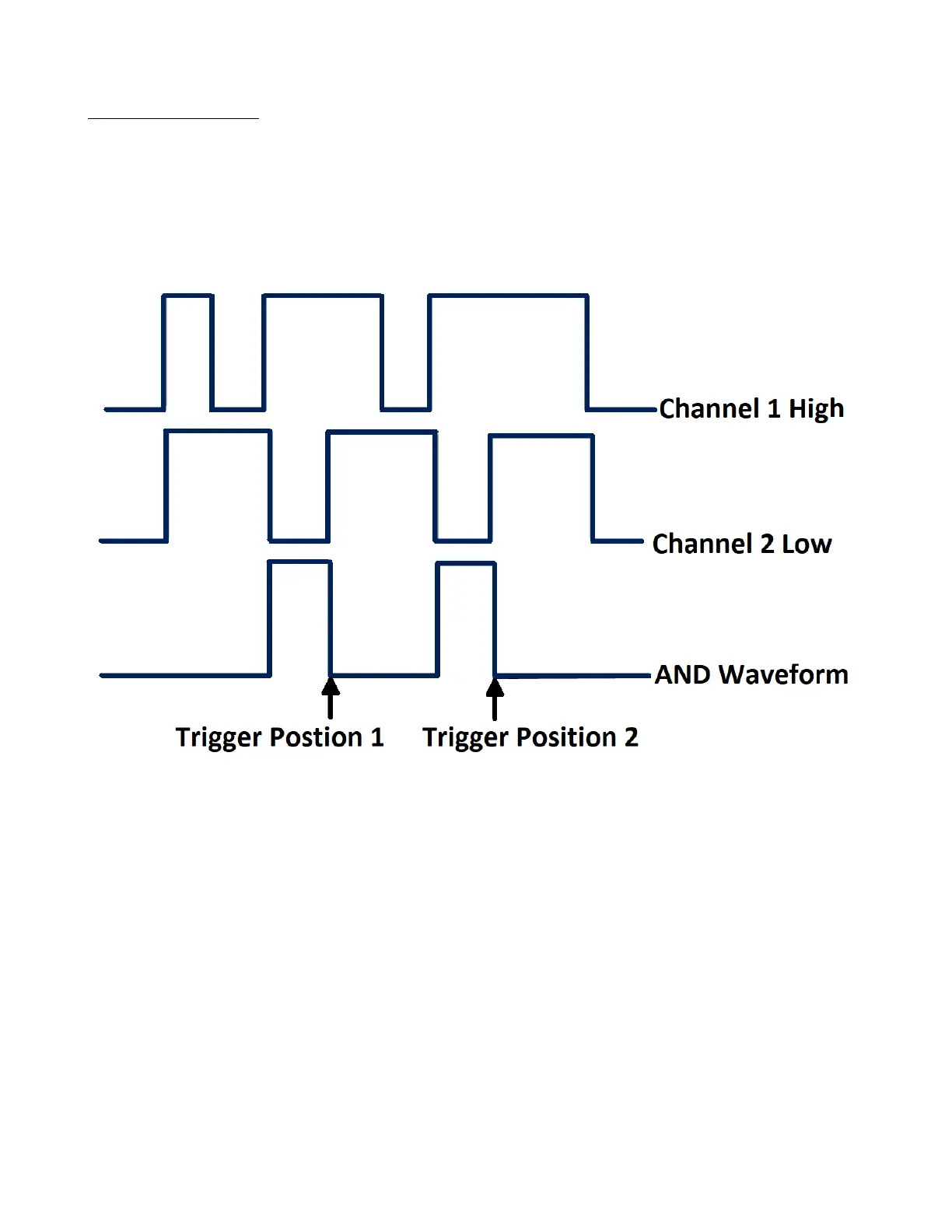
The Pattern trigger identies a trigger condition by looking for a specied pattern. The pattern trigger can be expanded
to incorporate delays.
Pattern durations are evaluated using a timer. The timer starts on the last edge that makes the pattern “true”. Potential
triggers occur on the rst edge that makes the pattern false, provided that the time qualier criterion has been met.
The oscilloscope provides 4 patterns: logical AND, OR, NAND and NOR combination of the channels. Each channel
can set to low, high or invalid.
Figure 6.25 Pattern Trigger
To setup a pattern trigger:
1. Press the Setup key to enter the Trigger menu.
2. Press the Type softkey, then use the Universal Knob to select Pattern.
3. Press the Source softkey, then use the Universal Knob to select CH1 or CH2 as the trigger source.
4. Press the Don’t care softkey to assign Don’t care, High or Low to the channel.
• Low: Sets the pattern to low on the selected channel. A low is a voltage level that is less than the channel’s
trigger level or threshold level.
• High sets the pattern to high on the selected channel. A high is a voltage level that is greater than the channel’s
trigger level or threshold level.
• Don’t care sets the pattern to don’t care on the selected channel. Any channel set to don’t care is ignored and is
not used as part of the pattern.
– If all channels in the pattern are set to Don’t care, the oscilloscope will not trigger.













 To Next Page