Trigger 42
6.5 Trigger Holdo
Trigger holdo can be used to add an additional, user-dened delay to the re-arming of the trigger circuit. This provides
control over how rapidly, or how often, the oscilloscope can be triggered. The oscilloscope will not trigger until the
holdo time expires.
Use the holdo to trigger on repetitive waveforms that have multiple edges (or other events) between waveform repetitions.
You can also use holdo to trigger on the rst edge of a burst when you know the minimum time between bursts.
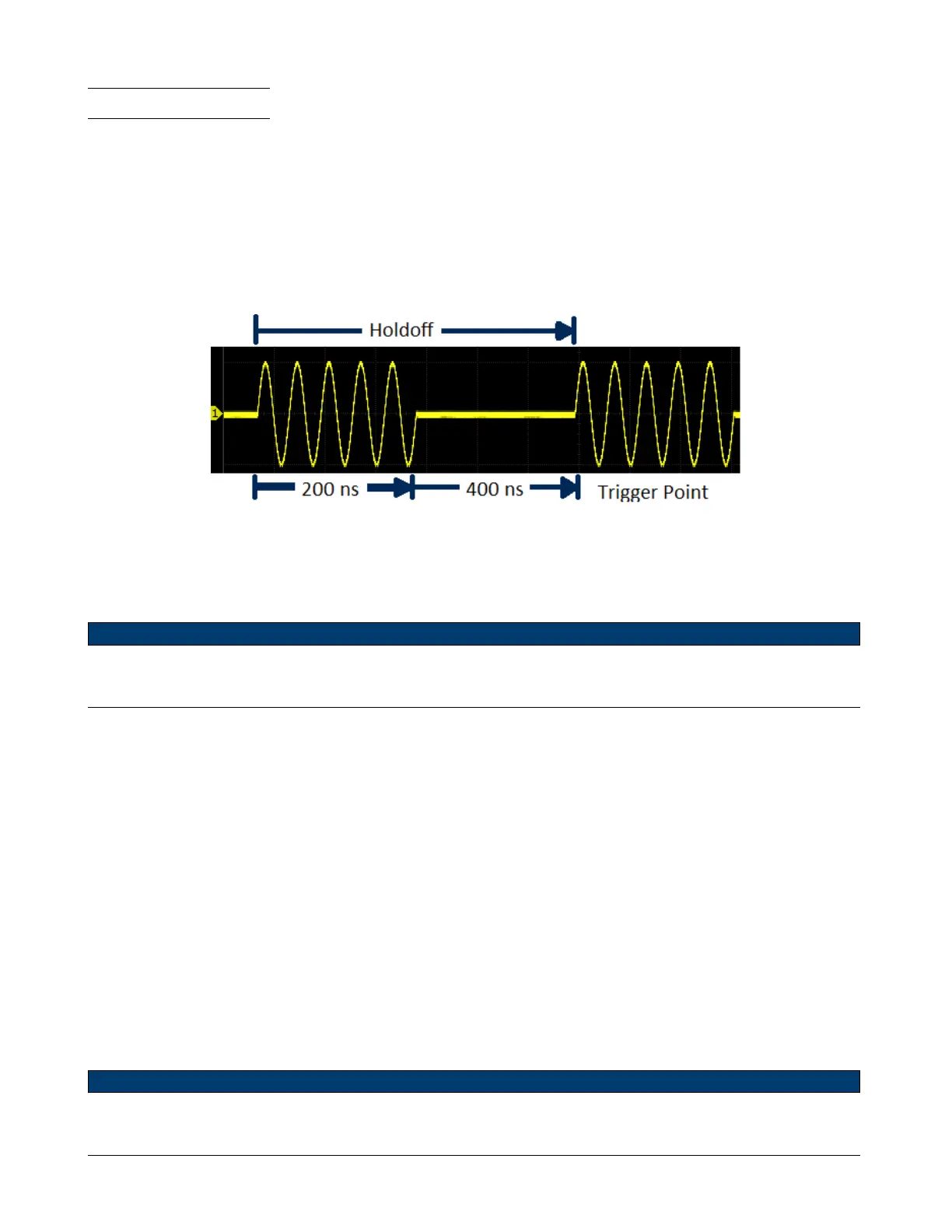
For example, to get a stable trigger on the repetitive pulse burst shown in gure 6.5 set the holdo time to be >200 ns
but <400 ns.
Figure 6.5 Holdo
The correct holdo setting is typically slightly less than one repetition of the waveform. Set the holdo to this time to
generate a unique trigger point for a repetitive waveform.
Note:
Only edge trigger and serial trigger have holdo option. The holdo is adjustable from 100 ns to 1.5 s.
To nd the repetition of the waveform:
1. Press the Stop key to stop data acquisition.
2. Turn the Horizontal Position Knob and the Horizontal Scale Knob to nd where the waveform repeats.
3. Measure the time using the cursors function.
4. Set the Holdo time.
To set the Holdo time.
1. Press the Setup key to enter the Trigger menu.
2. Press the Holdo Close softkey to enable Holdo.
3. Turn the Universal Knob to set the desired holdo time.
– Push the Universal Knob to open the numeric keypad.
Note:
Adjusting the time scale and horizontal position will not aect the holdo time.













 To Next Page