Trigger 58
6.7.8 Runt Trigger
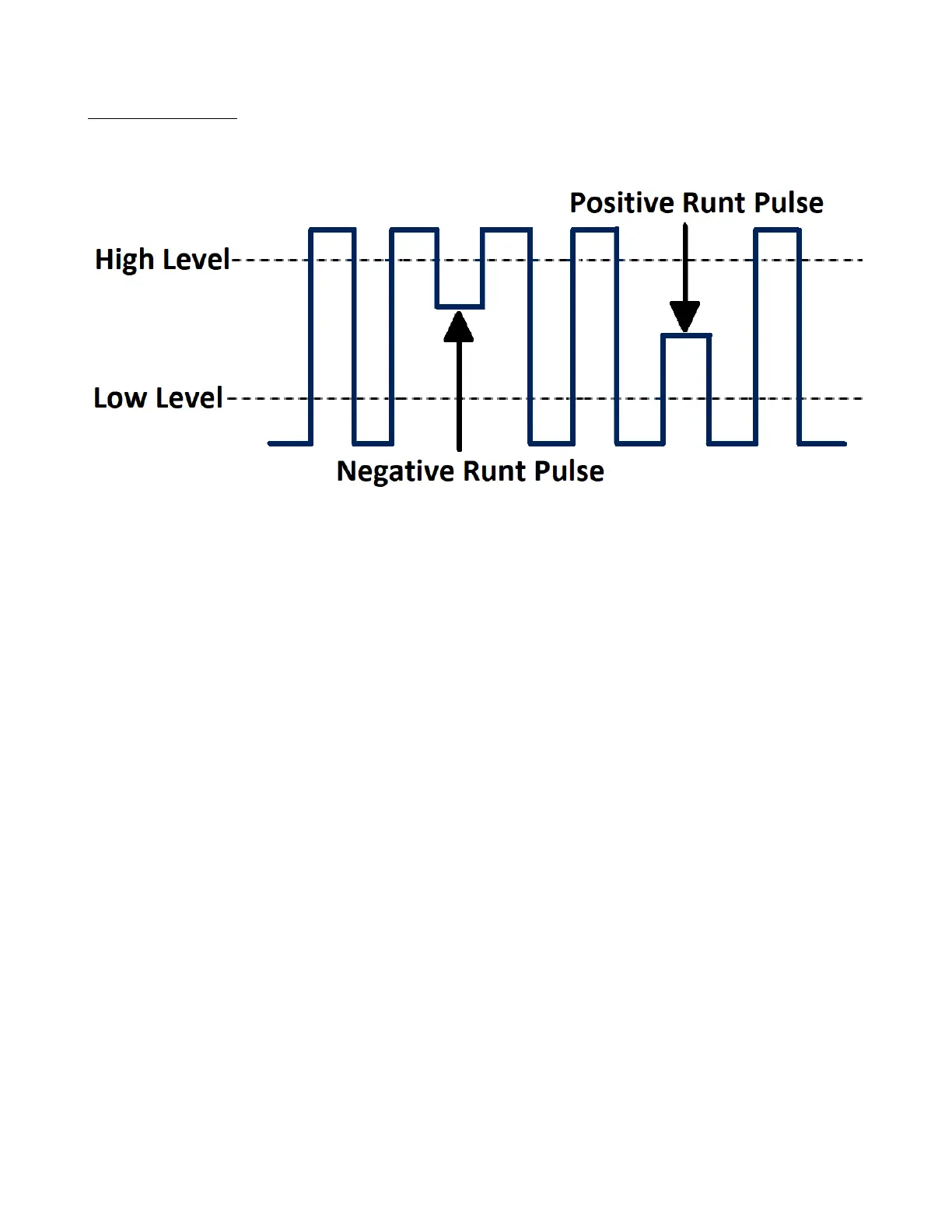
The runt trigger detects a pulse that crosses the rst threshold but not the second. It can occur when a logic driver has
insucient slew rate to reach a valid logic level in the time available.
Figure 6.23 Runt Trigger
• A positive runt pulse crosses through a lower threshold but not an upper threshold.
• A negative runt pulse crosses through an upper threshold but not a lower threshold.
To setup a runt trigger:
1. Press the Setup key to enter the Trigger menu.
2. Press the Type softkey, then use the Universal Knob to select Runt.
3. Press the Source softkey, then use the Universal Knob to select CH1 or CH2 as the trigger source.
4. Press the Polarity softkey to select Positive or Negative pulse to trigger.
5. Press the Slope softkey to select rising or falling edge.
6. Press the OverTime Type softkey to select State.
7. Press the Limit Range softkey, then use the Universal Knob to select the desired condition
(< =, > =, [ - - . - - ] or - - ] [ - - ).
8. Press the Time Setting softkey, then use the Universal Knob to select the desired value.
9. Press the Next Page softkey to enter the second page of the Trigger menu.
10. Press the Lower Upper softkey to select Lower or Upper trigger level.
– Use the Universal Knob to select the desired value.













 To Next Page