Math 94
9.3.2 Integrate
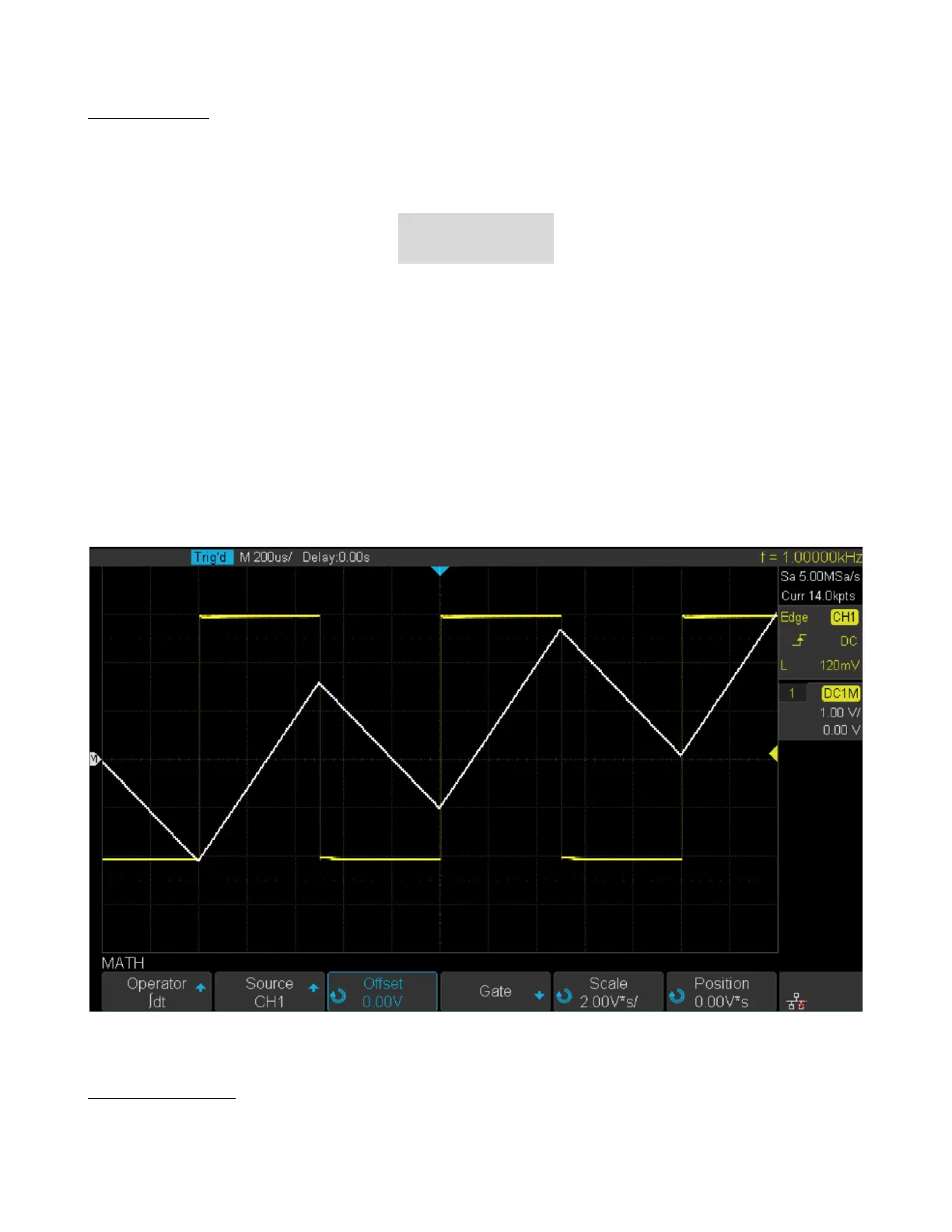
dt (integrate) calculates the integral of the selected source. You can use integrate to calculate the energy of a pulse in
volt-seconds or measure the area under a waveform.
dt plots the integral of the source using the "Trapezoidal Rule". The equation is:
𝐼
𝑛
= 𝑐
0
+Δ𝑡 +
𝑛
∑
𝑖=0
𝑦
𝑖
Where:
• I = integrated waveform
• Δt = point- to- point time dierence
• y = channel 1, 2, 3, or 4 data points
• co = arbitrary constant
• i = data point index
The integrate operator provides an Oset softkey that lets you enter a DC oset correction factor for the input signal.
Small DC oset in the integrate function input (or even small oscilloscope calibration errors) can cause the integrate
function output to "ramp" up or down. This DC oset correction lets you level the integrate waveform.
Figure 9.13 Integral with Oset
9.3.3 Square Root
Square root (
√
) calculates the square root of the selected source. Where the transform is undened for a particular
input, holes (zero values) appear in the function output.













 To Next Page