Using External ATEM Hardware Panels
ATEM Broadcast Panel Button Mapping and Button Brightness Level
Button Mapping on ATEM Broadcast Panels is easy. On the ATEM Broadcast Panel, go to the
System Control block and press PANEL SETUP followed by BUTTON MAP. Once in the button
map menu, you will notice the System Control window shows a Button number and an Input
number. Turn the knob under ‘Selected Button’ to select the desired button which you want to
associate with an input. You can do the same thing by selecting the desired button in the
Select row. The buttons in the Select row correspond to the buttons directly below them in the
Preview and Program rows. Next, turn the knob under Selected Input to set an input for the
selected button. Choose another button you wish to map and repeat until all the buttons are
mapped with desired inputs.
If you want to change the brightness of the buttons, press the BUTTON LEVEL button and
rotate the knob under ‘Brightness’ until the desired brightness level is seen.
Once you have configured all the button settings, press the SAVE button to save the new
button map and brightness level, or REVERT to discard changes.
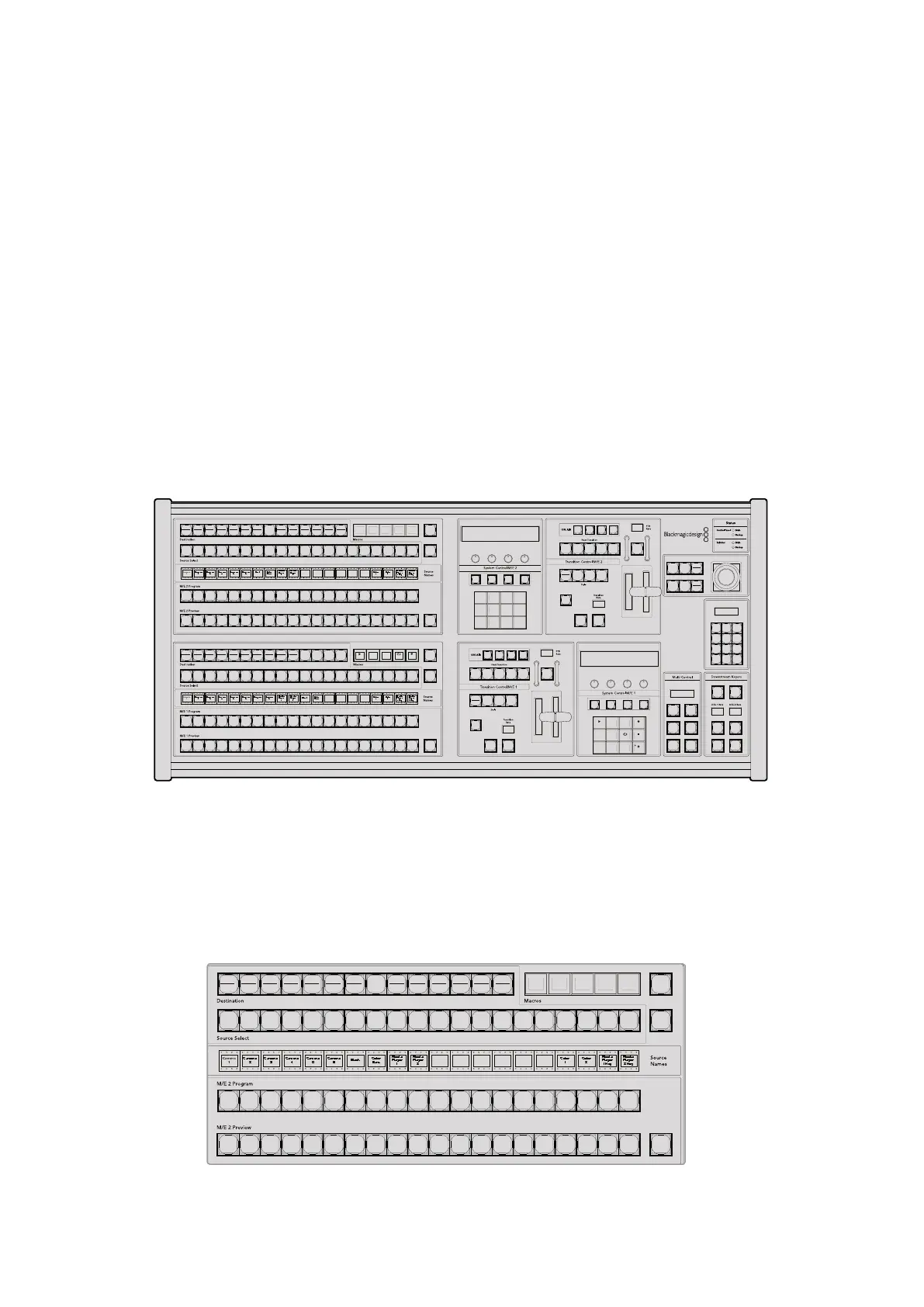
Using the ATEM 2 M/E BroadcastPanel
ATEM 2 M/E Broadcast Panel
Using the Control Panel
Mix Effects
The program bus, preview bus and source names display are used together to switch sources
on the program and preview outputs.
ATEM Mix Effects
1
8 9
0 CLRCAM
2 3
4 5 6
7
ON ON ON ON
ON ON ON ON
SHIFT
SHIFT
SHIFT
SHIFT
KEY 1
CUT
KEY 2
CUT
STNG
CUT
DVE
CUT
AUX 1
AUX 7
AUX 2
AUX 8
AUX 3
AUX 9
AUX 4
AUX 10
AUX 5
AUX 11
AUX 6
AUX 12
BORD
DIP
KEY 3
CUT
KEY 4
CUT
SHIFT
DEST
KEY 1
CUT
BORD
DIP
STNG
CUT
DVE
CUT
DSK 2
CUT
SSRC
CUT
BOX 1
DSK 1
CUT
KEY 2
CUT
KEY 3
CUT
KEY 4
CUT
BOX 3BOX 2 BOX 4
SHIFT
DEST
TIE
DSK 1
TIE
DSK 2
CUT
DSK 1
CUT
DSK 2
AUTO
DSK 1
AUTO
DSK 2
WIPE STNG DVE
MIX
DIP
BKGD KEY 1 KEY 2 KEY 3 KEY 4
WIPE STNG DVE
MIX
DIP
BKGD KEY 1 KEY 2 KEY 3 KEY 4
BOX 2
BOX 4
PATT
M/E 2
KEY
M/E 2
BOX 2
BOX 4
PATT
M/E 1
KEY
M/E 1
AUTOCUT
FTB
FTB
PREV
TRANS
AUTOCUT
PREV
TRANS
TRANS
DSK
KEYS
EFFECTS
KEYS
MEDIA
PLAYER
PANEL
SETUP
COLOR
MACRO
1
RECALL
& RUN
PLAY
RECORDLOOP
PLAY
RECORD
SHOW
NAMES
RECALL
DELETE
HOME
STOP
LOOP
MACRO
1
RECALL
PLAY
RECORDLOOP
1
8 9
0 CLRCAM
2 3
4 5 6
7
ON ON ON ON
ON ON ON ON
SHIFT
SHIFT
SHIFT
SHIFT
KEY 1
CUT
KEY 2
CUT
STNG
CUT
DVE
CUT
AUX 1
AUX 7
AUX 2
AUX 8
AUX 3
AUX 9
AUX 4
AUX 10
AUX 5
AUX 11
AUX 6
AUX 12
BORD
DIP
KEY 3
CUT
KEY 4
CUT
SHIFT
DEST
KEY 1
CUT
BORD
DIP
STNG
CUT
DVE
CUT
DSK 2
CUT
SSRC
CUT
BOX 1
DSK 1
CUT
KEY 2
CUT
KEY 3
CUT
KEY 4
CUT
BOX 3BOX 2 BOX 4
SHIFT
DEST
TIE
DSK 1
TIE
DSK 2
CUT
DSK 1
CUT
DSK 2
AUTO
DSK 1
AUTO
DSK 2
WIPE STNG DVE
MIX
DIP
BKGD KEY 1 KEY 2 KEY 3 KEY 4
WIPE STNG DVE
MIX
DIP
BKGD KEY 1 KEY 2 KEY 3 KEY 4
BOX 2
BOX 4
PATT
M/E 2
KEY
M/E 2
BOX 2
BOX 4
PATT
M/E 1
KEY
M/E 1
AUTOCUT
FTB
FTB
PREV
TRANS
AUTOCUT
PREV
TRANS
TRANS
DSK
KEYS
EFFECTS
KEYS
MEDIA
PLAYER
PANEL
SETUP
COLOR
MACRO
1
RECALL
& RUN
PLAY
RECORDLOOP
PLAY
RECORD
SHOW
NAMES
RECALL
DELETE
HOME
STOP
LOOP
MACRO
1
RECALL
PLAY
RECORDLOOP
187










 To Next Page