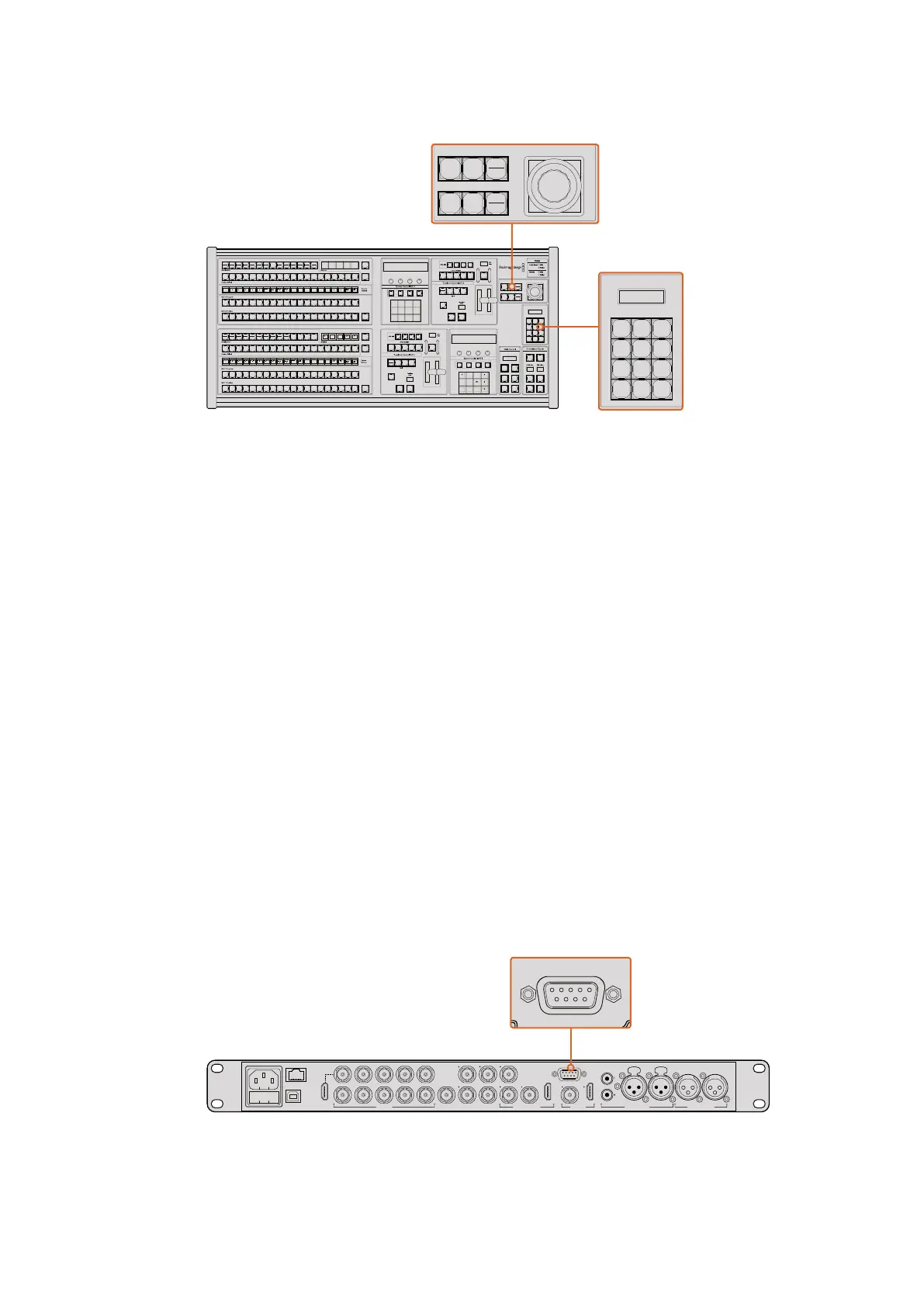
Using External ATEM Hardware Panels
Joystick and M/E Pattern and Key Buttons
Joystick and Numeric Keypad
The Number Pad is used to enter numerical data. For example, when setting the transition rate, the
number pad can be used to enter a numerical value. When entering data using the number pad,
the soft buttons below each parameter are used to apply the entered data to that parameter.
The joystick and numeric keypad are shared between the M/E 1 and M/E 2 control blocks.
They are context-sensitive which means any adjustments you make with them will solely be
applied to the M/E control block in which you are currently working.
Controlling Cameras using the Joystick
The joystick can also be used to control a remote camera head using the common VISCA
protocol when connected to an ATEM 1 M/E or 2 M/E model switcher. This is an extremely
powerful tool for controlling pan, tilt and zoom on remote cameras, also known as PTZ control.
You can easily control a bank of cameras one at a time by selecting each camera using the
system control soft buttons, then making your adjustments with the joystick.
Connecting a Remote Head
Your ATEM Broadcast Panel communicates with remote heads via your ATEM switcher’s RS-422
port labeled ‘remote’ or ‘RS-422 serial out’. After connecting your ATEM Broadcast Panel to
your ATEM switcher via Ethernet, simply connect your ATEM switcher to the RS-422 input on
the remote camera head. RS-422 ports are typically DB-9 serial ports, or RJ11 connectors that
look similar to a standard landline phone connector.
When connecting more than one remote head, they will normally be daisy chained together via
the RS-422 outputs/inputs between each head.
Connect a remote camera head to your ATEM 1 M/E or 2 M/E model
switcher via the RS-422 port labeled ‘remote’ on the rear panel.
1
8 9
0 CLRCAM
2 3
4 5 6
7
ON ON ON ON
ON ON ON ON
SHIFT
SHIFT
SHIFT
SHIFT
KEY 1
CUT
KEY 2
CUT
STNG
CUT
DVE
CUT
AUX 1
AUX 7
AUX 2
AUX 8
AUX 3
AUX 9
AUX 4
AUX 10
AUX 5
AUX 11
AUX 6
AUX 12
BORD
DIP
KEY 3
CUT
KEY 4
CUT
SHIFT
DEST
KEY 1
CUT
BORD
DIP
STNG
CUT
DVE
CUT
DSK 2
CUT
SSRC
CUT
BOX 1
DSK 1
CUT
KEY 2
CUT
KEY 3
CUT
KEY 4
CUT
BOX 3BOX 2 BOX 4
SHIFT
DEST
TIE
DSK 1
TIE
DSK 2
CUT
DSK 1
CUT
DSK 2
AUTO
DSK 1
AUTO
DSK 2
WIPE STNG DVE
MIX
DIP
BKGD KEY 1 KEY 2 KEY 3 KEY 4
WIPE STNG DVE
MIX
DIP
BKGD KEY 1 KEY 2 KEY 3 KEY 4
BOX 2
BOX 4
PATT
M/E 2
KEY
M/E 2
BOX 2
BOX 4
PATT
M/E 1
KEY
M/E 1
AUTOCUT
FTB
FTB
PREV
TRANS
AUTOCUT
PREV
TRANS
TRANS
DSK
KEYS
EFFECTS
KEYS
MEDIA
PLAYER
PANEL
SETUP
COLOR
MACRO
1
RECALL
& RUN
PLAY RECORDLOOP
PLAY
RECORD
SHOW
NAMES
RECALL
DELETE
HOME
STOP
LOOP
MACRO
1
RECALL
PLAY
RECORDLOOP
1
8 9
0 CLRCAM
2 3
4 5 6
7
ON ON ON ON
ON ON ON ON
SHIFT
SHIFT
SHIFT
SHIFT
KEY 1
CUT
KEY 2
CUT
STNG
CUT
DVE
CUT
AUX 1
AUX 7
AUX 2
AUX 8
AUX 3
AUX 9
AUX 4
AUX 10
AUX 5
AUX 11
AUX 6
AUX 12
BORD
DIP
KEY 3
CUT
KEY 4
CUT
SHIFT
DEST
KEY 1
CUT
BORD
DIP
STNG
CUT
DVE
CUT
DSK 2
CUT
SSRC
CUT
BOX 1
DSK 1
CUT
KEY 2
CUT
KEY 3
CUT
KEY 4
CUT
BOX 3BOX 2 BOX 4
SHIFT
DEST
TIE
DSK 1
TIE
DSK 2
CUT
DSK 1
CUT
DSK 2
AUTO
DSK 1
AUTO
DSK 2
WIPE STNG DVE
MIX
DIP
BKGD KEY 1 KEY 2 KEY 3 KEY 4
WIPE STNG DVE
MIX
DIP
BKGD KEY 1 KEY 2 KEY 3 KEY 4
BOX 2
BOX 4
PATT
M/E 2
KEY
M/E 2
BOX 2
BOX 4
PATT
M/E 1
KEY
M/E 1
AUTOCUT
FTB
FTB
PREV
TRANS
AUTOCUT
PREV
TRANS
TRANS
DSK
KEYS
EFFECTS
KEYS
MEDIA
PLAYER
PANEL
SETUP
COLOR
MACRO
1
RECALL
& RUN
PLAY
RECORDLOOP
PLAY
RECORD
SHOW
NAMES
RECALL
DELETE
HOME
STOP
LOOP
MACRO
1
RECALL
PLAY
RECORDLOOP
1
8 9
0 CLRCAM
2 3
4 5 6
7
ON ON ON ON
ON ON ON ON
SHIFT
SHIFT
SHIFT
SHIFT
KEY 1
CUT
KEY 2
CUT
STNG
CUT
DVE
CUT
AUX 1
AUX 7
AUX 2
AUX 8
AUX 3
AUX 9
AUX 4
AUX 10
AUX 5
AUX 11
AUX 6
AUX 12
BORD
DIP
KEY 3
CUT
KEY 4
CUT
SHIFT
DEST
KEY 1
CUT
BORD
DIP
STNG
CUT
DVE
CUT
DSK 2
CUT
SSRC
CUT
BOX 1
DSK 1
CUT
KEY 2
CUT
KEY 3
CUT
KEY 4
CUT
BOX 3BOX 2 BOX 4
SHIFT
DEST
TIE
DSK 1
TIE
DSK 2
CUT
DSK 1
CUT
DSK 2
AUTO
DSK 1
AUTO
DSK 2
WIPE STNG DVE
MIX
DIP
BKGD KEY 1 KEY 2 KEY 3 KEY 4
WIPE STNG DVE
MIX
DIP
BKGD KEY 1 KEY 2 KEY 3 KEY 4
BOX 2
BOX 4
PATT
M/E 2
KEY
M/E 2
BOX 2
BOX 4
PATT
M/E 1
KEY
M/E 1
AUTOCUT
FTB
FTB
PREV
TRANS
AUTOCUT
PREV
TRANS
TRANS
DSK
KEYS
EFFECTS
KEYS
MEDIA
PLAYER
PANEL
SETUP
COLOR
MACRO
1
RECALL
& RUN
PLAY
RECORDLOOP
PLAY
RECORD
SHOW
NAMES
RECALL
DELETE
HOME
STOP
LOOP
MACRO
1
RECALL
PLAY
RECORDLOOP
PUSH PUSH
CONTROL
USB 2.0 HDMI IN
SDI INPUTS REF IN AUX 1-3 PREVIEW PROGRAM OUTPUTS MULTI-VIEW ANALOG AUDIO IN
STEREO IN
REMOTE
ANALOG AUDIO OUT
CH 1
All SDI and HDMI video connections are
SD, HD and Ultra HD switchable unless indicated
CH 2CH 1 CH 2
IN
1
IN
2
IN
1
IN
3
IN
4
IN
5
IN
6
IN
7
IN
8
IN
9
IN
10
2
1 3
2
1
HD HD HD
PUSH PUSH
CONTROL
USB 2.0 HDMI IN
SDI INPUTS REF IN AUX 1-3 PREVIEW PROGRAM OUTPUTS MULTI-VIEW ANALOG AUDIO IN
STEREO IN
REMOTE
ANALOG AUDIO OUT
CH 1
All SDI and HDMI video connections are
SD, HD and Ultra HD switchable unless indicated
CH 2CH 1 CH 2
IN
1
IN
2
IN
1
IN
3
IN
4
IN
5
IN
6
IN
7
IN
8
IN
9
IN
10
2
1 3
2
1
HD HD HD
193










 To Next Page