126
1
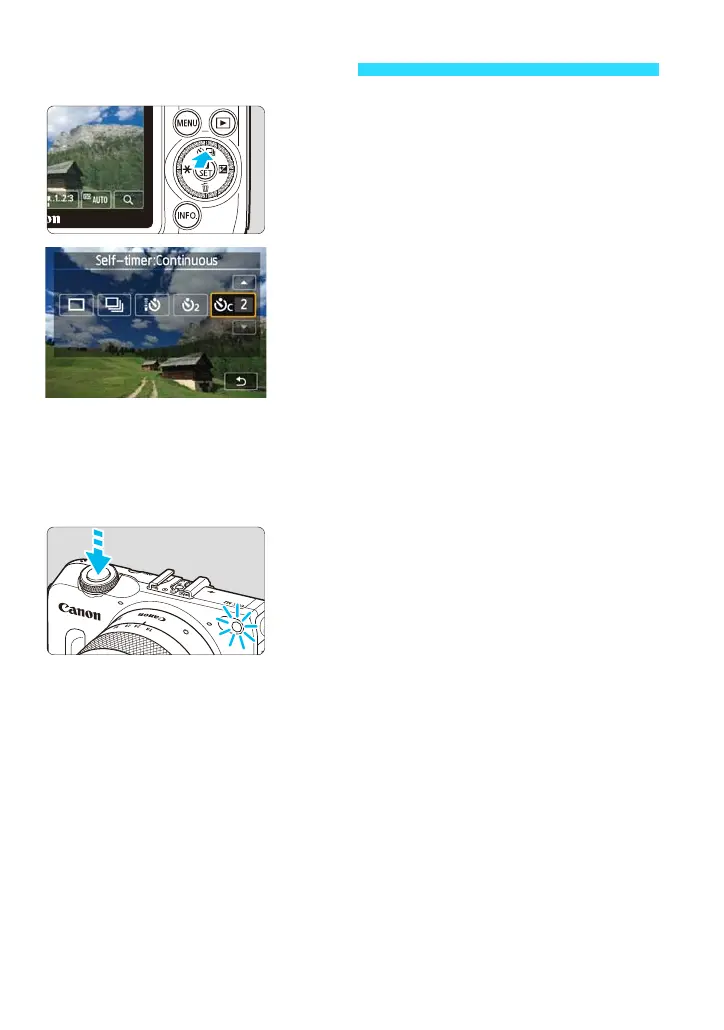
Press the <j/i> button.
You can also select the shooting mode on
the B Quick Control screen.
2
Tap the self-timer.
Q: 10-sec. self-timer
The remote controller can also be used
(p.295).
l: 2-sec. self-timer
q: 10-sec. self-timer plus continuous
shots
Tap [d]/[f] to set the number of
multiple shots (2 to 10) to be taken with
the self-timer.
By tapping [2], you can return to the
previous screen.
3
Take the picture.
Focus the subject, then press the shutter
button completely.
You can check the self-timer operation
with the self-timer lamp, beeper, and
countdown display (in seconds) on the
LCD monitor.
Two seconds before the picture is taken,
the self-timer lamp will light up and the
beeper will sound faster.
To cancel the self-timer shooting:
Press the <j/i> button or tap the screen.
To cancel the self-timer setting, press the <j/i> button and tap [u] or
[i].
j Using the Self-timer










 To Next Page