243
You can play back the images on the card as an automatic slide show.
1
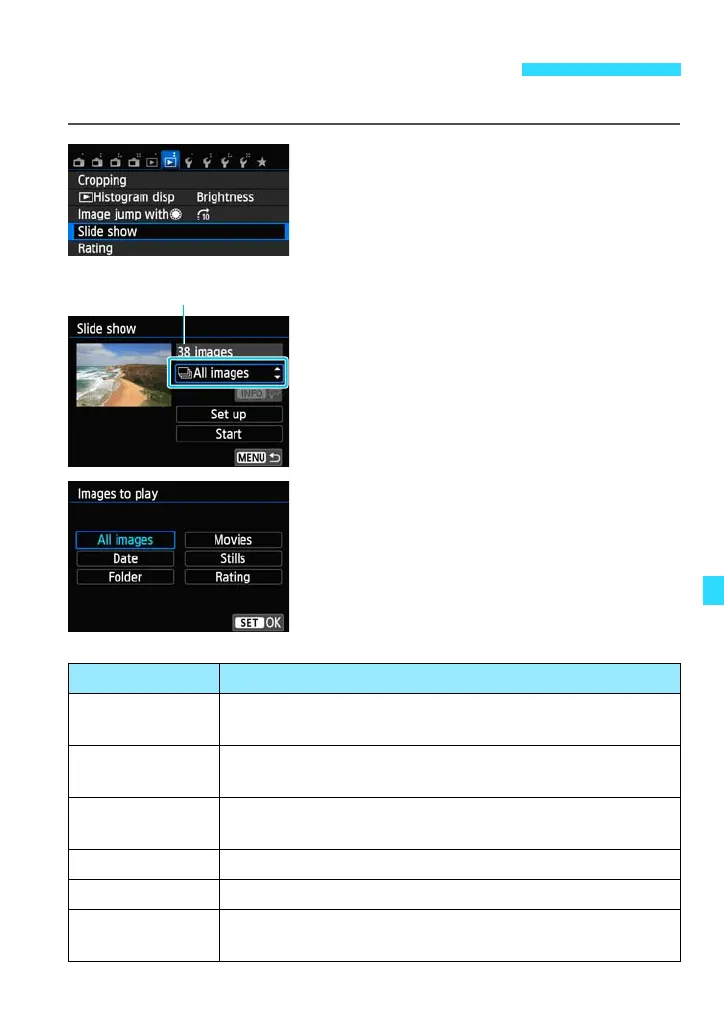
Select [Slide show].
Under the [x2] tab, select [Slide show],
then press <0>.
2
Select the images to be played.
Set the option that appears as [All
images] and is highlighted with a frame.
Press the <W> <X> keys to select [All
images], then press <0>. Press the
<W> <X> keys to select an option for
selecting which images to play and then
press <0>.
You can also select an option from a list
by tapping the [All images] option twice.
3 Slide Show (Auto Playback)
Number of images
to be played
Item Playback Description
j All images
All the still photos and movies on the card will be played
back.
i Date
Still photos and movies taken on the selected shooting
date will be played back.
nFolder
Still photos and movies in the selected folder will be
played back.
k Movies Only the movies on the card will be played back.
z Stills Only the still photos on the card will be played back.
9 Rating
Only the still photos and movies with the selected rating
will be played back.















 To Next Page