208
You can prevent the beeper from sounding when focus is achieved, during
self-timer operation, and during touch screen operations.
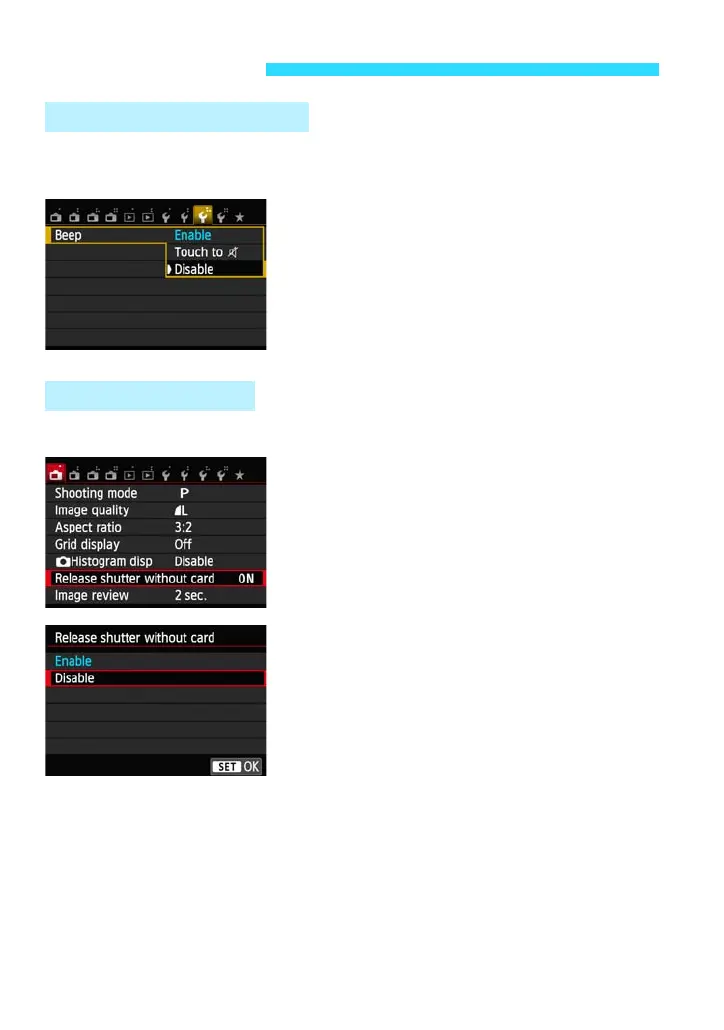
Under the [53] tab, select [Beep], then
press <0>. Select [Disable], then press
<0>.
To silence the beeper only during touch
screen operations, select [Touch to h].
This setting prevents shooting if there is no card in the camera.
Under the [A1] tab, select [Release
shutter without card], then press <0>.
Select [Disable], then press <0>.
If there is no card inserted in the camera
and you press the shutter button, “No card
in camera” will be displayed on the LCD
monitor, and you cannot release the shutter.
Handy Features
3 Disabling the Beeper
3 Card Reminder










 To Next Page