44
The camera is compatible with EF-M lenses. If you use Mount Adapter EF-
EOS M, you can also use EF and EF-S lenses.
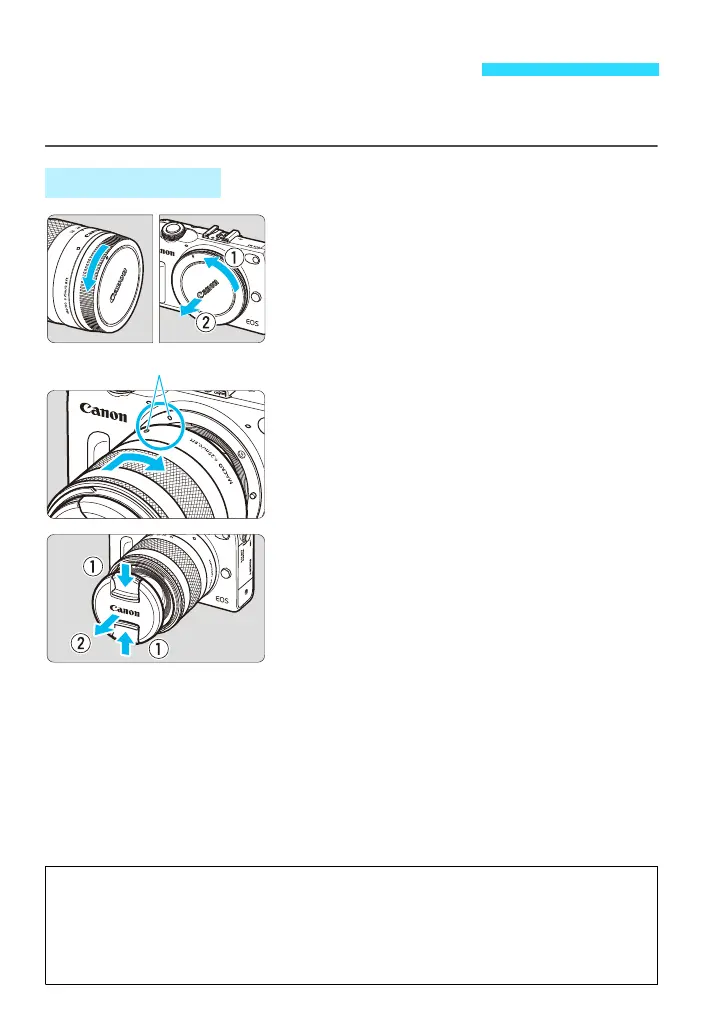
1
Remove the caps.
Remove the rear lens cap and the body
cap by turning them as shown by the
arrows.
2
Attach the lens.
Align the lens’ white mount index with the
camera’s white mount index. Turn the
lens as shown by the arrow until it clicks
in place.
3
Remove the front lens cap.
Attaching and Detaching a Lens
Attaching a Lens
Minimizing Dust
When changing lenses, do it quickly in a place with minimal dust.
When storing the camera without a lens attached, be sure to attach the body cap
to the camera.
Remove dust on the body cap before attaching it.















 To Next Page