k Shooting Movies
178
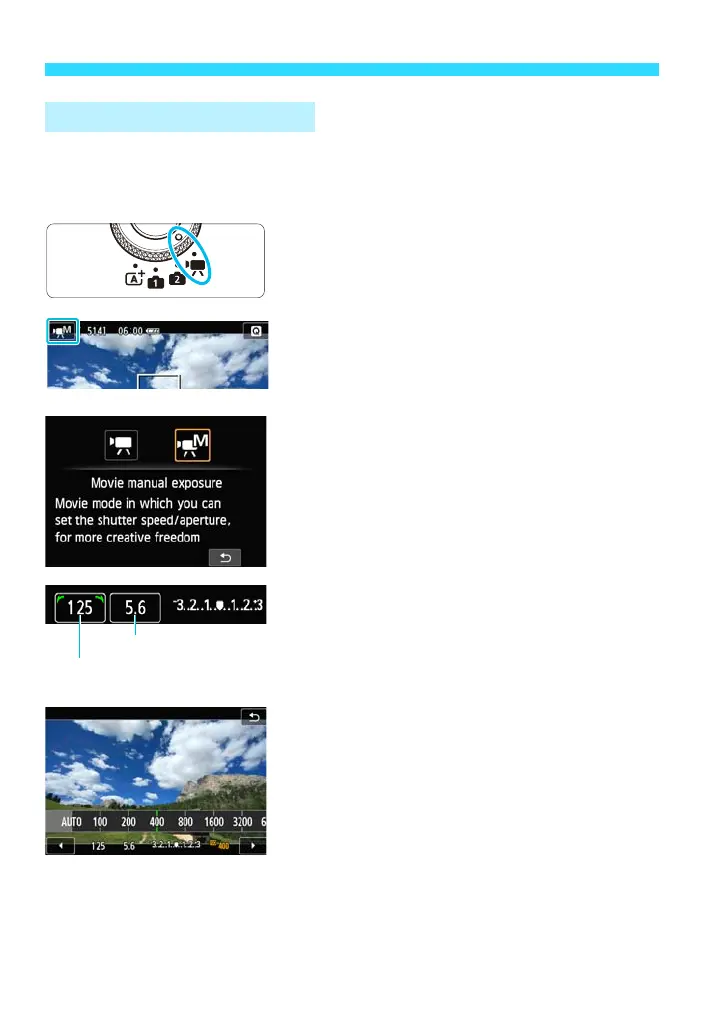
In the [M] shooting mode (Movie manual exposure), you can freely set the
shutter speed, aperture, and ISO speed for movie shooting. Using manual
exposure to shoot movies is for advanced users.
1
Set the Mode Dial to <k>.
2
Tap the shooting mode icon on the
screen’s upper left corner.
The shooting mode selection screen will
appear.
3
Select [M] (Movie manual
exposure) for the shooting mode.
4
Set the shutter speed and aperture.
Press the <O> button to toggle between
shutter speed selection and aperture
selection.
Turn the <5> dial to set the shutter
speed or aperture.
The shutter speeds that can be set
depend on the frame rate <9>.
• 8, 7 : 1/4000 sec. - 1/60 sec.
• 6, 5, 4 : 1/4000 sec. - 1/30 sec.
5
Set the ISO speed.
As with still photos, you can set the ISO
speed with 1. Shooting screen, 2. Menu
screen, 3. B Quick Control screen, 4.
<XL> button assigned with the menu’s
Custom Function (p.291).
6
Focus and shoot the movie.
The procedure is the same as steps 4 and
5 for “Autoexposure Shooting” (p.176).
Manual Exposure Shooting















 To Next Page