150
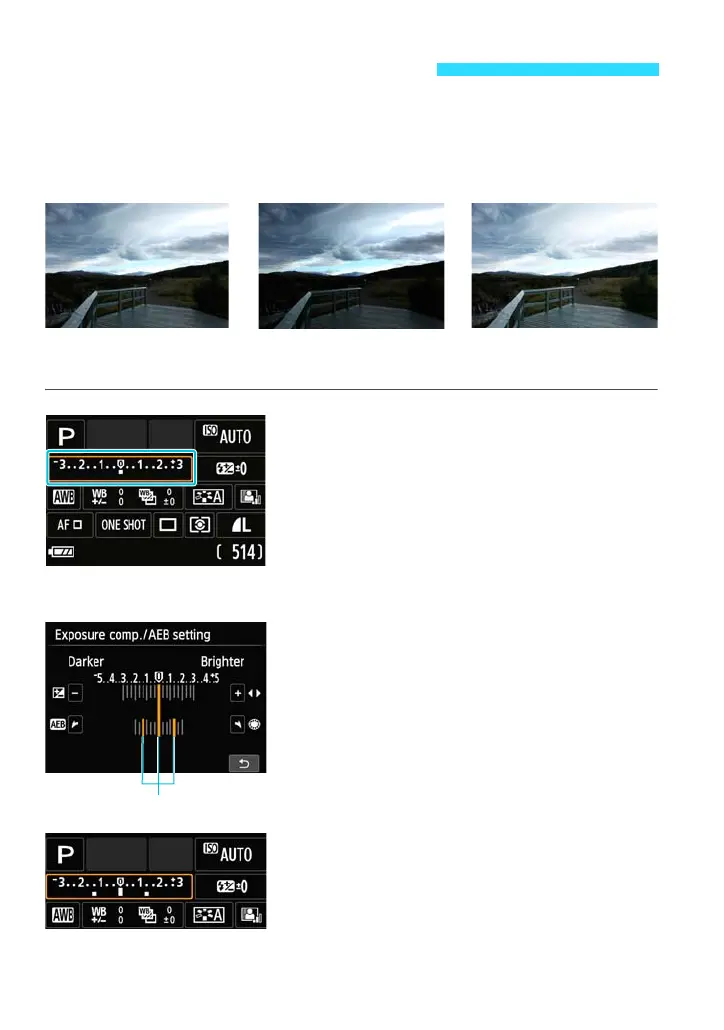
This feature takes exposure compensation a step further by varying the
exposure automatically (up to ±2 stops in 1/3-stop increments) with three
shots as shown below. You can then choose the best exposure.
This is called AEB (Auto Exposure Bracketing).
1
Display the B Quick Control
screen.
Press the <B> button a few times to
display the B Quick Control screen.
2
Select exposure compensation/AEB
setting.
Press the <S> keys to select
[Expo.comp./AEB], then press <0>.
3
Set the AEB range.
Turn the <5> dial or tap [e]/[f] to set
the AEB range.
You can also set both AEB and exposure
compensation. Either tap [+]/[-] or press
the <Y> <Z> keys to adjust the AEB
range centering on exposure
compensation setting.
After you exit the setting, the AEB range
will appear on the LCD monitor.
Auto Exposure Bracketingt
Standard exposure
Darker exposure
(Decreased exposure)
Brighter exposure
(Increased exposure)















 To Next Page