86
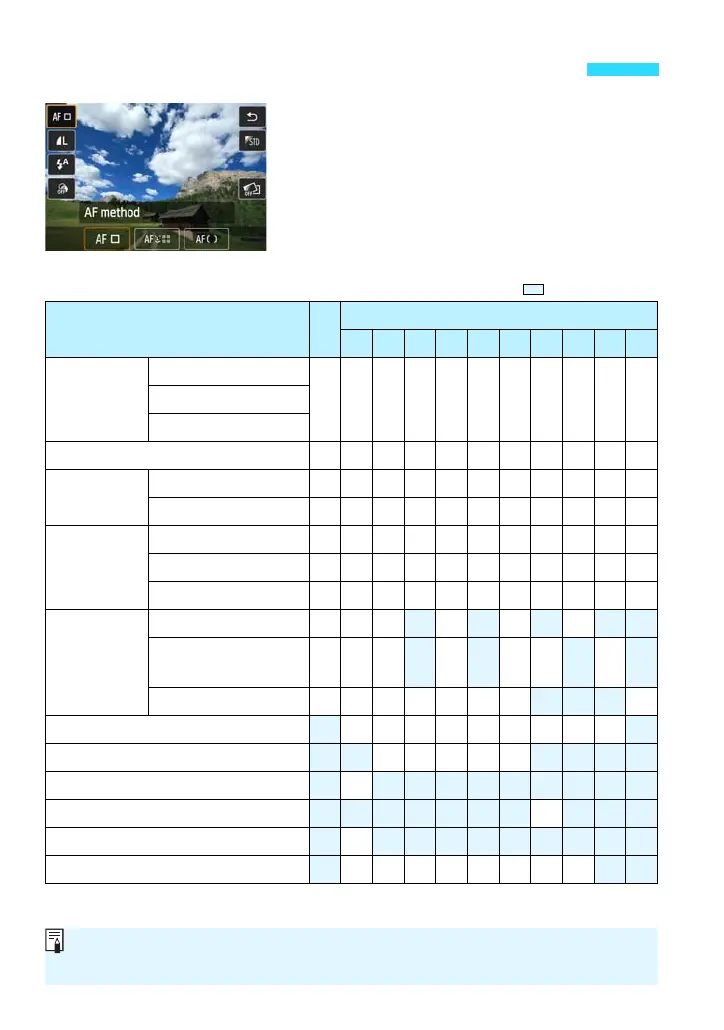
With <A> and in Basic Zone modes, you
can set the following functions with Q
Quick Control (p.50) and B Quick
Control (p.52).
* Functions with Q can be set with the Q Quick Control screen.
Functions that Can Be Set with Quick Control
Functions that Can Be Set with <A> and in Basic Zone Modes
o: Default setting k: User selectable : Not selectable
Function A
Basic Zone Modesv
C 2 3 4 5 C P 6 F G
AF method
(p.113) Q
FlexiZone - Single
k k k k k k k k k k ku+Tracking
FlexiZone - Multi
Image-recording quality
(p.97) Q k k k k k k k k k k k
Drive mode
(p.124)
u:
Single shooting
o o k o o k k o o o o
i:
Continuous shooting
k k o k k o o k k k k
Self-timer
(p.126)
Q (10 sec.)
k k k k k k k k k k k
l (2 sec.) k k k k k k k k k k k
q (Continuous)
k k k k k k k k k k k
Speedlite
90EX
Q
a:
Automatic firing
o o o o o o
D : Flash on
(Fires at all times)
k k k k ko o
b: Flash off k k k o k o k o
Ambience-based shots
(p.87) Q k k k k k k k k k
Light/scene-based shots
(p.90) Q k k k k k
Background blur (p.74) k
Color tone Q k
Extra Effect Shot (p.73) Q k
Creative filters (p.128) Q k k k k k k k k
If you change the shooting mode or set the power to <2>, it will revert to the
default settings (except the AF method, image-recording quality and self-timer).















 To Next Page