Handy Features
220
In Creative Zone and movie shooting modes, the camera’s shooting settings
and menu settings can be reverted to their defaults. With this procedure, all
settings in all shooting modes, including <A> and Basic Zone modes, will
revert to their default values.
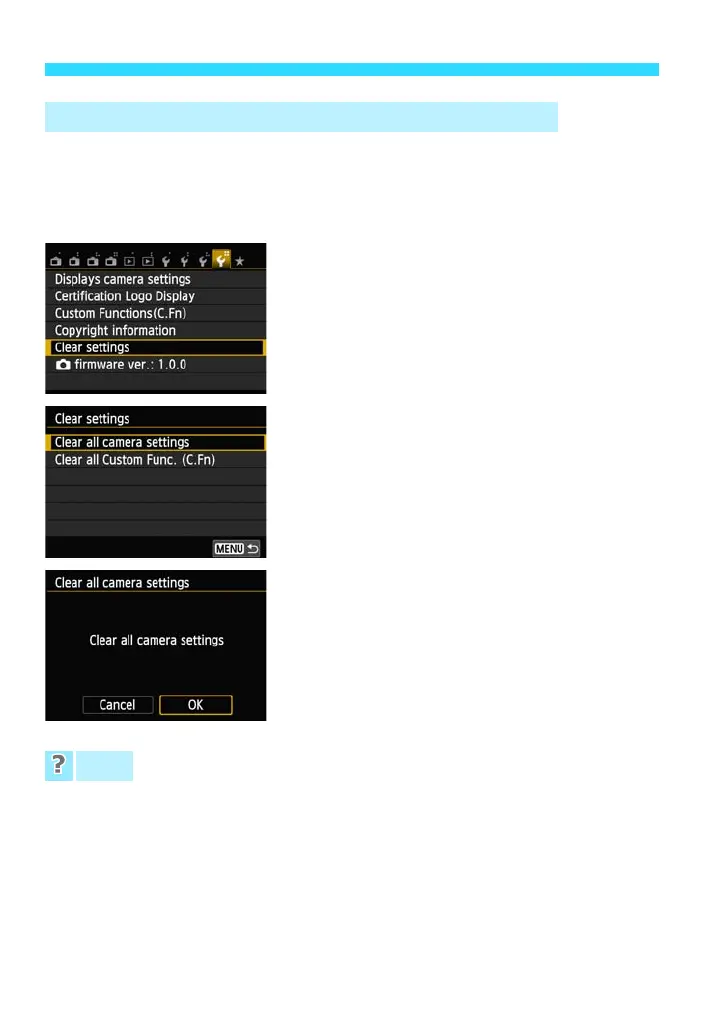
1
Select [Clear settings].
Under the [54] tab, select [Clear
settings], then press <0>.
2
Select [Clear all camera settings].
Select [Clear all camera settings], then
press <0>.
3
Select [OK].
Select [OK], then press <0>.
Setting [Clear all camera settings] will
reset the camera to the default settings
as shown on the next page.
Clearing all camera settings
After the procedure above, select [Clear all Custom Func. (C.Fn)] in [54:
Clear settings] to clear all the Custom Function settings (p.286).
3 Reverting the Camera to the Default Settingsw
FAQ










 To Next Page