286
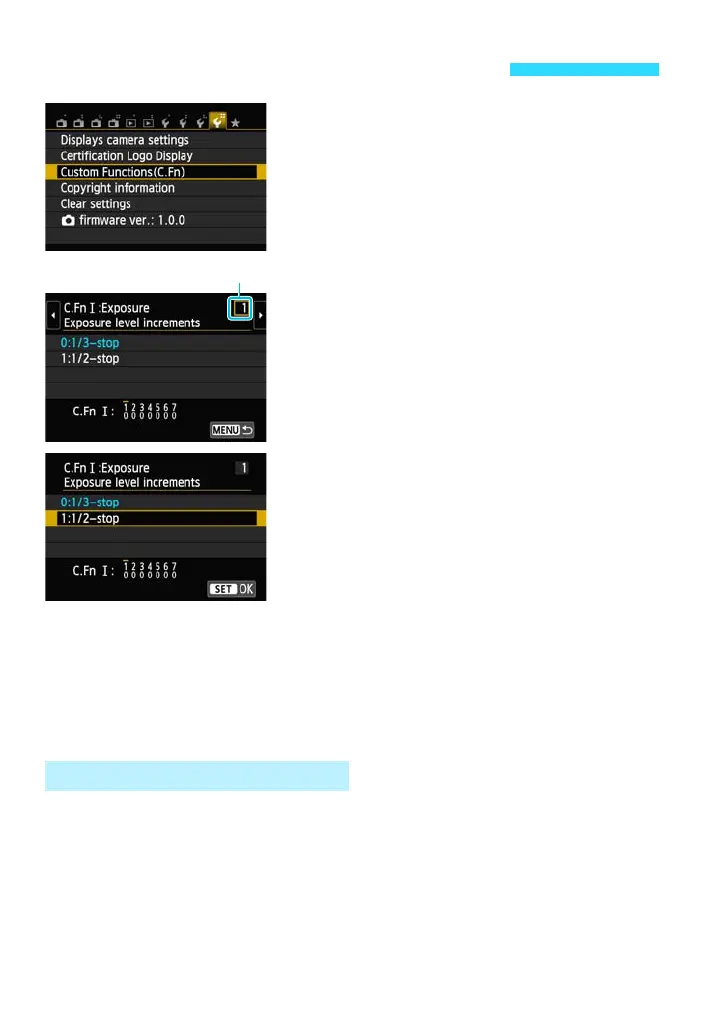
1
Select [Custom Functions (C.Fn)].
Under the [54] tab, select [Custom
Functions (C.Fn)], then press <0>.
2
Select the Custom Function number.
Press the <Y> <Z> keys to select the
Custom Function number, then press
<0>.
3
Change the setting as desired.
Press the <W> <X> keys to select the
desired setting (number), then press
<0>.
Repeat steps 2 and 3 if you want to set
other Custom Functions.
At the bottom of the screen, the current
Custom Function settings are indicated
below the respective function numbers.
4
Exit the setting.
Press the <M> button.
The screen for step 1 will reappear.
Under [54: Clear settings], select [Clear all Custom Func. (C.Fn)] to clear
all the Custom Function settings (p.220).
3 Setting Custom Functionst
Clearing All Custom Functions















 To Next Page