209
Handy Features
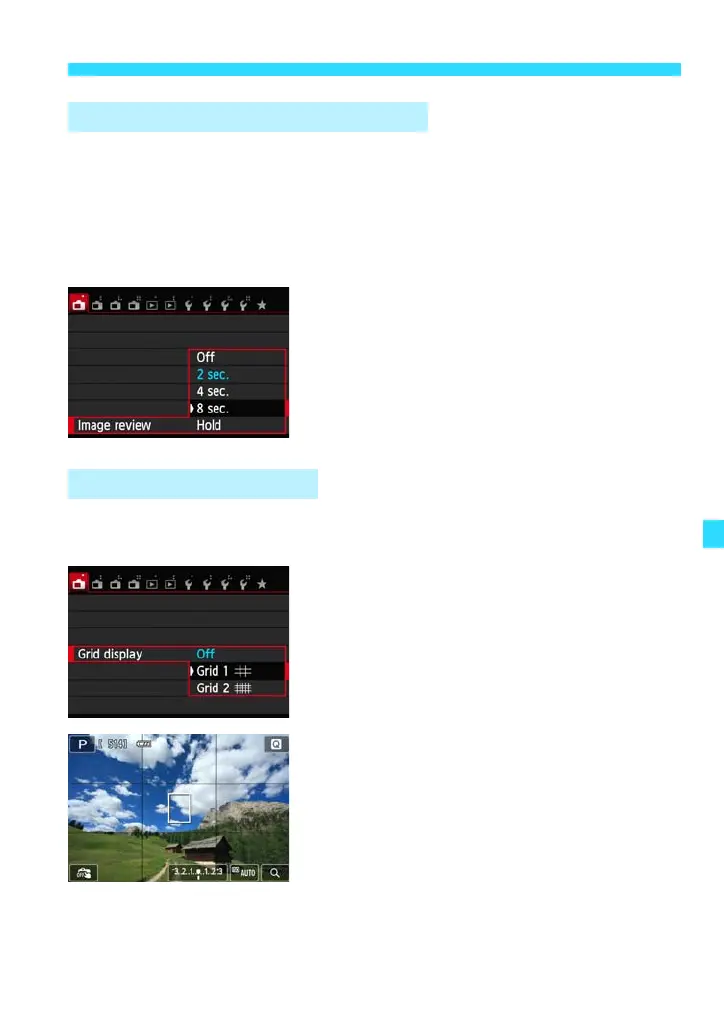
You can change how long the image is displayed on the LCD monitor
immediately after capture. If [Off] is set, the image will not be displayed
immediately after image capture. If [Hold] is set, the image review will be
displayed up until the [LCD auto off] time.
During image review, if you operate anything such as pressing the shutter
button halfway, the image review will end.
Under the [A1] tab, select [Image review],
then press <0>. Select the desired
setting, then press <0>.
By displaying a grid on the LCD monitor, you can check the picture for any
horizontal or vertical tilt. Two grid patterns are provided.
Under the [A1] tab, select [Grid display],
then press <0>. Select either [Grid 1l]
or [Grid 2m], then press <0>.
3 Setting the Image Review Time
3 Displaying the Grid






 To Next Page