46
When you use a lens with built-in Image Stabilizer, camera shake is corrected
to obtain a sharper shot. With <A>, the Image Stabilizer is automatically set
to [Enable]. (It does not appear in the menu.)
* Lenses with built-in Image Stabilizer have “IS” in their names.
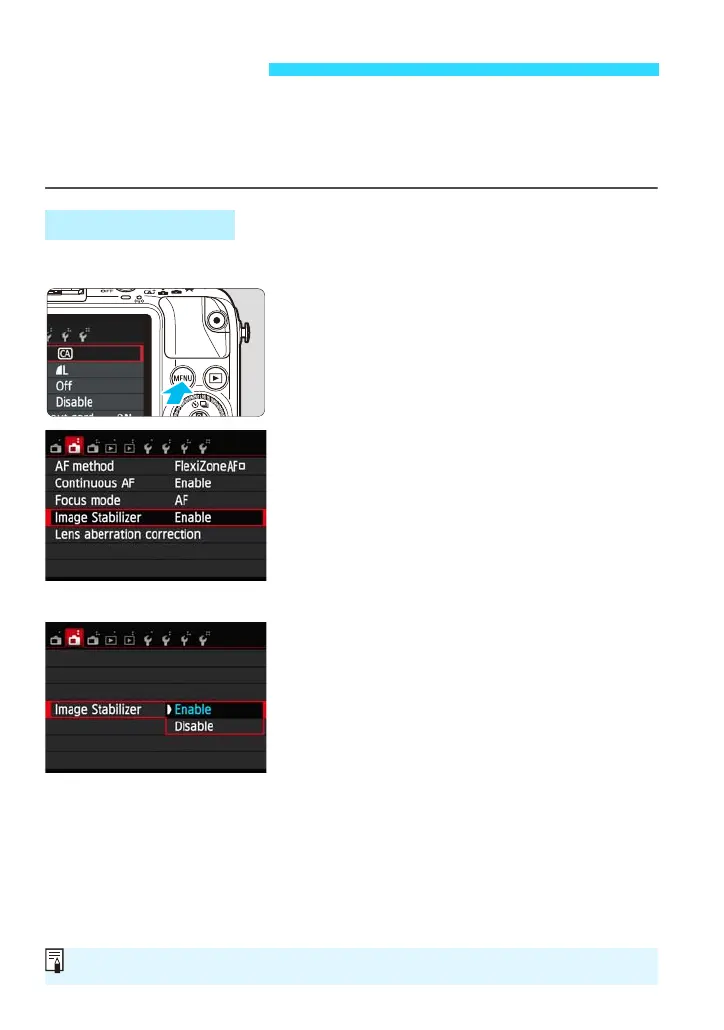
Set it with the menu. The default setting is [Enable].
1
Display the menu screen.
Press the <M> button.
2
Under the [A2] tab, select [Image
Stabilizer].
[Image Stabilizer] is displayed when an
EF-M lens with IS function is attached.
Press the <Y> <Z> keys to select the
[A2] tab.
Press the <W> <X> keys to select
[Image Stabilizer], then press <0>.
3
Select [Enable].
Press the <W> <X> keys to select
[Enable], then press <0>.
Press the <M> button.
Image Stabilizer
With an EF-M Lens
IS stands for Image Stabilizer.















 To Next Page