314
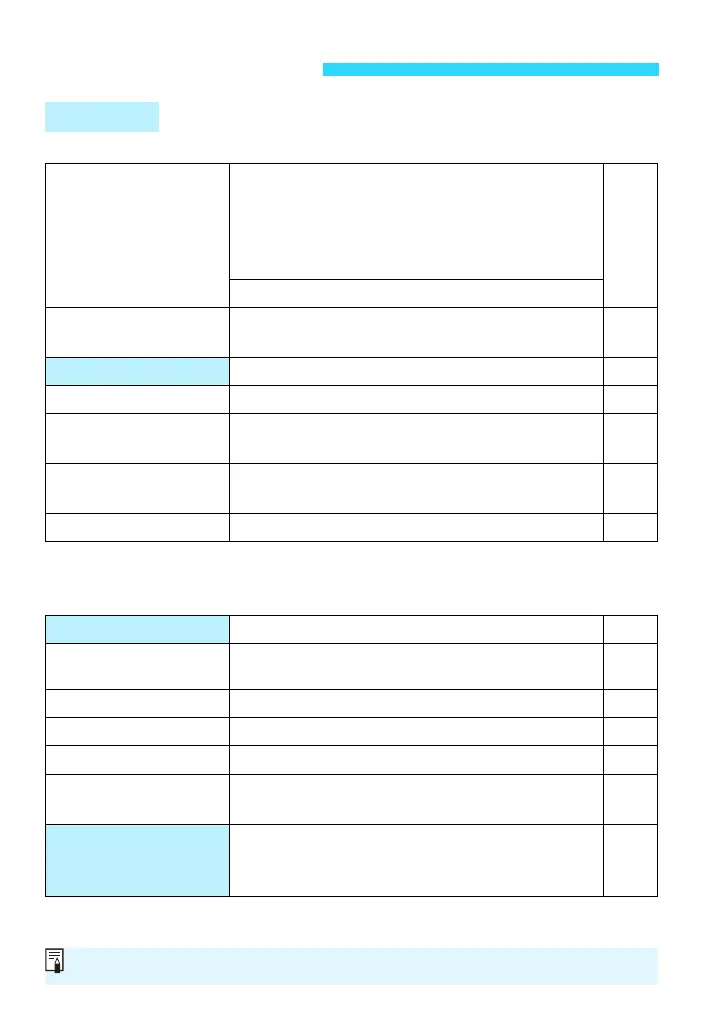
B Shooting 1 (Red) Page
* Grayed out with <A>.
R Shooting 2 (Red)
*[Focus mode] and [Image Stabilizer] (for a lens with IS function) will be displayed
when an EF-M lens is attached. With <A>, they will not be displayed.
3 Menu Settings
Still Photo
Shooting mode*
v: CCreative Auto / 2Portrait /
3Landscape / 4Close-up / 5Sports /
CKids / PFood / 6Night Portrait /
FHandheld Night Scene /
GHDR Backlight Control
69
94
136
139
143
w: d/ s/ f/ a
Image quality
73/ 83/ 74/ 84/ 7a/ 8a/ b/ c/
1+73/ 1
97
Aspect ratio 3:2 / 4:3 / 16:9 / 1:1 101
Grid display Off / Grid 1l / Grid 2m 209
zHistogram
display
Disable / Brightness / RGB 66
Release shutter
without card
Enable / Disable 208
Image review
Off / 2 sec. / 4 sec. / 8 sec. / Hold 209
AF operation One-Shot AF / Servo AF 110
AF method
FlexiZone - Single /
u
+Tracking / FlexiZone - Multi
113
Continuous AF
Enable / Disable 109
Focus mode*
AF / MF / AF+MF 108
Image Stabilizer* Enable / Disable 46
Lens aberration
correction
Peripheral illumination: Enable / Disable
Chromatic aberration: Enable / Disable
159
External Speedlite
control
Flash firing / E-TTL II metering / Flash sync.
speed in Av mode / Flash function settings /
Flash C.Fn settings
299
Shaded menu options are not displayed with <A> or in Basic Zone modes.










 To Next Page