Handy Features
210
If you do not operate the camera for a while, first the LCD monitor and
eventually the entire camera will turn off automatically to save power.
The Power lamp will blink when you set the power to <1> and turn off
when you are using the camera. When the LCD monitor turns off, the
Power lamp will light up in green.
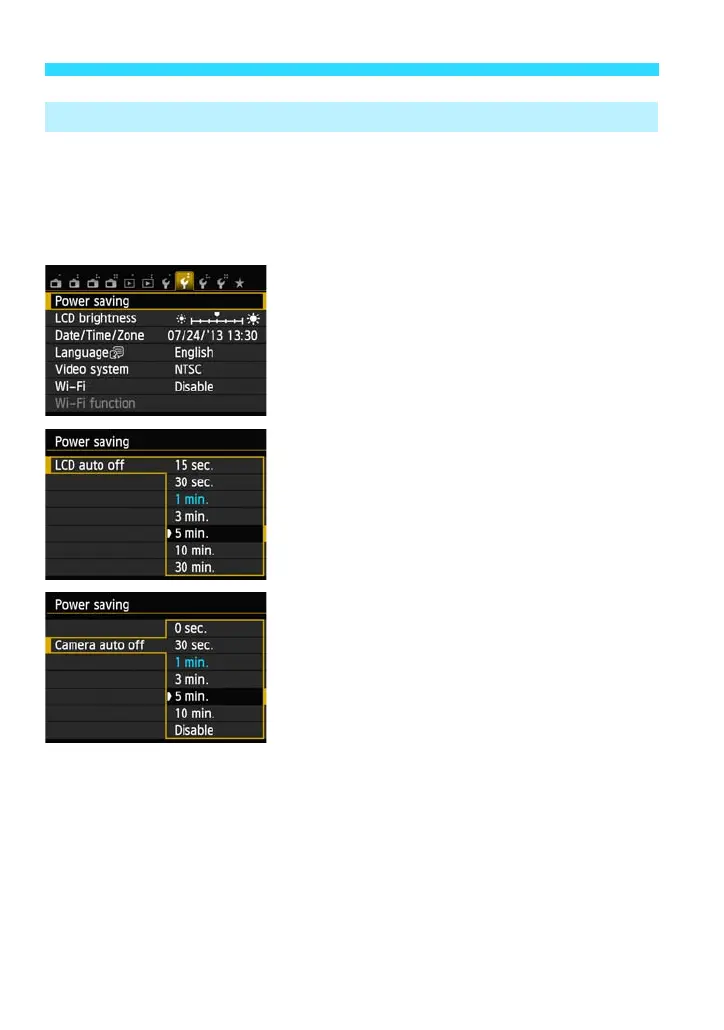
Under the [52] tab, select [Power
saving], then press <0>.
Select the desired setting for [LCD auto
off] and [Camera auto off], then press
<0>.
LCD auto off
You can set how long the camera waits
before turning the LCD monitor off.
Camera auto off
You can set how much longer the camera
waits after turning the LCD monitor off
before automatically turning itself off.
If the camera’s power has turned off to
save power, you can turn it on again by
pressing the power button, or by holding
down the <x> button for at least 2 sec.
3
Setting Power-saving Features (LCD auto off, Camera auto off)















 To Next Page