EasyManua.ls Logo

Canon EOS M2 - Exposure

Canon EOS M2
364 pages
Print Icon
To Next Page IconTo Next Page
To Previous Page IconTo Previous Page
Loading...
k Shooting Movies
180
Each time you press the <B> button, the information display will
change.
* Applies to a single movie clip.
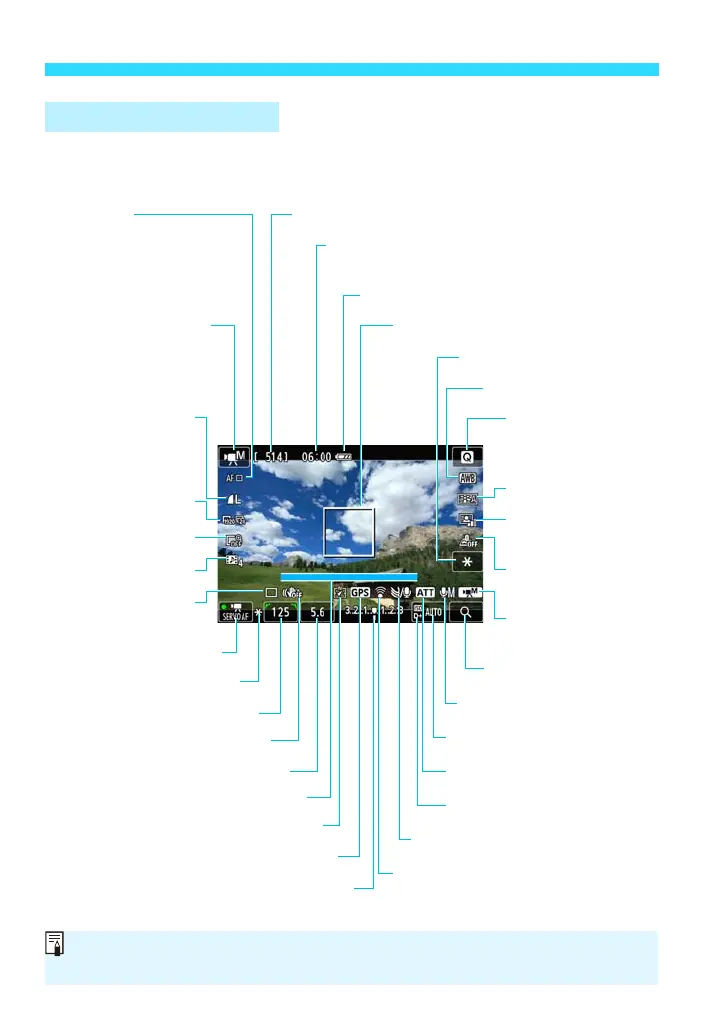
Movie Shooting Screen
Movie shooting remaining time*/
Elapsed time
Quick Control
ISO speed
Exposure level indicator
Aperture
White balance
Movie recording
size
Image-recording
quality
(still photos)
Auto Lighting
Optimizer
AF method
d : FlexiZone - Single
c : u+Tracking
o : FlexiZone - Multi
Battery check
Picture Style
Movie shooting mode
L : Autoexposure
K : Manual exposure
Recording level: Manual
Video snapshot
Video snapshot shooting duration
AE lock
Wind filter
Attenuator
AF point (FlexiZone - Single)
Exposure mode
Shutter speed
Drive mode
Possible shots (still photos)
Movie Servo AF
AE lock
Highlight tone priority
Magnify/Digital zoom
Miniature effect
movie
Digital compass
GPS connection indicator
Eye-Fi card
Digital zoom
Image Stabilizer: OFF
When movie shooting starts, the movie shooting remaining time will change to
the elapsed time.

Table of Contents

Other manuals for Canon EOS M2

Related product manuals