129
U Using Filter Effects
5
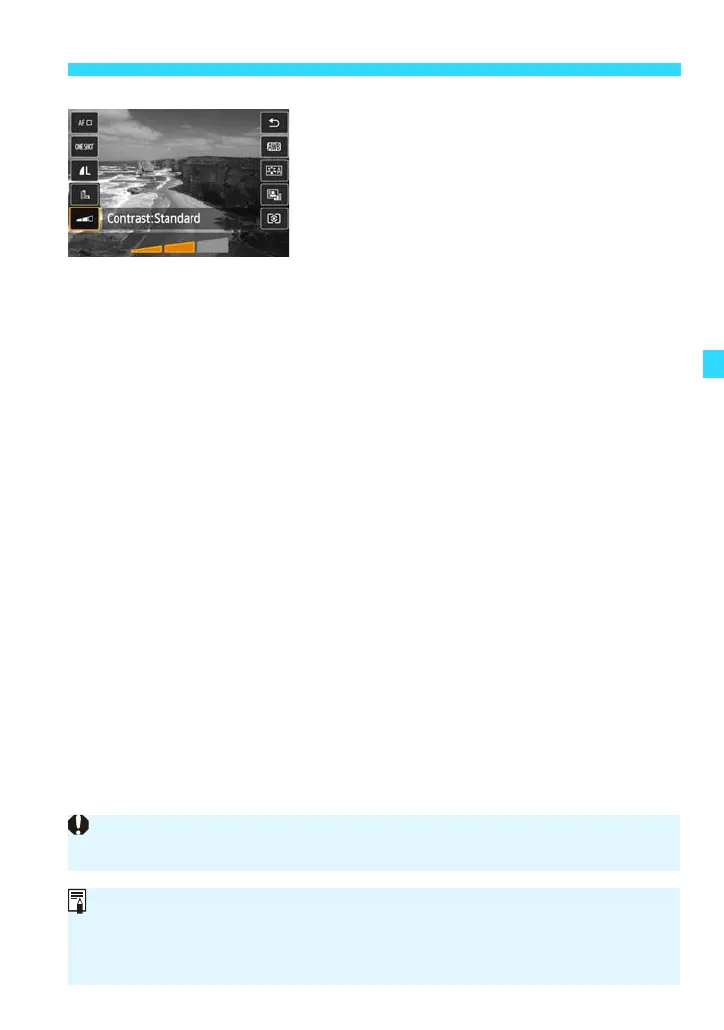
Adjust the filter effect.
You can adjust the effect except the
Miniature effect. When you tap on a filter,
the [J] (except for Toy camera) or
[K] (Toy camera) indicator will appear.
Tap [L] or [M] to adjust the
effect while checking the results on the
LCD monitor.
For the Miniature effect, tap [2], then
drag the white frame over the part of the
image you want to remain sharp. Tap [P]
to switch the white frame’s orientation
between vertical and horizontal.
6
Take the picture.
Press the shutter button.
When you use a Creative filter and shoot, even if you set the Drive/self-timer
mode to continuous shooting (i/q), single shooting will take effect.
You cannot shoot with Creative filters if the image-recording quality is
1+73or 1 or if AEB, white balance bracketing, or Multi Shot Noise
Reduction is set.
When you use a Creative filter and shoot, the histogram will not be displayed.










 To Next Page