3 Shooting Video Snapshots
192
3
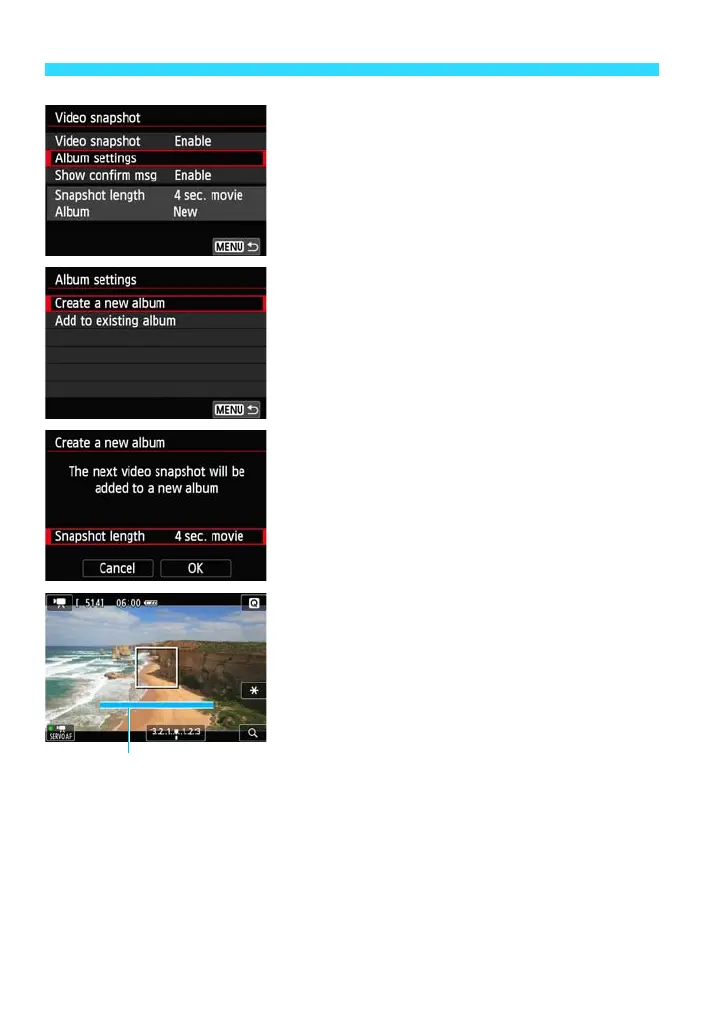
Select [Album settings].
Select [Album settings], then press
<0>.
If you want to continue shooting for an
existing album, go to “Adding to an
Existing Album” (p.196).
4
Select [Create a new album].
Select [Create a new album], then press
<0>.
5
Select the Snapshot length.
Press <0>, then press the <W> <X>
keys to select the snapshot’s length, then
press <0>.
6
Select [OK].
Select [OK], then press <0>.
Press the <M> button to exit the
menu and return to the movie shooting
screen. A blue bar will appear to indicate
the snapshot length.
Go to “Creating a Video Snapshot Album”
(p.193).















 To Next Page