N Cropping JPEG Images
266
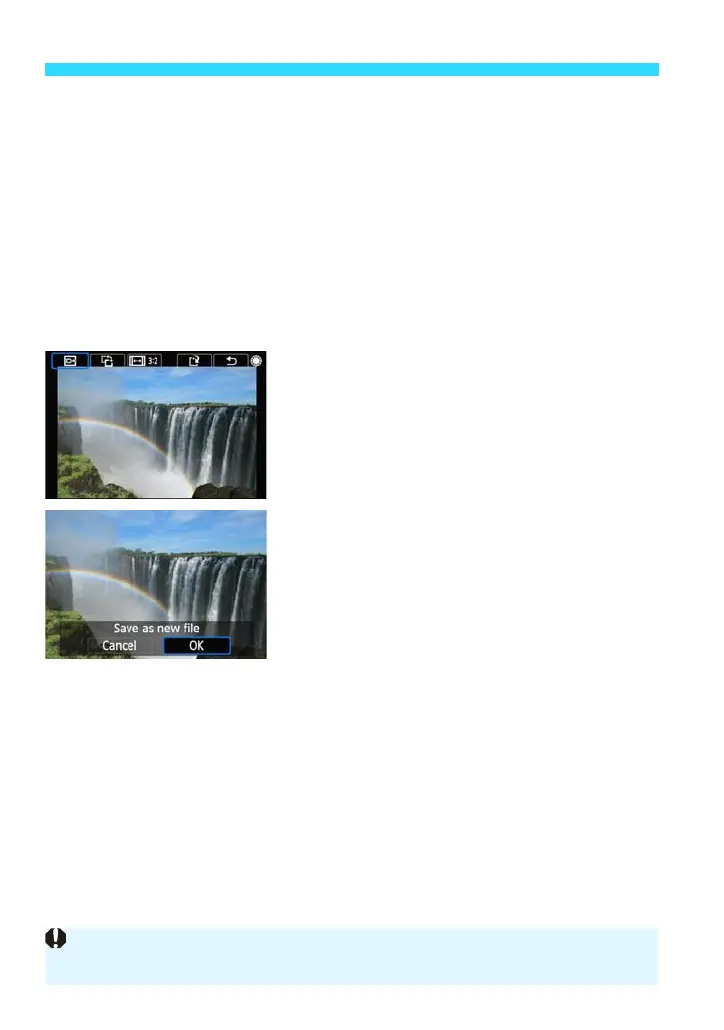
Rotating the Cropping Frame Orientation
Turn the <5> dial to select [X].
Pressing <0> will toggle the cropping frame between the vertical and
horizontal orientations. This enables you to create a vertical image from a
horizontal one, and vice versa.
Changing the Cropping Frame Aspect Ratio
Turn the <5> dial to select [Q].
Pressing <0> will toggle the aspect ratio between [3:2], [16:9], [4:3],
and [1:1].
4
Check the cropped image.
Turn the <5> dial to select [R].
Pressing <0> will toggle the screen
between the cropped image and the
cropping frame display.
5
Save the image.
Turn the <5> dial to select [W].
Select [OK], then press <0> to save
the cropped image.
Check the destination folder and image
file number, then select [OK].
To crop another image, repeat steps 2 to
5.
To return to the menu, press the <M>
button.
You cannot crop an image that has been cropped.
You cannot apply a Creative filter or resizing to a cropped image.







 To Next Page