CHAPTER 13 TROUBLESHOOTING
13-90
COPYRIGHT
©
1999 CANON INC. CANON GP605/605V REV.0 JAN. 1999 PRINTED IN JAPAN (IMPRIME AU JAPON)
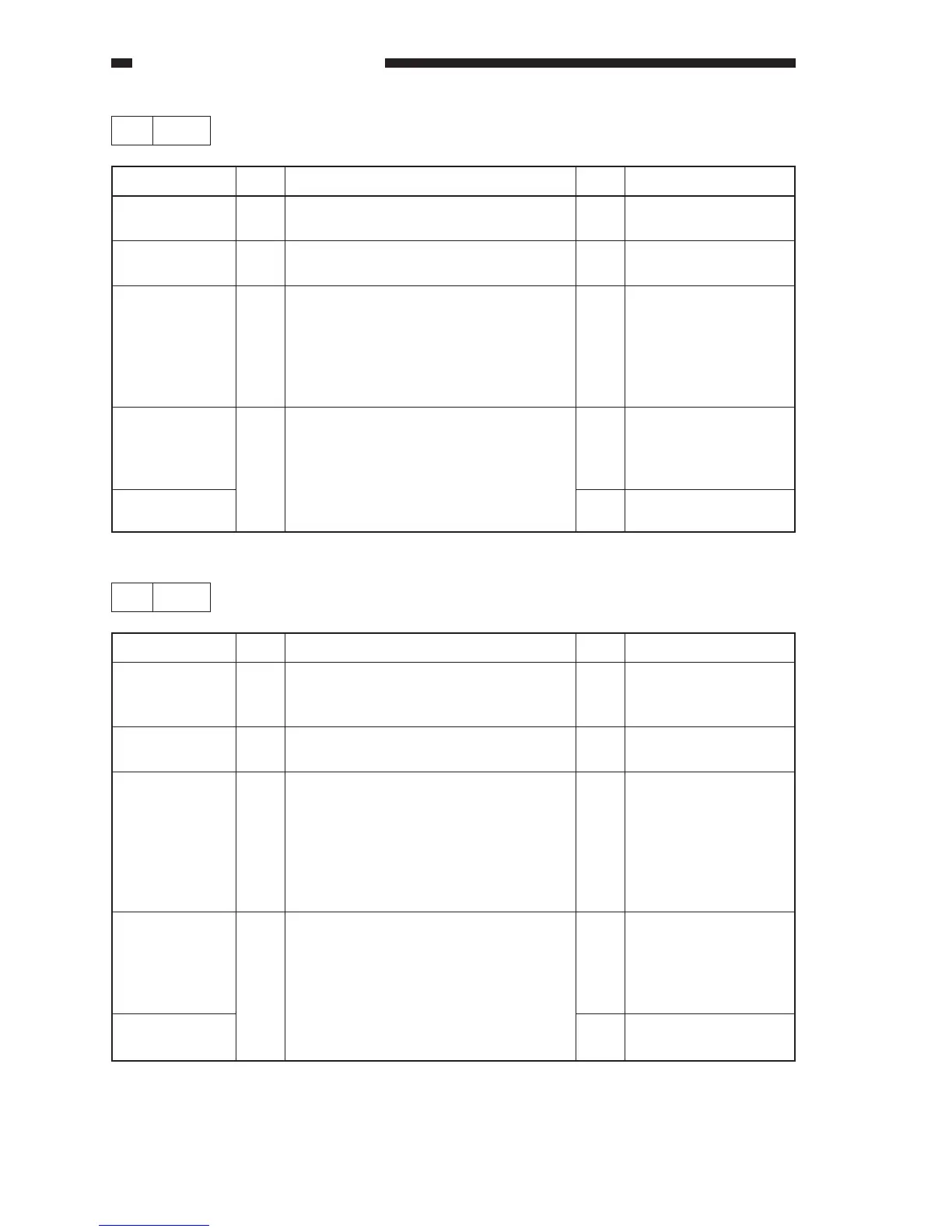
20 E060
Step
1
2
3
4
Action
Connect the connectors
securely.
Connect it securely.
If normal, replace the
switch.
End.
Replace the DC
controller PCB.
Checks
Are the connectors of the primary
charging assembly connected securely?
Is the connector (J502) of the DC
controller PBC connected securely?
Is the mounting of the primary charging
cleaner home position detecting switch
and the connection of the cable normal?
Replace the primary charging wire
cleaner motor (M8). Is the problem
corrected?
Yes/No
NO
NO
NO
YES
NO
Cause
Connector
Connector
Primary
charging wire
cleaner home
position
detecting switch
(MSW4)
Primary
charging wire
cleaner motor
(M8)
DC controller
PCB
21 E063
Step
1
2
3
4
Action
Connect the connectors
securely.
Connect the connector
securely.
If normal, replace the
detecting switch.
End.
Replace the DC
controller PCB.
Checks
Are the connectors of the transfer/
separation charging assembly connected
securely?
Is the connector (J509) on the DC
controller PCB connected securely?
Is the mounting of the transfer/separation
charging wire cleaner home position
detecting switch and the connection of the
cable normal?
Replace the transfer/separation charging
wire cleaner motor (M9). Is the problem
corrected?
Yes/No
NO
NO
NO
YES
NO
Cause
Connector
Connector
Transfer/
separation
charging wire
cleaner home
position
detecting switch
(MSW6)
Transfer/
separation
charging wire
cleaner motor
(M9)
DC controller
PCB



 To Next Page