[Authentication
Algorithm]
SHA1 is used.
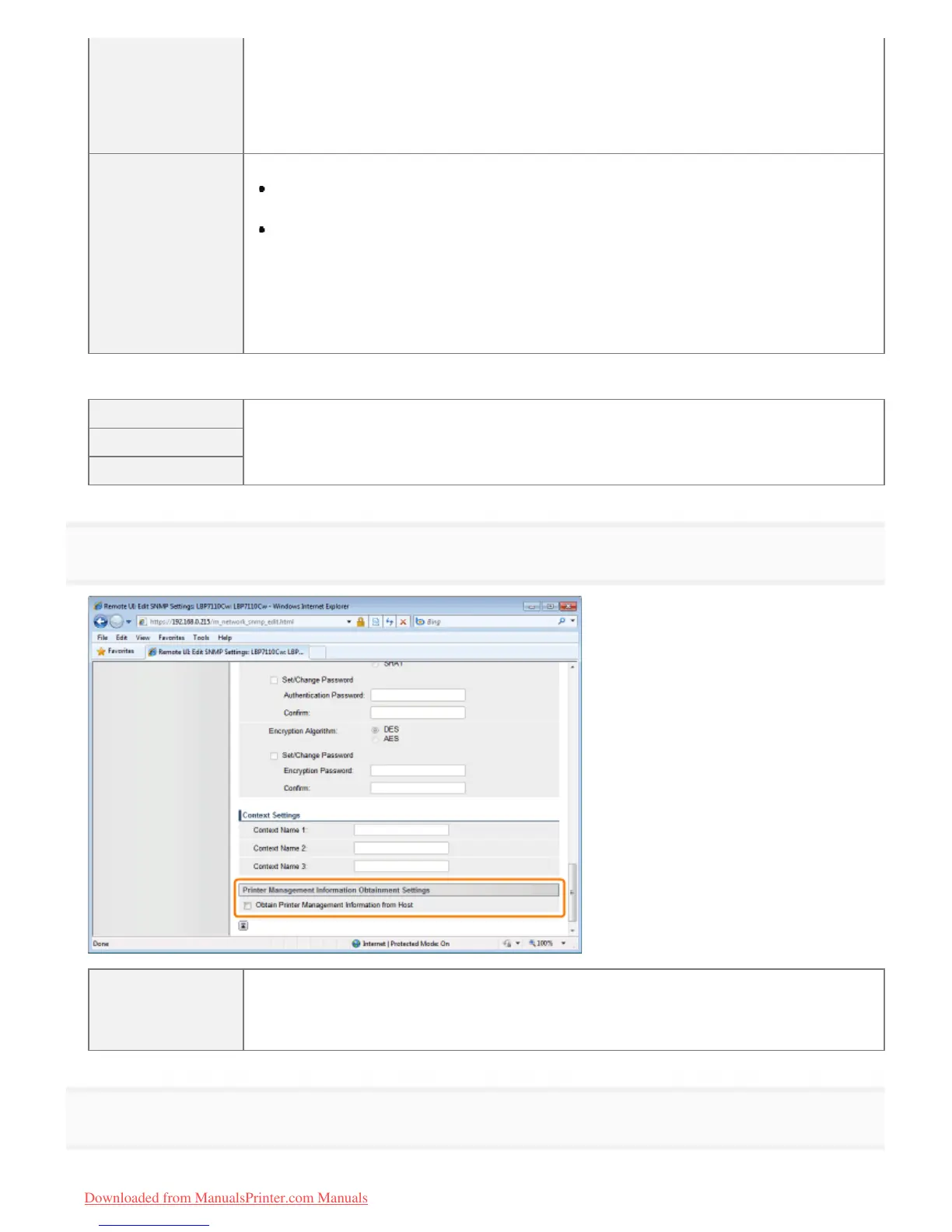
To set or change the authentication password
Select the [Set/Change Password] check box, and then enter the password to
[Authentication Password] and [Confirm].
You can enter 6 to 16 single-byte alphanumeric characters.
[Encryption
Algorithm]
Select the encryption algorithm.
[DES]
DES is used.
[AES]
AES is used.
To set or change the encryption password
Select the [Set/Change Password] check box, and then enter the password to [Encryption
Password] and [Confirm].
You can enter 6 to 16 single-byte alphanumeric characters.
[Context Settings]
[Context Name 1]
Enter a context name to be used in the SNMPv3 protocol. You can enter up to 32 single-byte
alphanumeric characters.
[Context Name 2]
[Context Name 3]
7
Specify whether or not to obtain the printer management information as needed.
[Obtain Printer
Management
Information from
Host]
Select the check box if you want to periodically obtain the printer management information such
as print applications and ports from host computers on the network by using SNMP.
8
Click [OK].
㻟㻡㻤㻌㻛㻌㻡㻝㻠
Downloaded from ManualsPrinter.com Manuals




 To Next Page