3-CONTROLSANDINSTRUMENTS
Keypad[60630759]
NavigationthroughtheLiquidCrystalDis-
play(LCD)multi-functiondisplayscreens
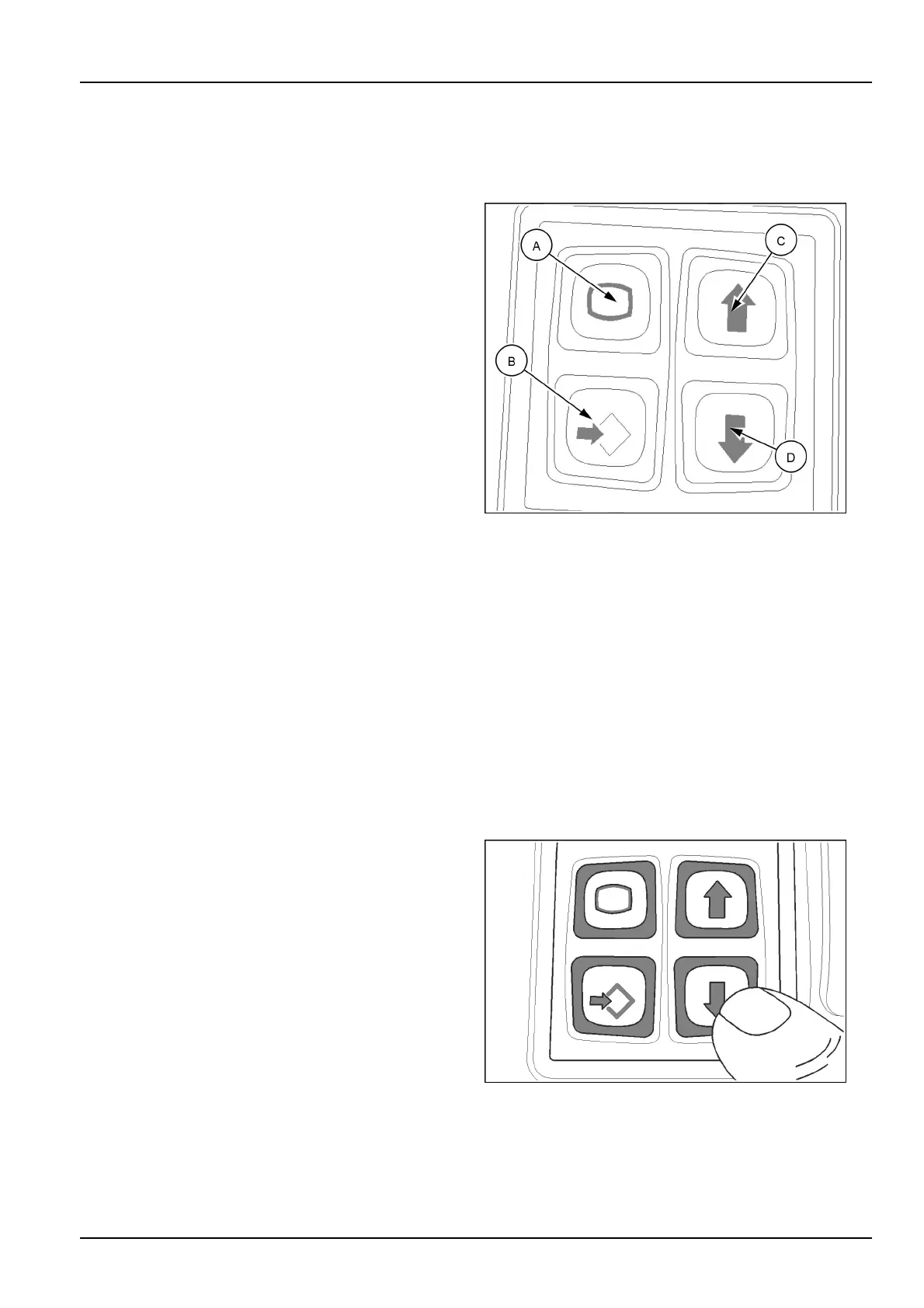
Thekeypadislocatedontheconsolejustbelowthesteer-
ingwheel.Usethiskeypadtomovefromonescreento
another,choosevariousselections,monitorthemachine
functions,andretrieveinformation.
Allselectionsmadewiththecomputerizedtechnologyof
theLCDscreenareessentiallyprogrammedinthesame
manner.
Whenusingthescreen,usethearrowkeys(C)and(D)to
scrolltothedesiredselection,highlightthatselectionand
presstheconrm/enterkey(B).
Followanyscreenpromptswhengivenandusethecon-
rmkeytoentertheselection.Usetheescapekey(A)to
returntothemainmenu.Thiswilllockthechosenselec-
tionintomemory.
Allfunctionscanbeaccessedinthesamebasicmanner.
A.Escapekey-Usethiskeytoexitandreturntothe
drivingscreen.Thiskeycanbeusedanytimetostart
overandbeginagainortoexitaeld.Itcanalsobe
usedtoelectronicallycheckfaultcodes.
B.Enter/conrmkey-Usethiskeytoconrmselections:
Afterselectionshavebeenhighlighted,usetheenter/
conrmkeytochooseselections.
C.Uparrowkey-Usethiskeytoscrolluptoselections.
D.Downarrowkey-Usethiskeytoscrolldowntoselec-
tions.
NOTE:Arrowsonthescreenwillindicateifselectionsare
upordownfromthecurrentselection.
RCIL10WHL182BAL1
Usingthearrowkeys
AtanytimeduringoperationorwiththekeyswitchON,the
operatormayscrollthroughfourinformationscreensand
twotripscreensbyusingthearrowkeys.Thesescreens
areinacircularloopandmaybeaccessedbypressing
theupordownkey.Thefollowingsequenceshownuses
thedownkeyonly.
NOTE:PressingtheescapekeywillreturntheLCDback
tothenormaldrivingscreen.Inordertolockthechanges
intomemory,theoperatormustpresstheconrmkey,
thenusetheescapekeytoreturntothemainscreen.
Turningthemachineoffwillalsolockthesettingsinto
memory.
Fromthedrivingscreen,pushthedownarrow,asshown.
RCPH10WHL021BAL2
3-45



 To Next Page