M-Series Operator’s Manual 4/9/2015 10-39
Repeat (F2 in the Insert Subprogram Menu)
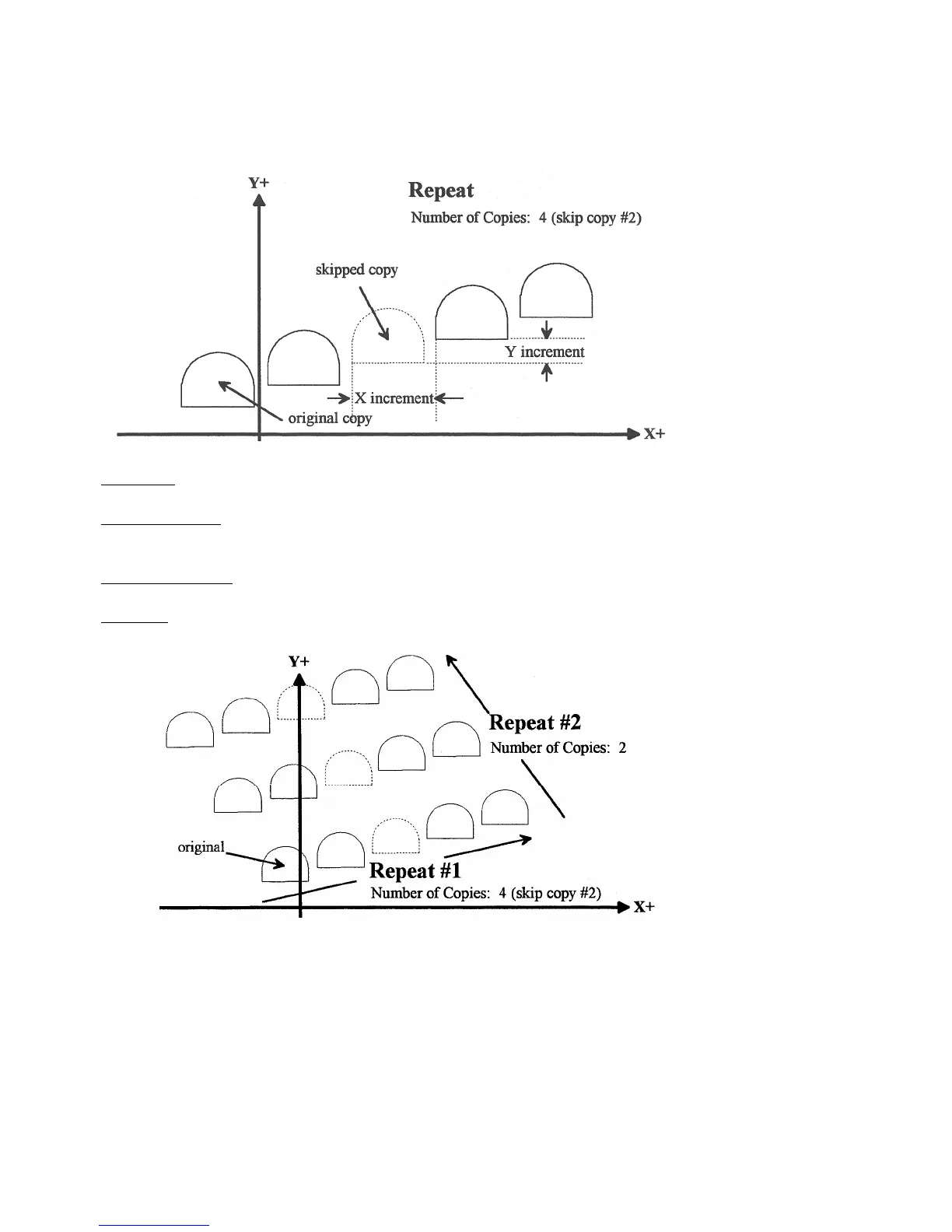
The Repeat feature is useful for repeating a part contour one or more times along a straight line in the XY plane. The
contour formed by these operations may either be closed or open. If a rotary axis is enabled, this operation can also be
used for repeating such a contour one or more times over a specified rotary increment.
Increment: Specifies the X and Y distances between the start points of each copy of the contour.
Rotary Increment: Specifies the rotary incremental amount to move between each copy of the contour. Note: This
field will appear only if a rotary axis is enabled.
Number of Copies: The number of times to repeat the contour.
Skip List: List of copies that are skipped. Enter the number or numbers of the copies that you wish to skip. In the
example below will skip copy # 2.
* NOTE: An array of repeats may be accomplished by doing a repeat of a repeat.



 To Next Page