M-Series Operator’s Manual 4/9/15
8-6
Radial Digitize
(F2 from Digitize Menu)
Setting up a Radial Digitize Run
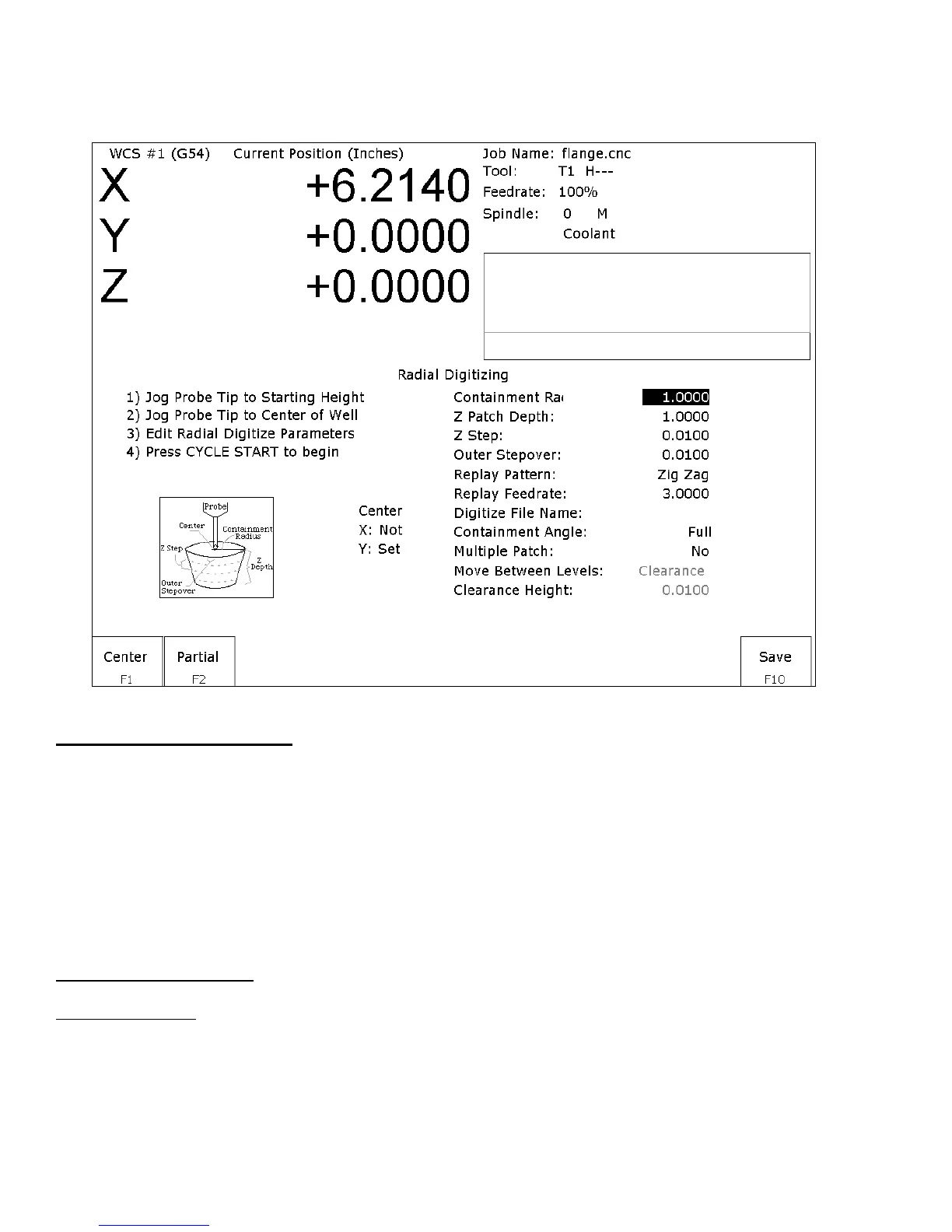
To set up a digitize run, edit the parameters shown. Jog the probe tip to the starting height and to the center of the
bore to be digitized. Then press F1 - Center to define the center position for digitizing. This center position will
be used as the center of all radial digitizing runs until you leave the radial digitize menu or redefine the center. If
you are using a full angle, you can now press CYCLE START to begin digitizing. If you have specified partial
angle, press F2 - Partial to define the partial angle (see setting the partial angle section in this chapter). After
defining the partial angle, pressing CYCLE START will start the digitize run.
WARNING: The probe must be able to retreat to the center from any position on the digitize surface. If the
digitize surface contains features that do not allow for the probe to exit after entering, a probe crash may
occur! See radial digitize note 2 later in this section.
Radial Digitize Parameters
Containment Radius: The maximum distance from the center position to look for a digitize data point. This
parameter is used to contain the probe within a circle with this radius centered at the center position. If the probe
does not contact the surface before reaching the maximum radius that data point will be recorded as being at the
maximum radius, and digitizing will proceed with the next point.



 To Next Page