M-Series Operator’s Manual 4/9/15 2-1
Chapter 2
Operator Panel
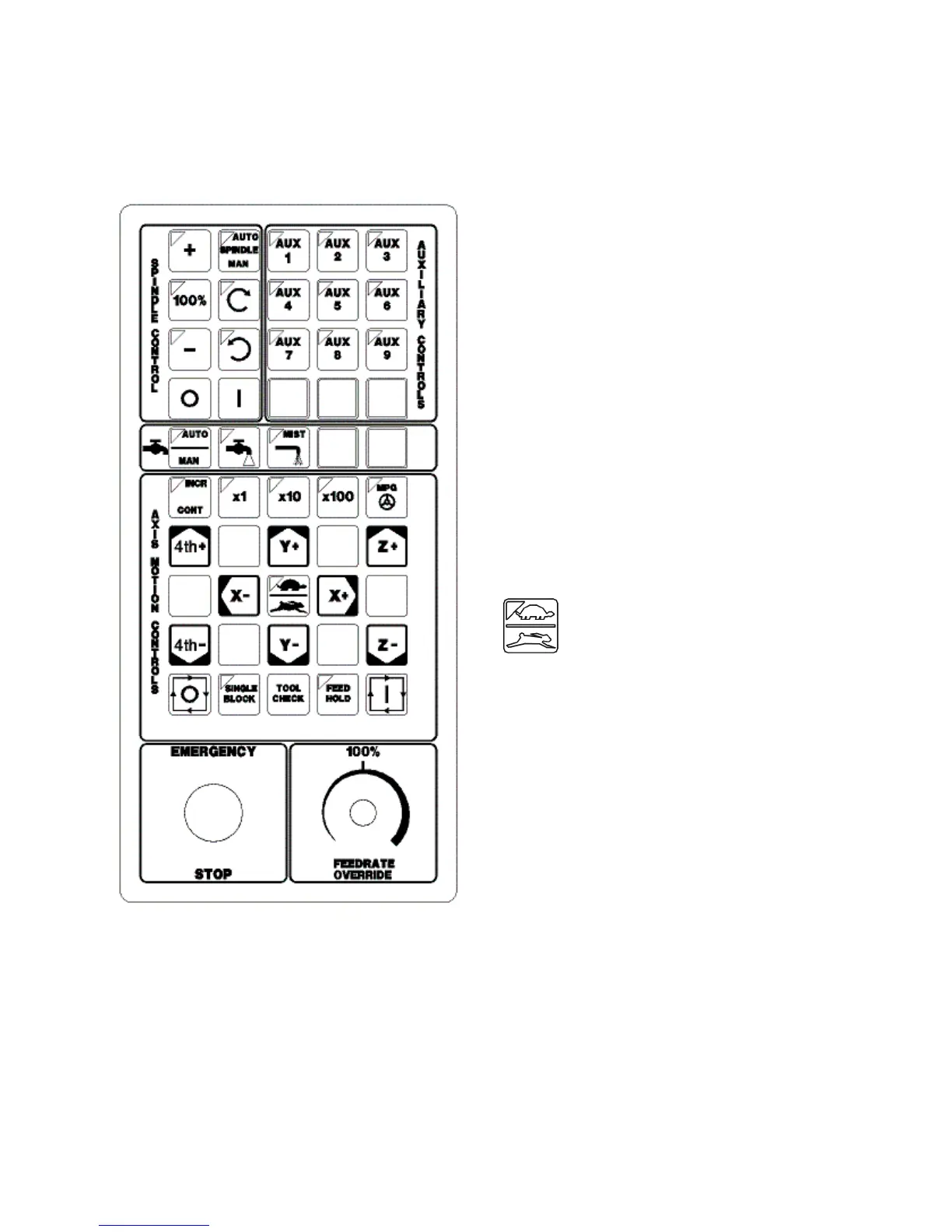
Fig 1 - M-Series Jog Panel
The M-Series operator panel is a sealed membrane keyboard
that enables you to control various machine operations and
functions. The panel contains momentary membrane
switches. The M-Series jog panel can be customized as to
the location of various keys. The jog panel displayed in the
figure above is representative of a default configuration
found on most M-series controls.
Axis Jog Buttons
X+ X- Y+ Y- Z+ Z- 4TH+ 4TH-
The yellow X, Y, Z, and 4TH keys are momentary switches
for jogging each of the four axes of the machine. There are
two buttons for each axis (+/-). Only one axis can be jogged
at a time.
* NOTE: The jog buttons will not operate if the M-Series
CNC software is not running, or if a job (a CNC program) is
running.
Slow/Fast
The slow/fast key is located in the center of the Axis Motion
Controls section and is labeled with the turtle and rabbit
icon shown to the right. The turtle represents slow jogging
mode. When SLOW jog is selected (LED on) and a jog
button is pressed, the axis moves at the slow jog rate. If
FAST jog is selected, the axis will move at the fast jog rate.
See Chapter 14 for information on setting the fast and slow
jog rates for each axis.
Inc/Cont
INC/CONT selects between incremental and continuous
jogging. Pressing the key will toggle between these two
modes. The LED is lit when INC is selected. If CONT jog
is selected and an axis jog button is pressed, the axis will
move continuously until the button is released.
x1, x10, x100
Press any one of these keys to set the jog increment amount. The amount you select is the distance the control will
move an axis if you make an incremental jog (x1=0.0001", x10=0.0010" and x100=0.0100"). You may select only one
jog increment at a time, and the current jog increment is indicated by the key that has a lit LED. The jog increment
you select is for all axes; you cannot set separate jog increments for each axis. The jog increment also selects the
distance the control will move an axis for each click of the MPG handwheel.



 To Next Page