M-Series Operator’s Manual 4/9/2015 10-16
Drilling (F1 in the Canned Cycle Menu: option #1)
If you press F1 - Drill from the Canned Cycle Menu, you will gain access to three types of drilling operations:
Drilling, Chip Breaking, and Deep Hole drilling. The current drilling operation in use is reflected in the field “Cycle
Type” and pressing F3 - Toggle or SPACE toggles between all three. In this section we will examine the first option:
Drilling.
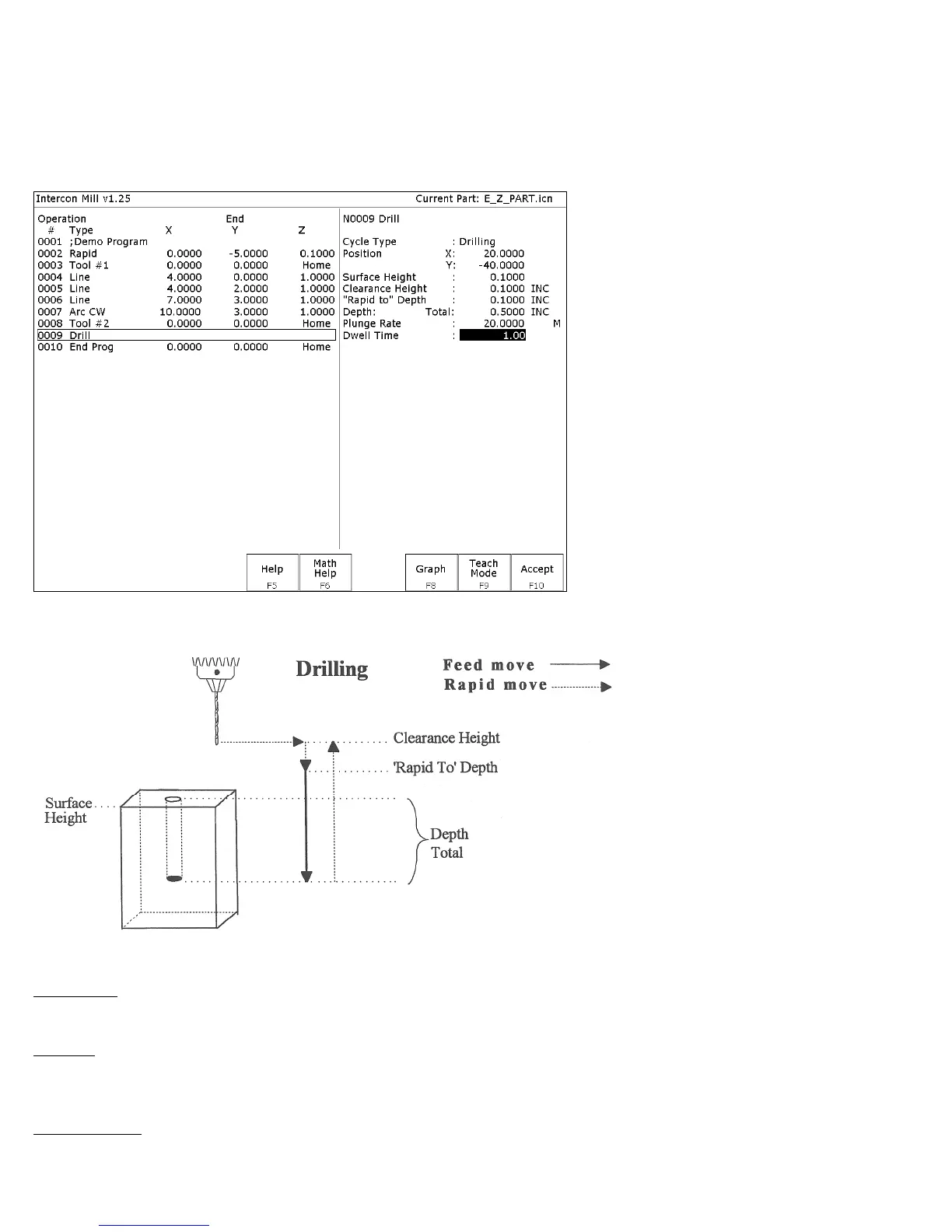
The numbers in the fields on the screen correspond to the following example, shown here graphically:
Where:
Cycle Type: Selects one of three drilling operations: Drilling, Chip Breaking, or Deep Hole drilling. Press F3 -
Toggle or SPACE to toggle between the three choices.
Position: Specifies the X and Y coordinates where the drilling will take place. If either the X or Y coordinate is an
incremental value, you will have the option to drill multiple holes in a linear pattern (See Canned Cycle Introduction
#2).
Surface Height: Absolute Z-axis position from where each incremental depth is measured.



 To Next Page