M-Series Operator’s Manual 4/9/15 2-5
Keyboard Jog Panel
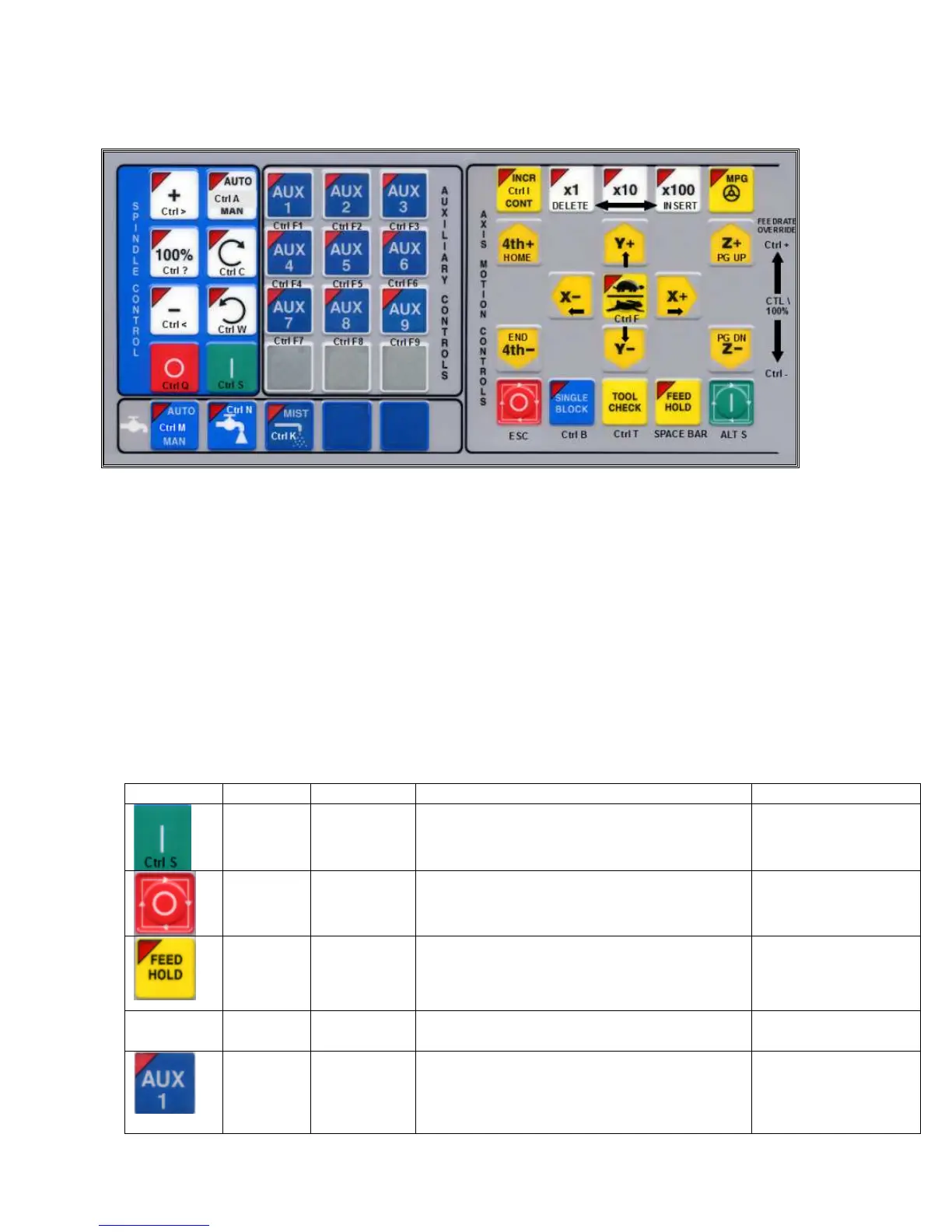
The PC keyboard may be used as a jog panel. Press Alt-J to display and enable the keyboard jog panel. The jog panel
appears as shown below:
Some controls, such as coolant on/off, spindle on/off, feedrate and spindle override will work without the “jog panel”
being displayed but for full functionality (and jogging) of the keyboard jog panel, the “jog panel” must be displayed on
the screen. To enable keyboard jogging, parameter 170 must be set to “1”.
The status window in the upper right corner of the screen displays the jogging mode (continuous/incremental),
incremental step size, and jog speed (fast/slow). In continuous mode, the jog keys start movement when pressed and
movement stops when you release the key. In incremental mode, the axis will move the indicated incremental step
amount.
As shown in the picture above, the jog keys are located in the cursor key block to the right of the main keyboard and to
the left of the numeric keypad. If a jog key controls an axis, it will be overlaid with the axis symbol (“X”, “Y”, etc.)
The jog keys are the arrow keys, Page Up, and Page Down.
The remaining keys are described below:
Legend Key(s) Function Description Availability (Notes)
Alt S Cycle Start Same as Cycle Start. Always, with few
exceptions.
Esc Cycle
Cancel
Same as Cycle Cancel. During a job run;
otherwise, Esc is
used to exit menus.
Space
Feed Hold Turns Feed Hold on and off Always, with few
exceptions.
Alt J Start/Exit
Panel
Invokes or exits the jog panel. Always, with few
exceptions.
Ctrl F1
-
Ctrl F12
Aux 1 –
Aux 12
Executes the corresponding Aux function and
signals the PLC. A custom PLC program is
required to act upon jog panel signals.
Always, with few
exceptions.



 To Next Page