M-Series Operator’s Manual 4/9/2015 10-41
Rotate (F4 in the Insert Subprogram Menu)
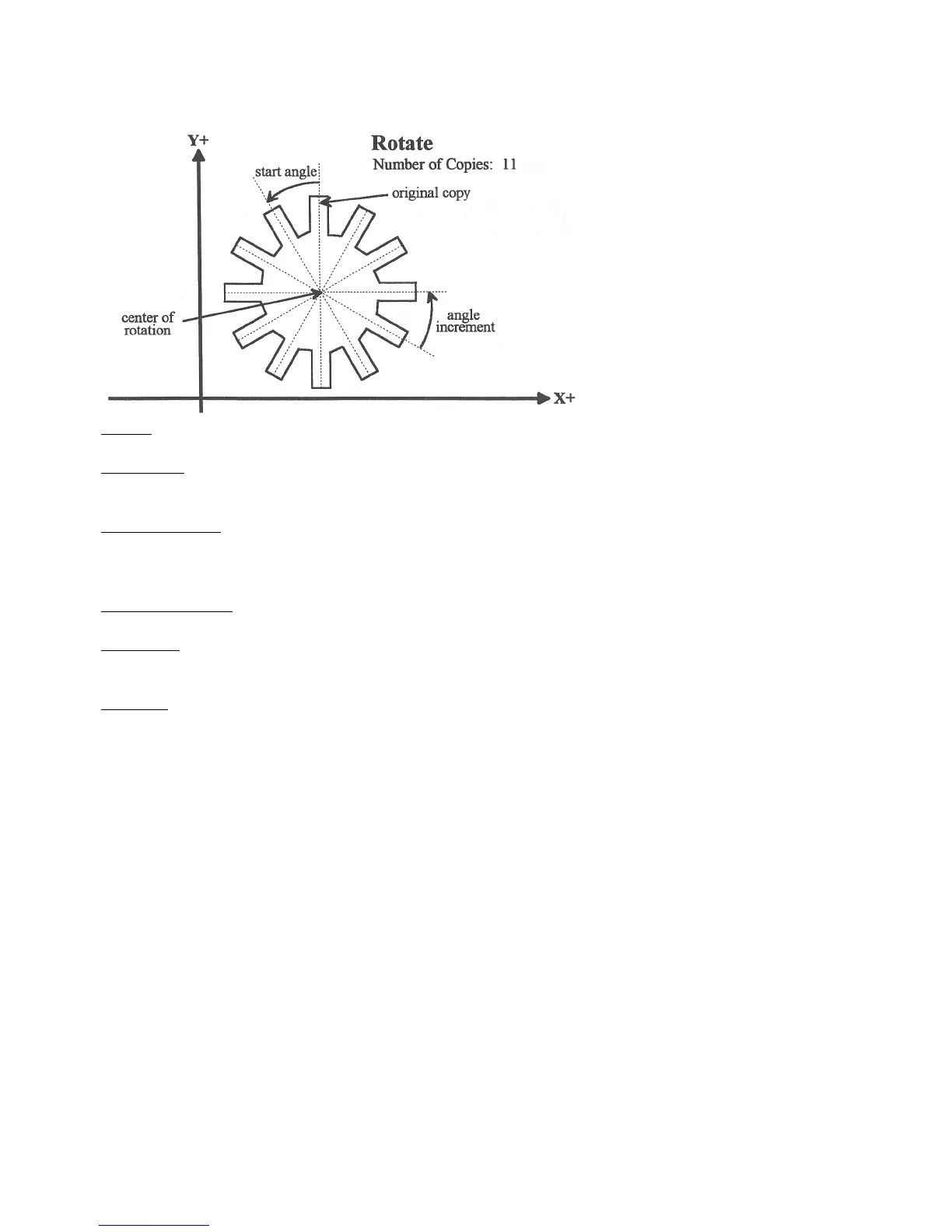
The Rotate feature is useful for rotating a part contour multiple times around a given point. The contour formed by
these operations may either be closed or open.
Center: The XY location of the center of rotation.
Start Angle: The angle from the original copy at which the first copy will be placed. A positive angle indicates a
counterclockwise rotation, while a negative angle indicates a clockwise rotation.
Angle Increment: The angle at which each copy after the first will be placed from the first copy. A positive angle
indicates a counterclockwise, while a negative angle indicates a clockwise rotation. Must have a value larger than 1 in
the number of copies.
Number of Copies: The number of times to rotate the contour.
End Angle: The angle at which the final rotated copy will start, not the angle at which it will end. A positive angle
indicates a counterclockwise rotation, while a negative angle indicates a clockwise rotation.
Skip List: List of copies that are skipped. Enter the number or numbers of the copies that you wish to skip.
NOTE: The user may enter the Start Angle, the Number of Copies, and either the Angle Increment or the End Angle
value, and Intercon will compute the rest.



 To Next Page