M-Series Operator’s Manual 4/9/15
G21 - Select Metric Units
G21 selects metric units, affecting the interpretation of all subsequent dimensions and feedrates in the job file. G21
does not change the native machine units, as set on the control setup menu.
G22/G23 – Work Envelope On/Off
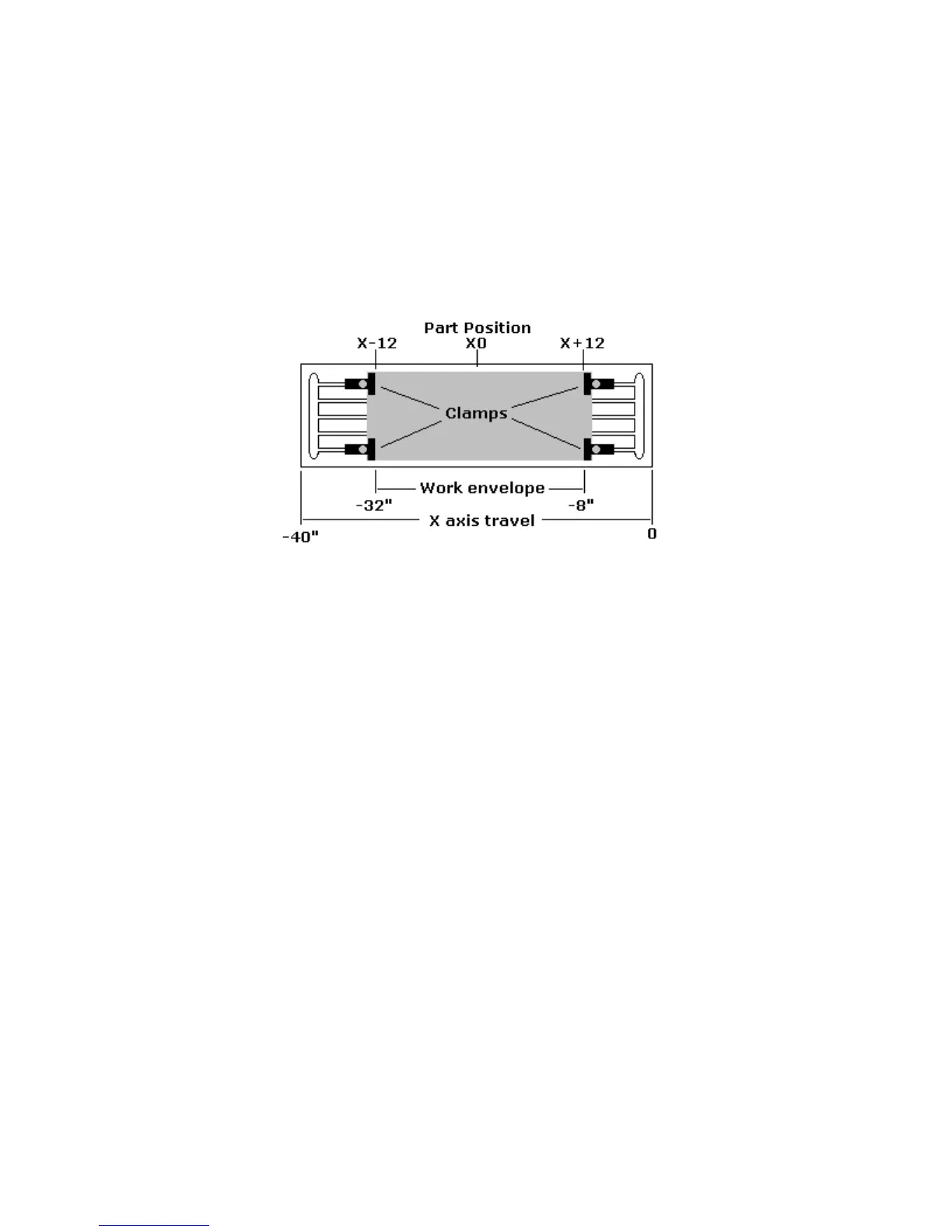
G22 turns on programmable work envelope in machine coordinates. When the machine tries to move into the
forbidden area, let’s say the x-axis, an “x-axis work envelope exceeded” message is displayed, letting you know
which line of the program is at fault. The work envelope is set with the X, Y, Z for the ‘+’ limit and I, J, K for the
‘–‘limit. G22 is modal and remains on until turned off by G23 or the end of the job. The limits entered in the X, Y,
Z and I, J, K parameters are stored in the WCS menu under F3 - Work Envel. For more information see chapter 4.
Example: (Machine homes to the X + switch and has 0 to –40 inches of travel in the X axis,)
G22 X-8 I-32 ; Keeps programs from moving into the outside 8 inches of X-
; axis of travel
G1 X-13 F20 ; Would generate a “X axis work envelope exceeded, line 3”
; message
G23 ; Allows travel into G22 forbidden area.
M25 ; Z home
G0 X-13 ; Ok to move X here now
G28 - Return to Reference Point
G28 moves to the first reference point, by way of an intermediate point. The location of the reference point, in
machine coordinates, may be set in Work Coordinate System Configuration. The intermediate point is specified in
the local coordinate system, and may be at the current location (resulting in a move directly to the reference point).
If an intermediate point is specified, only those axes for which positions are specified will be moved. If no axes are
specified, all axes will be moved. The location of the intermediate point is stored for later use with G29.
Examples:
G28 G91 Z0 ; move Z-axis directly to reference point
;( X and Y don't move)
G28 G91 X-.5 Y0 Z0 ; move X -0.5 (from current position), then move all
; three axes to reference point
G28 G90 X2 Y4 Z.1 ; move all axes to (X2, Y4, Z0.1), then to
; reference point
G28 ; move all axes to the reference point
;( no intermediate point)
* NOTE: As with G0 positioning moves, the Z-axis will move separately. If Z is moving up (the usual case) Z will
move first, then the other axes. If Z is moving down, the other axes will move first, then Z. Because of this, it is
rarely necessary to specify an intermediate point different from the current position.



 To Next Page