EasyManua.ls Logo

Contax TVS DIGITAL - Page 70

Contax TVS DIGITAL
109 pages
Print Icon
To Next Page IconTo Next Page
To Previous Page IconTo Previous Page
Loading...
6.
[RECORDING]
Adding
Voice
Memos
to
an
Image
Recording
allows
you
to
add
sound
to
a
recorded
image
(stilt
picture)
or
delete
added
sound
data.
<Adding
sound>
Set
the
mode
dial
to
“H"
and
turn
on
the
camera.
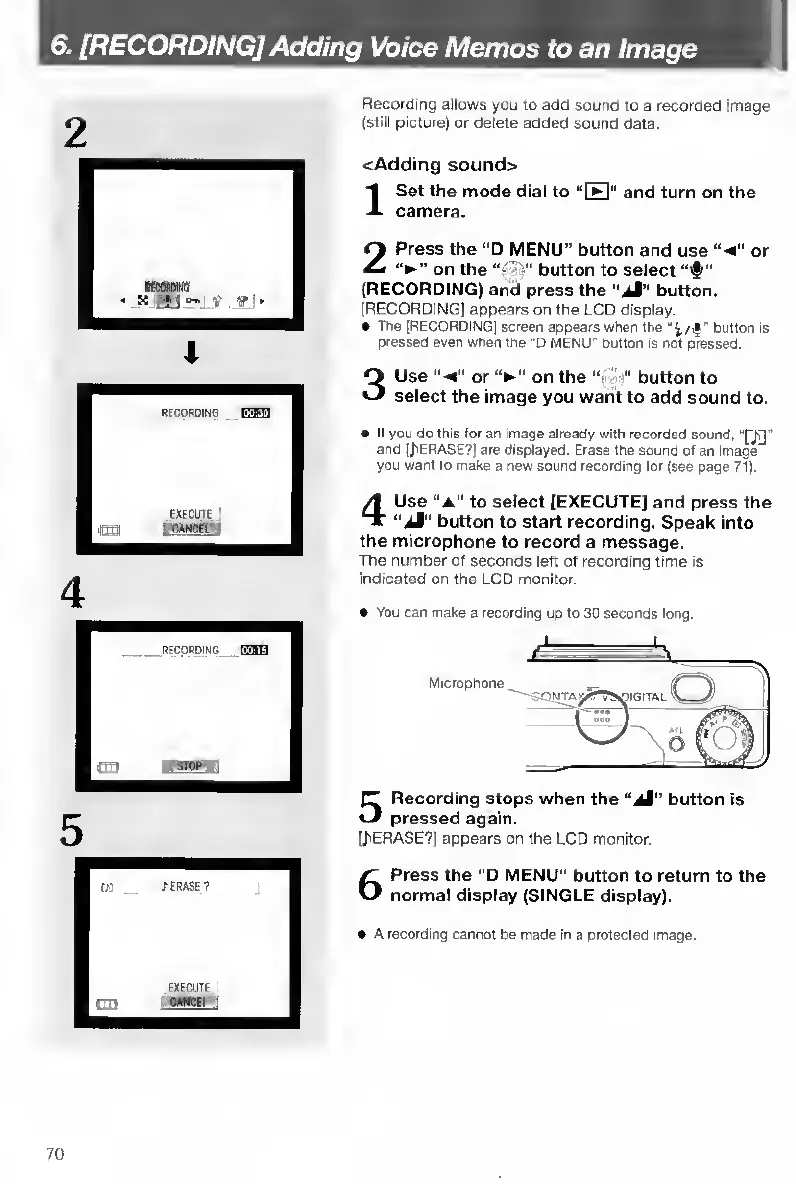
Press
the
“O
MENU”
button
and
use
or
on
the
button
to
select
(RECORDING)
and
press
the
"jM"
button.
(RECORDING)
appears
on
the
LCD
display.
The
[RECORDING]
screen
appears
when
the
button
is
pressed
even
when
the
“0
MENU"
button
Is
not
pressed.
3
U
se
"
<”
or
on
the
“•
button
to
select
the
image
you
warit
to
add
sound
to.
If
you
do
this
for
an
image
already
with
recorded
sound,
"Q]]
'
and
(JiERASE?)
are
displayed.
Erase
the
sound
of
an
image
you
want
to
make
a
new
sound
recording
tor
(see
page
71).
4
U
se
“a"
to
select
[EXECUTE]
and
press
the
“ij”
button
to
start
recording.
Speak
into
the
microphone
to
record
a
message.
The
number
of
seconds
left
of
recording
time
is
indicated
on
the
LCD
monitor.
You
can
make
a
recording
up
to
30
seconds
long.
Microphone
5
R
ecording
stops
when
the
“Ji”
button
is
pressed
again.
[/'ERASE?)
appears
on
the
LCD
monitor.
6
P
ress
the
"D
MENU”
button
to
return
to
the
normal
display
(SINGLE
display).
A
recording
cannot
be
made
in
a
protected
image.
70

Table of Contents

Other manuals for Contax TVS DIGITAL

Related product manuals