EasyManua.ls Logo

Contax TVS DIGITAL - Page 71

Contax TVS DIGITAL
109 pages
Print Icon
To Next Page IconTo Next Page
To Previous Page IconTo Previous Page
Loading...
4
*
RECOCOmG
Wi
EXECUTE
CD
WK«-
I
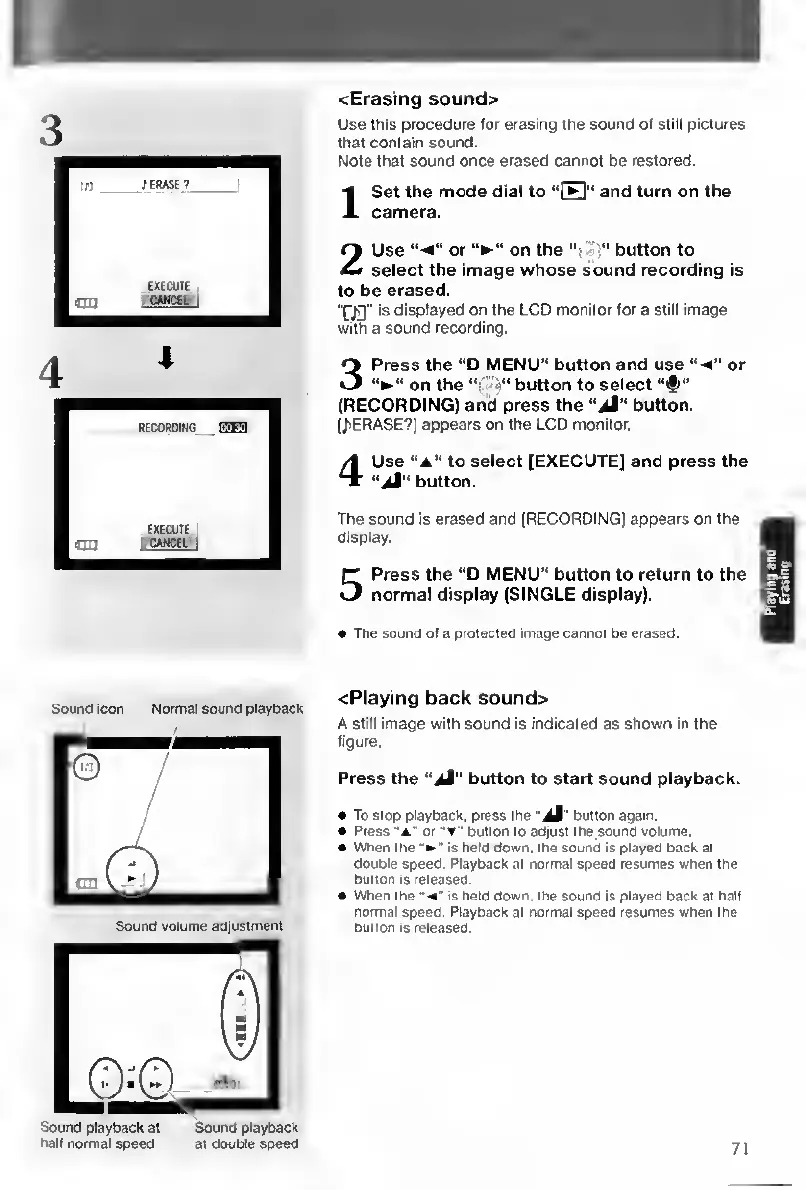
cErasing
sound>
Use
this
procedure
for
erasing
the
sound
of
still
pictures
that
contain
sound.
Note
that
sound
once
erased
cannot
be
restored.
Set
the
mode
dial
to
“Q"
and
turn
on
the
camera.
2
U
se
or
on
the
-j”
button
to
select
the
image
whose
sound
recording
is
to
be
erased.
“fjg"
is
displayed
on
the
LCD
monitor
tor
a
still
image
with
a
sound
recording.
3
P
ress
the
“D
MENU”
button
and
use
“•*”
or
on
the
button
to
select
“#”
(RECORDING)
and
press
the
button.
UiERASE?)
appears
on
the
LCD
monitor.
4
U
se
to
select
[EXECUTE]
and
press
the
"ji"
button.
The
sound
is
erased
and
(RECORDING]
appears
on
the
display.
5
P
ress
the
“D
MENU”
button
to
return
to
the
normal
display
(SINGLE
display).
The
sound
of
a
protected
image
cannot
be
erased.
Sound
icon
Normal
sound
playback
Sound
volume
adjustment
Sound
playback
at
Sound
playback
hall
normal
speed
at
double
speed
<Playing
back
souncl>
A
still
Image
with
sound
Is
indicated
as
shown
In
the
figure.
Press
the
button
to
start
sound
playback.
To
Slop
playback,
press
the
button
again.
«
Press
or
~w"
button
to
adjust
the
sound
volume.
When
the'
is
held
down,
the
sound
Is
played
back
at
double
speed.
Playback
at
normal
speed
resumes
when
the
button
Is
released.
When
the
<"
is
held
down,
the
sound
is
played
back
at
halt
normal
speed.
Playback
at
normal
speed
resumes
when
tne
button
Is
released.
71

Table of Contents

Other manuals for Contax TVS DIGITAL

Related product manuals