To Perform Continuous Milling
Automatically Switching Out the Worn Milling Bur (Intelligent Tool Control)
During milling, the milling bur wears out and may need to be replaced.
If you want to have the worn milling bur switched out automatically during milling, use Intelligent Tool Control.
Intelligent Tool Control is a function that enables you to continuously use up to three milling burs of the same
type. When a milling bur reaches its replacement time, it is automatically switched with a milling bur that has not
been used. This makes it possible to perform milling for a long time without any loss in milling quality.
Procedure
A
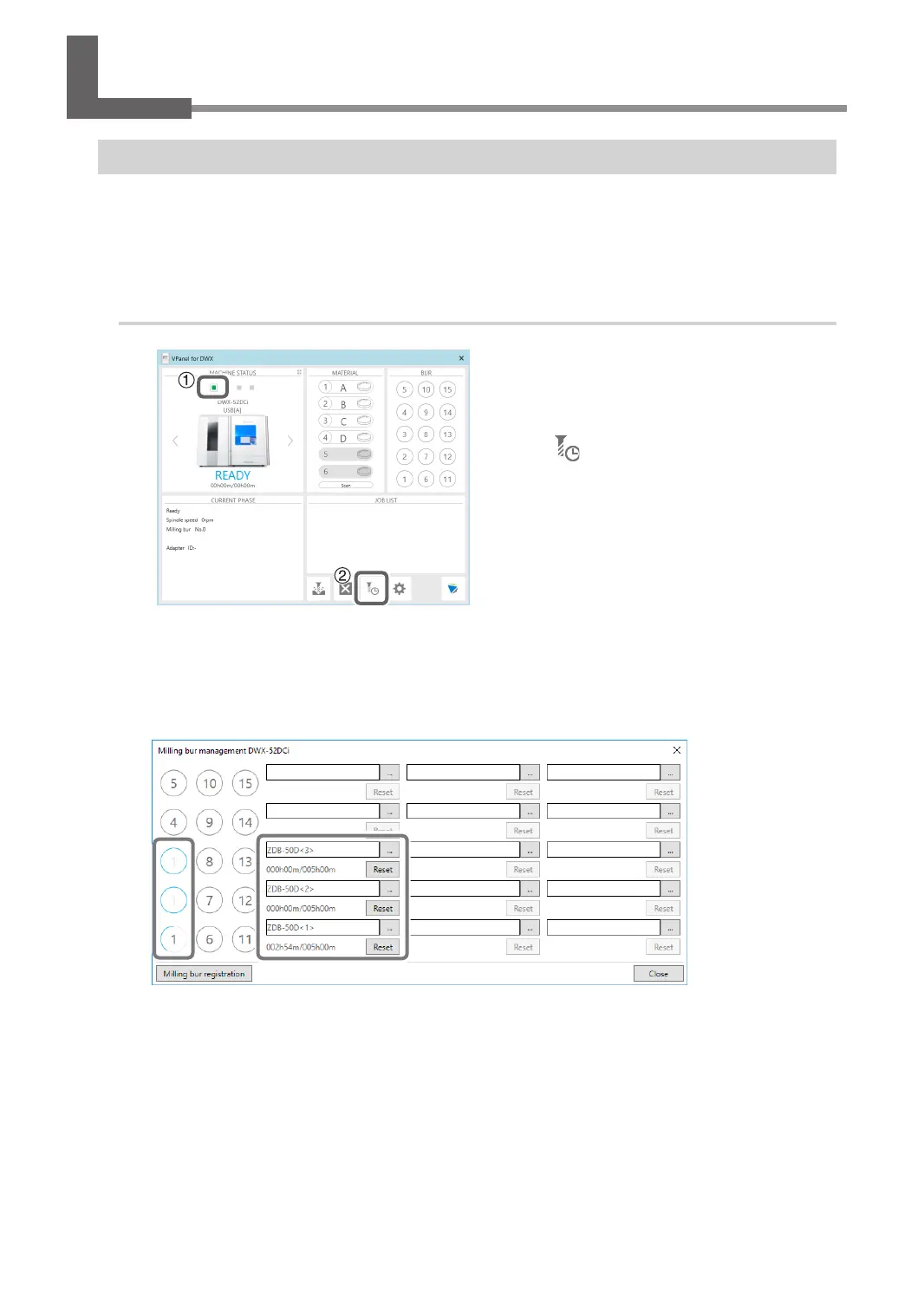
1 In the VPanel top window, select the
machine for which you want to set
Intelligent Tool Control.
2 Click .
The "Milling bur management" window opens.
B
Set the milling burs that you want to automatically switch between with Intelligent Tool
Control into multiple milling bur stockers (two or three locations).
Milling burs with the same name are specied as a single set. If the milling bur being used reaches its
replacement time, it is automatically switched with the next milling bur.
55
Chapter 2 Milling



 To Next Page