AssuredSAN 4004 Series Setup Guide 105
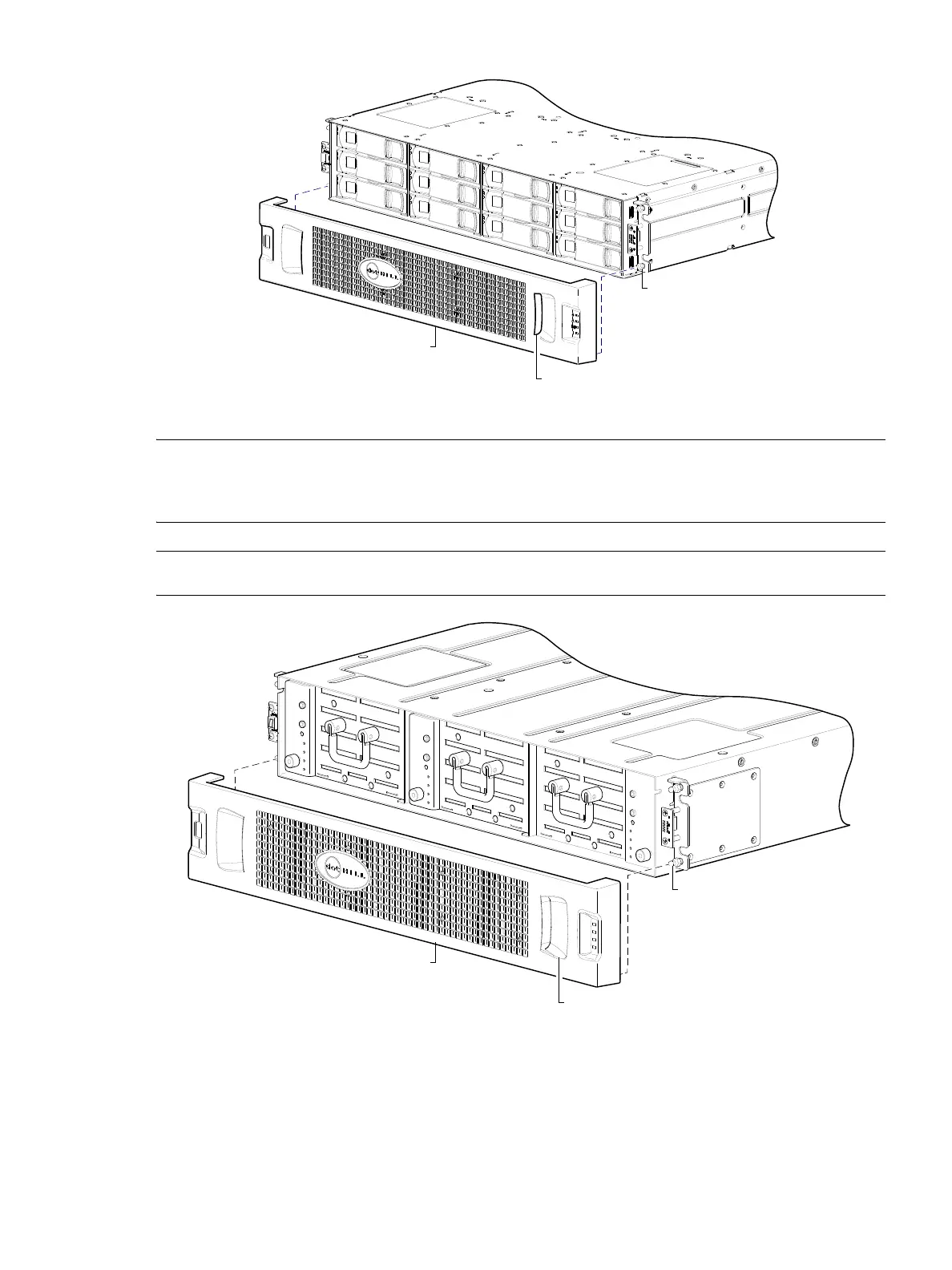
Figure 84 Partial assembly showing bezel alignment with 2U12 chassis
NOTE: For more information about servicing or replacing the removable air filter option for 2U12
enclosures (Figure 84), refer to the AssuredSAN 12-drive Enclosure Bezel Kit Installation instructions
included in your product ship kit.
NOTE: Bezel alignment for the 2U48 enclosure is shown in Figure 85 below.
Figure 85 Partial assembly showing bezel alignment with 2U48 chassis
Once you have removed the bezel, you can access the drawers. To open a drawer, you should first revolve
the pull-handle upwards by 90to enable pulling the drawer outward for viewing disks. The handle can be
in the stowed position when pushing the drawer back into the enclosure along the drawer slide (see
Figure 86 on page 106 for instructions about using 2U48 drawer handles).
Ball stud on chassis ear
(typical 4 places)
Enclosure bezel sub-assembly
(EMI shield and removable air filter)
Pocket opening (typical 2 places)
Ball stud on chassis ear
(typical 4 places)
Enclosure bezel sub-assembly
(Includes EMI shield for disks)
Pocket opening (typical 2 places)



 To Next Page