AssuredSAN 4004 Series Setup Guide 65
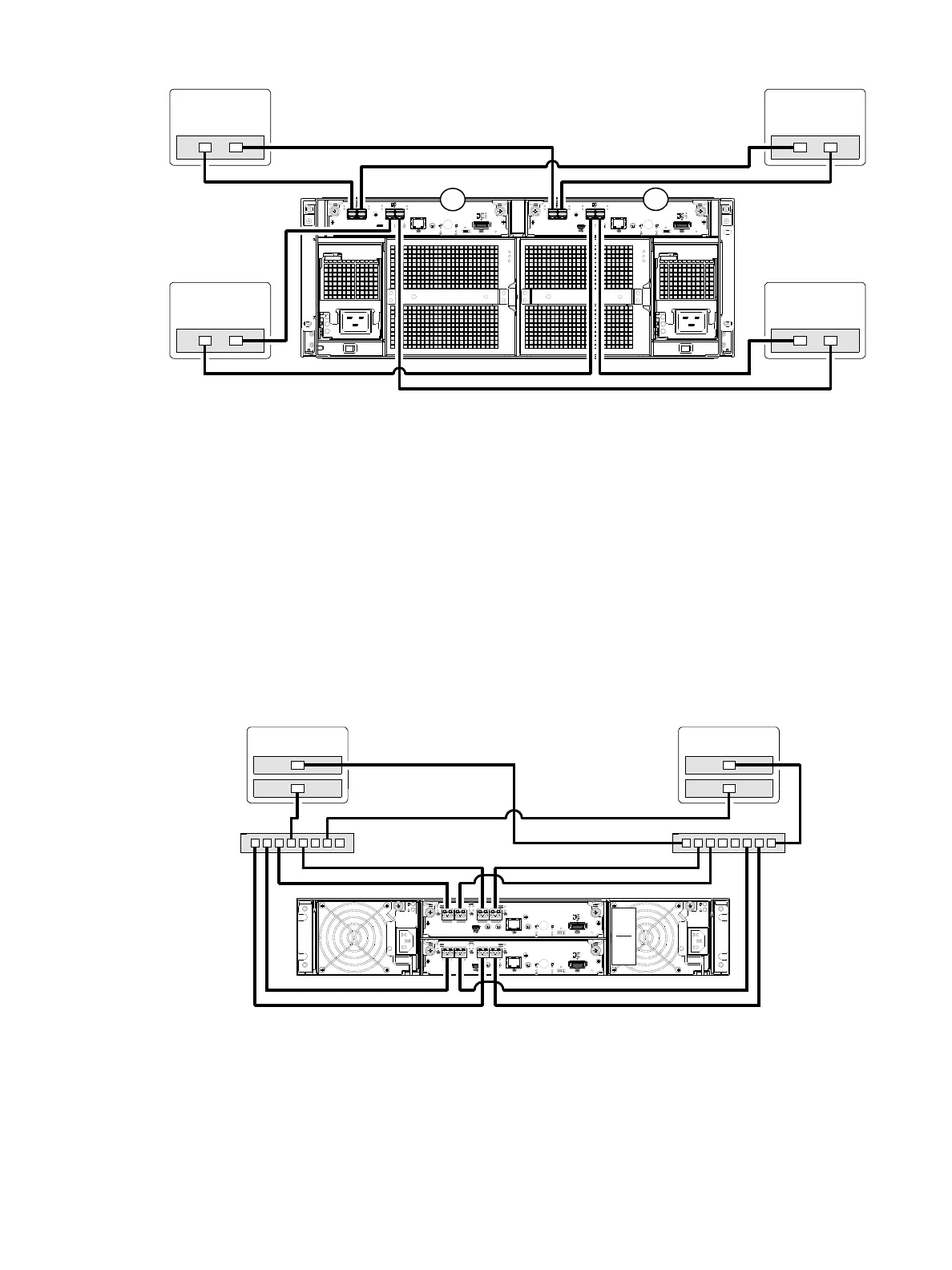
Figure 66 Connecting hosts: direct attach—four servers/one HBA per server/dual path (4U HD mini-SAS)
Connecting switch attach configurations
A switch attach solution—or SAN—places a switch between the servers and the controller enclosures
within the storage system.
Using switches, a SAN shares a storage system among multiple servers, reducing the number of storage
systems required for a particular environment. Using switches increases the number of servers that can be
connected to the storage system. A 4004 Series controller enclosure supports 64 hosts.
The diagrams that follow show the SAN by using labeled switches and by using a cloud symbol to denote
a SAN fabric.
Dual-controller configuration
Two servers/two switches
Figure 67 Connecting hosts: switch attach—two servers/two switches (2U CNC)
6Gb/s 6Gb/s
12Gb/s
S
S
A
12Gb/s
S
S
A
12Gb/s
S
S
A
12Gb/s
S
S
A
Server 1Server 2
4554
0A
0B
Server 3Server 4
4824/4834/4844
Server 1
Server 2
Switch A
Switch B
0A
0B



 To Next Page