AssuredSAN 4004 Series Setup Guide 15
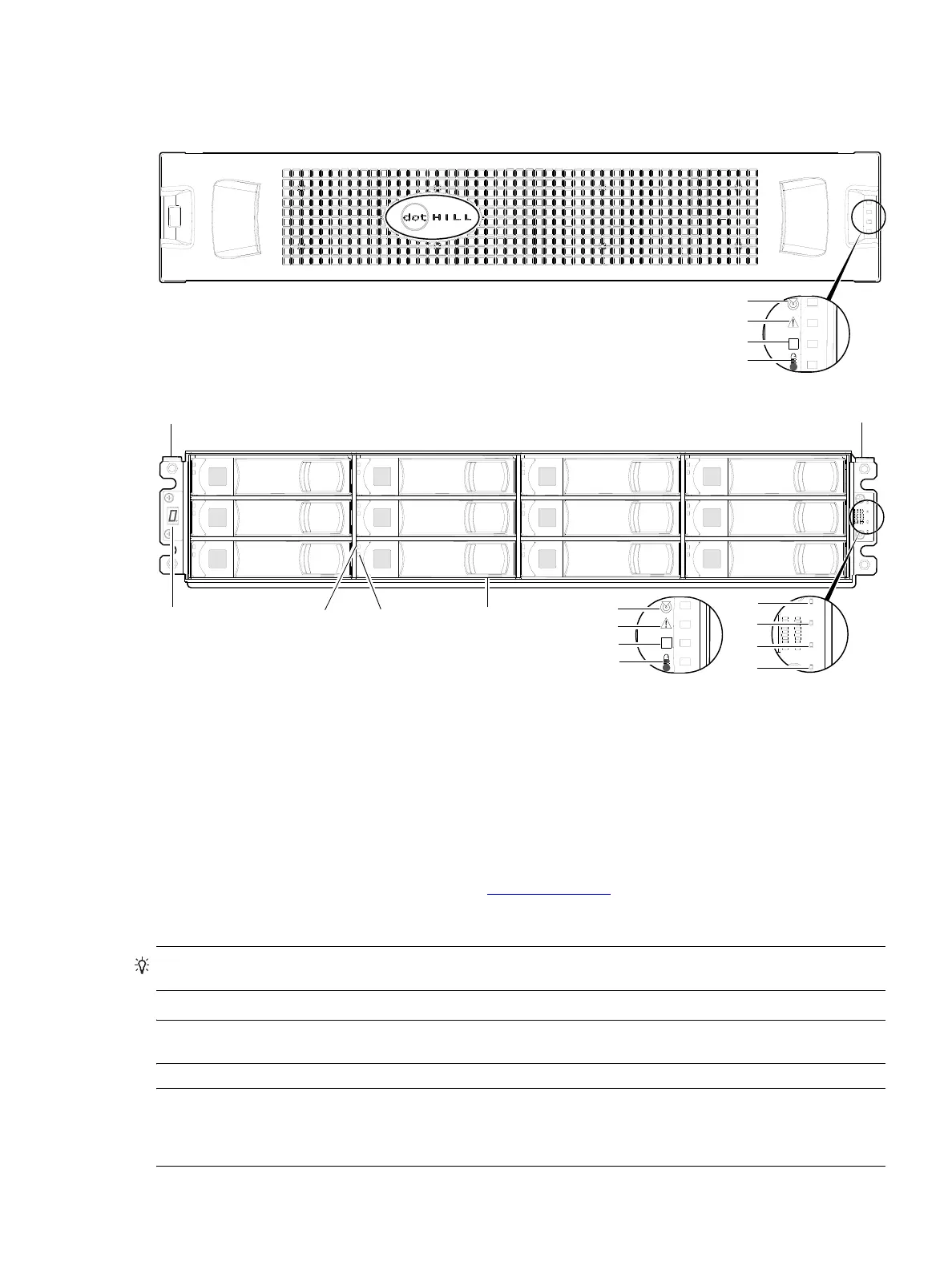
12-drive enclosure front panel components
2U12 enclosures support
single or dual-IOMs, and can be equipped with either two redundant AC or two
redundant DC power supply modules (see Figure 10
on page 21
).
1
This bezel might optionally include a removable air filter that can be serviced or replaced. Hard copy instructions for attaching or
removing the bezel, and for servicing or replacing the air filter, are provided in the shipping container of a new enclosure. This
particular bezel is used with both the 2U12 and 2U48 chassis. When configured for use with the 2U48 chassis, the bezel does not
include the air filter option.
2
Alternatively, you can access the AssuredSAN 12-drive Enclosure Bezel Kit Installation document online. See Dot Hill’s customer
resource center (CRC) web site for additional information: https://crc.dothill.com
.
Figure 2 2U12 enclosure: front panel
TIP: See Enclosure bezel attachment and removal on page 104 and Figure 84 on page 105 (2U12).
NOTE: Front and rear panel LEDs for controller enclosures are described in LED descriptions.
NOTE: Additional component notes:
• Controller modules within the same enclosure must be of the same type.
• For optimal performance, do not mix 6 Gb and 3 Gb disk drives within the same enclosure.
1 Enclosure ID LED
2 Disk drive status LED: Fault
3 Disk drive status LED: Power/Activity
4 3.5" disk or drive blank (typical 12 slots)
5 Enclosure status LED: Unit Locator
6 Enclosure status LED: Fault/Service Required
7 Enclosure status LED: FRU OK
8 Enclosure status LED: Temperature Fault
5
6
7
8
Note: Remove this enclosure bezel to access the front panel components shown below.
1, 2
This bezel is used with 2U12 and 2U48 chassis; but 2U48 does not use the air filter option.
21
5
34
6
7
8
Left ear
Right ear
Note: Integers on disks indicate drive slot numbering sequence.
0
4
8
1
5
9
2
6
10
3
7
11
8
6
5
7
(Silk screens on bezel)



 To Next Page