124 LED descriptions
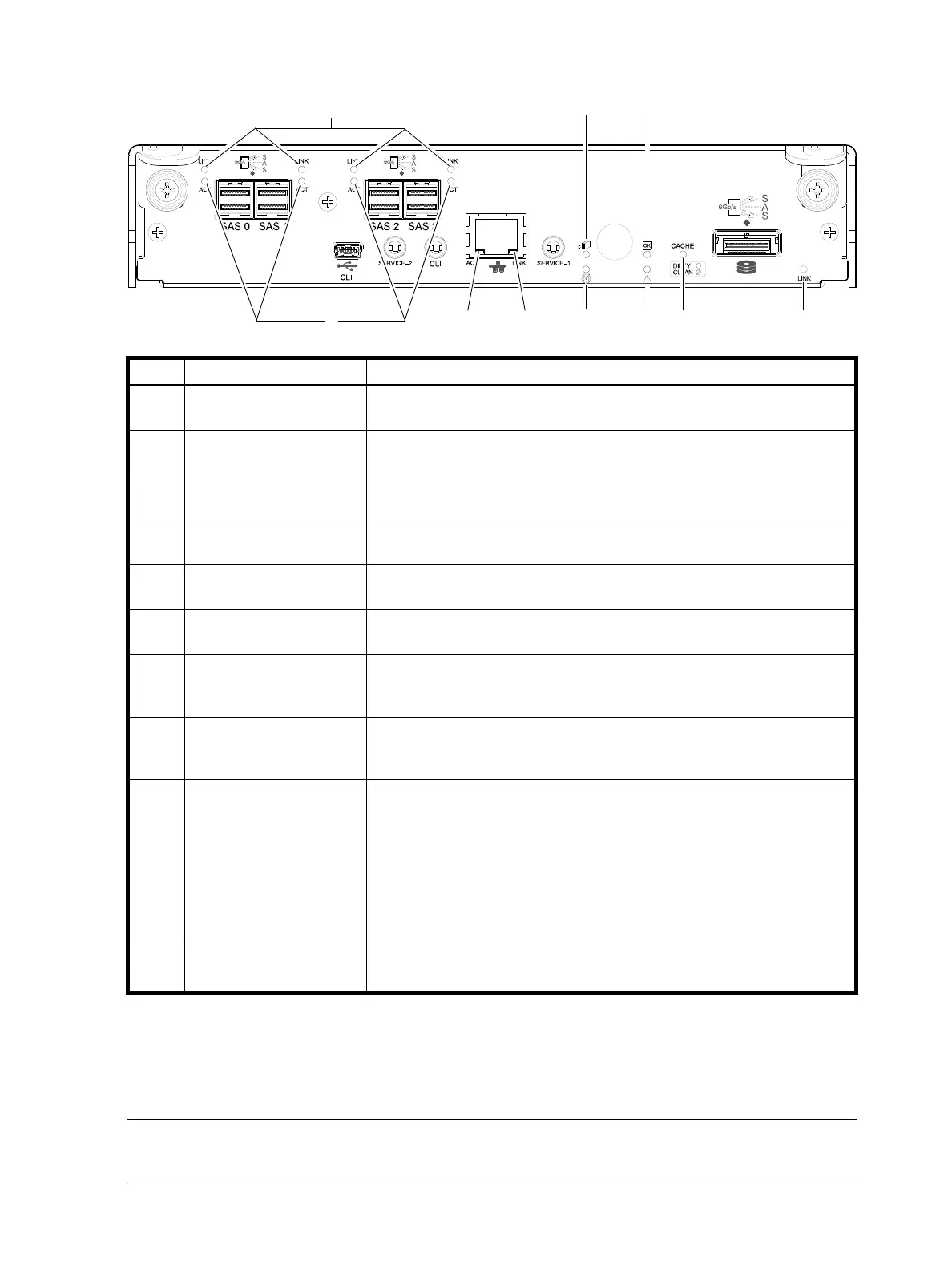
4524/4534/4544/4554 SAS controller module—rear panel LEDs
1
Cables must be qualified HD mini-SAS host cable options.
2
Use a qualified SFF-8644 to SFF-8644 cable option when connecting the 4524/4534/4544/4554 controller to a 12 Gb SAS HBA.
3
Use a qualified SFF-8644 to SFF-8088 cable option when connecting the 4524/4534/4544/4554 controller to a 6 Gb SAS HBA.
4
When port is down, both LEDs are off.
Figure 102 LEDs: 4524/4534/4544/4554 SAS controller module (HD mini-SAS)
NOTE: Once a Link Status LED is lit, it remains so, even if the controller is shut down via the SMC,
RAIDar, or the CLI.
LED Description Definition
1Host 12 Gb SAS,
1- 3
Link Status
Off — No link detected.
Green — The port is connected and the link is up.
2Host 12 Gb SAS
1- 3
Link Activity
Off — The link is idle.
Blinking green — The link has I/O activity.
3Network Port Link
Active Status
4
Off — The Ethernet link is not established, or the link is down.
Green — The Ethernet link is up (applies to all negotiated link speeds).
4 Network Port Link Speed
4
Off — Link is up at 10/100base-T negotiated speeds.
Amber — Link is up and negotiated at 1000base-T.
5 OK to Remove Off — The controller module is not prepared for removal.
Blue — The controller module is prepared for removal.
6 Unit Locator Off — Normal operation.
Blinking white — Physically identifies the controller module.
7 FRU OK Off — Controller module is not OK.
Blinking green — System is booting.
Green — Controller module is operating normally.
8 Fault/Service Required Amber — A fault has been detected or a service action is required.
Blinking amber — Hardware-controlled power-up or a cache flush or restore
error.
9 Cache Status Green — Cache is dirty (contains unwritten data) and operation is normal.
The unwritten information can be log or debug data that remains in the
cache, so a Green cache status LED does not, by itself, indicate that any user
data is at risk or that any action is necessary.
Off — In a working controller, cache is clean (contains no unwritten data).
This is an occasional condition that occurs while the system is booting.
Blinking green — A CompactFlash flush or cache self-refresh is in progress,
indicating cache activity.
See also Cache Status LED details on page 125.
10 Expansion Port Status Off — The port is empty or the link is down.
On — The port is connected and the link is up.



 To Next Page