AssuredSAN 4004 Series Setup Guide 109
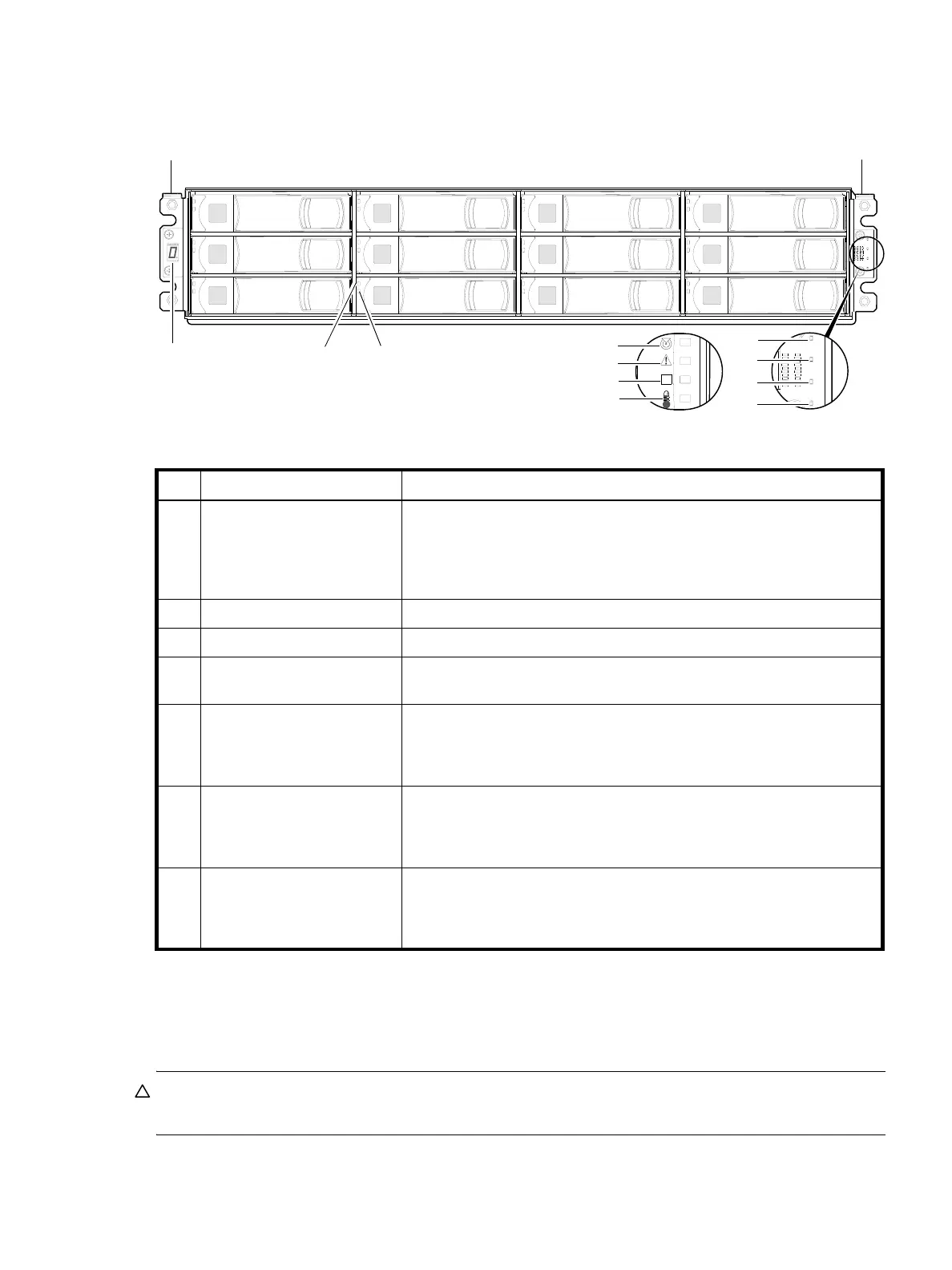
12-drive enclosure front panel LEDs
The enclosure bezel is removed to reveal the underlying 2U12 enclosure front panel LEDs. The front panel
LEDs—including LFF disk LEDs—are described in the table below the illustration.
Figure 90 LEDs: 2U12 enclosure front panel
The enclosure bezel for this model provides the EMI protection from the product. The bezel should be
securely attached to the enclosure during operation (see Enclosure bezel attachment on page 104 and
Figure 84 on page 105).
CAUTION: Whether configured with or without an air filter, to ensure adequate EMI protection from the
product, the enclosure bezel should be properly installed while the enclosure is in operation.
LED Description Definition
1 Enclosure ID Green — On
Enables you to correlate the enclosure with logical views presented by
management software. Sequential enclosure ID numbering of controller
enclosures begins with the integer 0. The enclosure ID for an attached drive
enclosure is nonzero.
2 Disk drive — Upper LED See Disk drive LEDs (2U12/2U24) on page 110.
3 Disk drive — Lower LED See Disk drive LEDs (2U12/2U24) on page 110.
4 Unit Locator White blink — Enclosure is identified
Off — Normal operation
5 Fault/Service Required Amber — On
Enclosure-level fault condition exists. The event has been acknowledged but
the problem needs attention.
Off — No fault condition exists.
6 FRU OK Green — On
The enclosure is powered on with at least one power supply operating
normally.
Off — Both power supplies are off; the system is powered off.
7 Temperature Fault Green — On
The enclosure temperature is normal.
Amber — On
The enclosure temperature is above threshold.
21
4
3
5
6
7
Left ear
Right ear
0
4
8
1
5
9
2
6
10
3
7
11
7
5
4
6
(Silk screens on bezel)
Integers on disks indicate drive slot numbering sequence.
Notes: Enclosure bezel is removed to show front panel LEDs.



 To Next Page