Autopilot Servo Installation, Configuration, and Calibration
SkyView System Installation Guide - Revision K 10-11
SkyView Network Connection
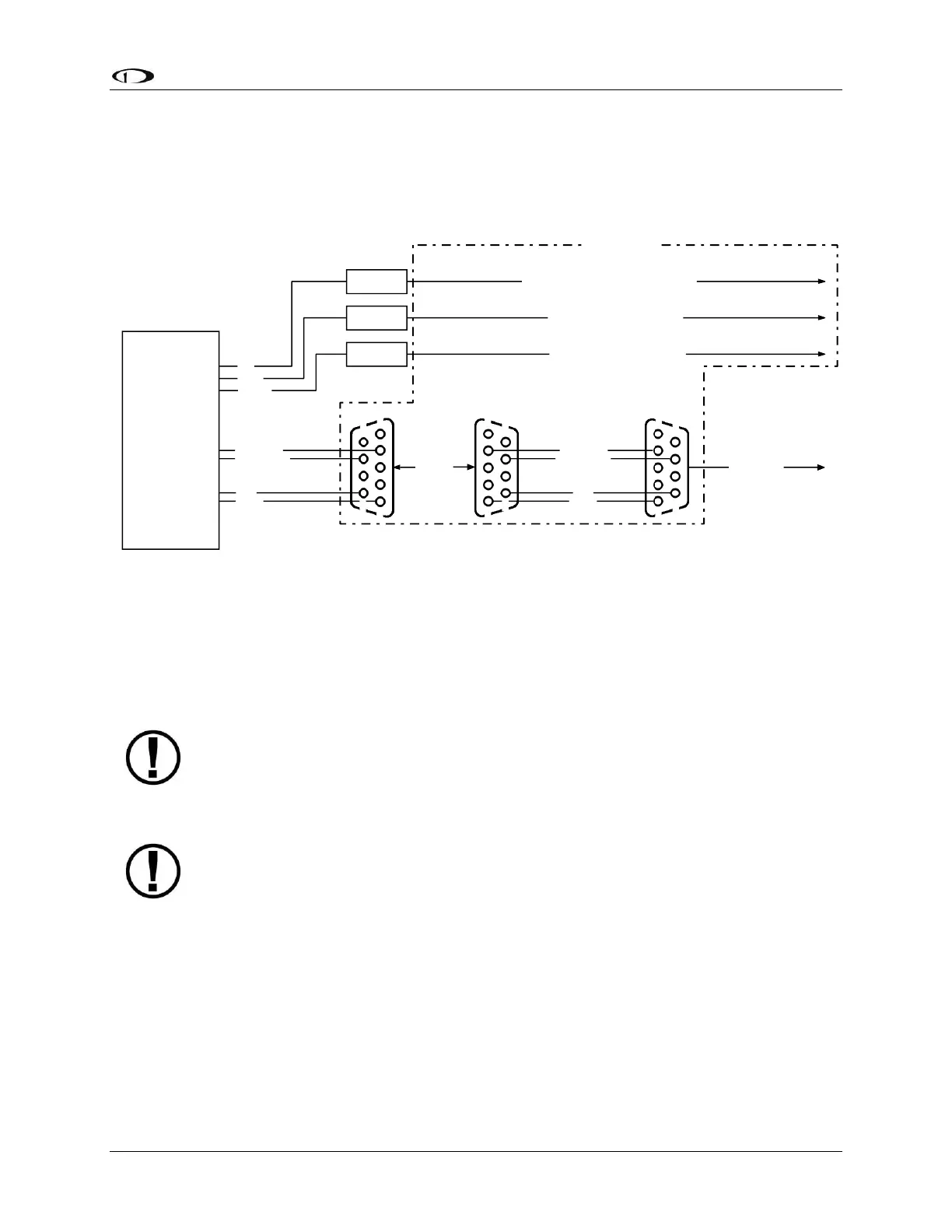
Connect the servos to the SkyView network according to Figure 55 and Table 40. Installers
should strongly consider using the SV-NET-SERVO cabling kit (one per servo) for completing the
network connection to the servos in the system. Figure 56 is the recommended pin insertion
scheme for the three D9 connectors present in the SV-NET-SERVO cabling kit.
SV-NET-SERVO Kit
Female DB9 Connector
Pin Insertion View
SV-NET-SERVO Kit
Male DB9 Connector
Pin Insertion View
GREEN
BLUE
WHITE/BLUE
SERVO
(SV32, SV42,
or SV52)
1
5
6
9
SV-NET-SERVO Kit
Female DB9 Connector
Pin Insertion View
CONNECT
1
5 5
6
9 9
WHITE/BLUE
WHITE/GREEN
BLUE
GREEN
1
6
To SkyView
Network
SPLICE
SPLICE
SPLICE
RED
BLACK
YELLOW
RED - 20 AWG - To Servo Power Switch/Breaker
BLACK - 20 AWG - To Aircraft Ground
YELLOW - To Disengage/CWS Button
WHITE/GREEN
All wires in the kit are 20 feet long and 22 AWG unless otherwise specified.
Kit Contents
Figure 56–SV-NET-SERVO Recommended Pin Insertion (All Connectors Rear View)
Note that the kit contains 20 feet of wire of each color, which should be sufficient for most
servo installations. Also note that the white/blue, white/green and blue, green wire
combinations come pretwisted.
Remember to configure the network after connecting all modules to a display.
AP Disengage/CWS Button
The installation of the AP Disengage/CWS button is required.
The AP Disengage/CWS button should be in a very accessible location, usually mounted to the
stick or yoke. This button’s primary purpose is to immediately disengage the autopilot. It is also
required for autopilot calibration, control wheel steering functionality, and can be used to
engage the autopilot.
This button should be a single pole, normally open, momentary button. Verify that two
terminals of the button are shorted when the button is pressed and open (no-connect) when
the button is released. One terminal of the button should connect to the servos’ yellow wires,
and the other should connect to ground.



 To Next Page