5-122
F codes
E codes
C codes
P codes
H codes
A codes
b codes
r codes
J codes
d codes
U codes
y codes
Chap. 5 FUNCTION CODES
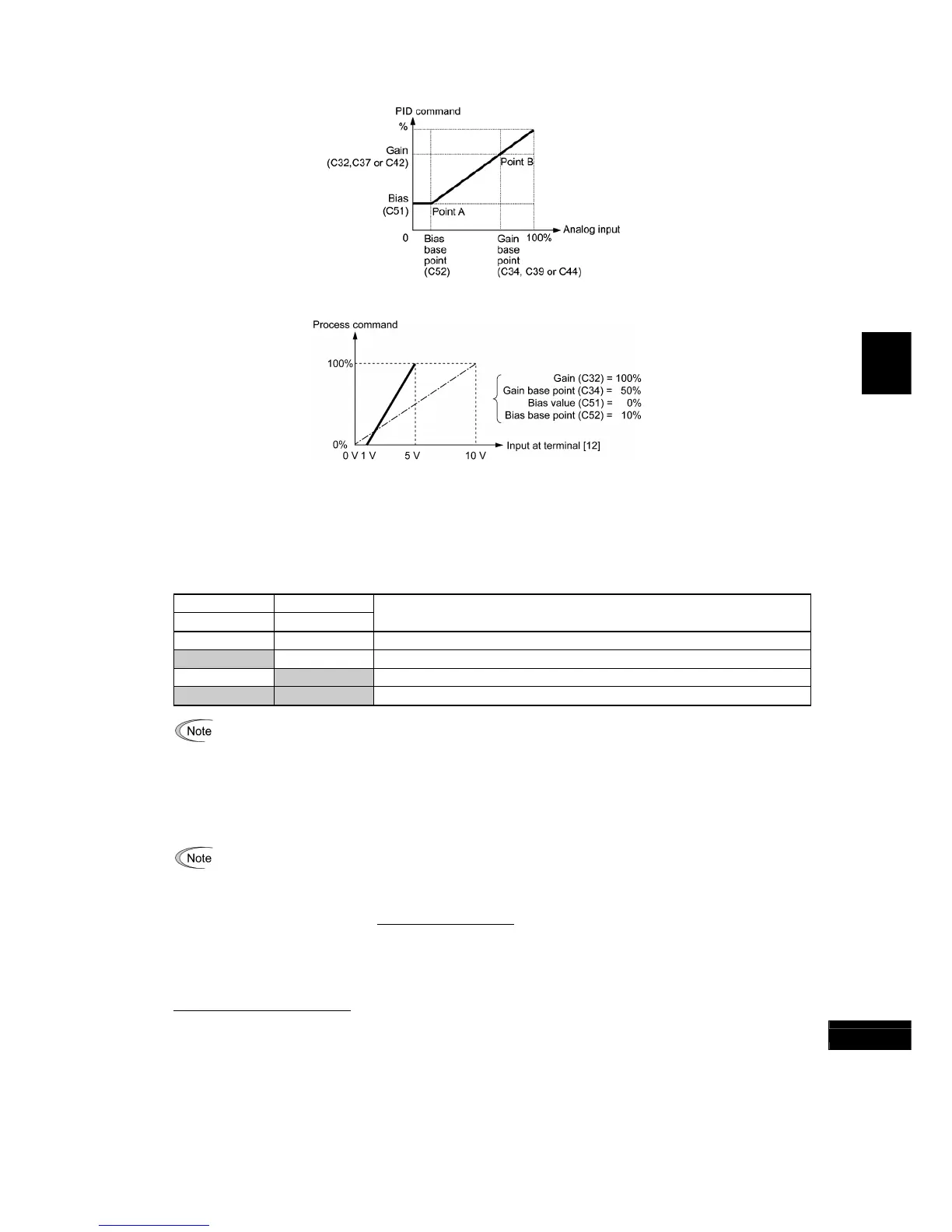
Gain and bias
(Example) Mapping the range of 1 through 5 V at terminal [12] to 0 through 100%
[ 3 ] PID command with UP/DOWN control (J02 = 3)
When the UP/DOWN control is selected as a PID speed command, turning the terminal command UP or DOWN ON
causes the PID speed command to change within the range from 0 to 100%.
The PID speed command can be specified in mnemonic physical quantities (such as temperature or pressure) with the
PID display coefficients (E40, E41).
To select the
UP/DOWN control as a PID speed command, the UP and DOWN should be assigned to the digital input
terminals [X1] to [X7]. (
E01 to E07, data = 17, 18)
UP DOWN
Data = 17 Data = 18
Function
OFF OFF Retain PID speed command value.
ON OFF Increase PID speed command value at a rate between 0.1%/0.1 s and 1%/0.1 s.
OFF ON Decrease PID speed command value at a rate between 0.1%/0.1 s and 1%/0.1 s.
ON ON Retain PID speed command value.
The inverter internally holds the PID command value set by the UP/DOWN control and applies the held value
at the next restart (including powering ON).
[ 4 ] PID command via communications link (J02 = 4)
Use function code S13 that specifies the communications-linked PID command. The transmission data of 20000
(decimal) is equal to 100% (maximum frequency) of the PID command. For details of the communications format, refer
to the RS-485 Communication User's Manual.
• Other than the remote command selection by J02, the multi-frequency 4, 8 or 12 (specified by C08, C12 o
reference position), and is saved as function code data.
Selecting Feedback Terminals
For feedback control, determine the connection terminal according to the type of the sensor output.
• If the sensor is a current output type, use the current input terminal [C1] of the inverter.
• If the sensor is a voltage output type, use the voltage input terminal [12] of the inverter, or switch over the terminal
[V2] to the voltage input terminal and use it.
For details, refer to the descriptions of E61 through E63.



 To Next Page