Revision 1 36 9/10/2019
numbers to allow for a successful communications link. Leave all other configuration
parameters at their default settings.
3.4.5.3 Ethernet Option
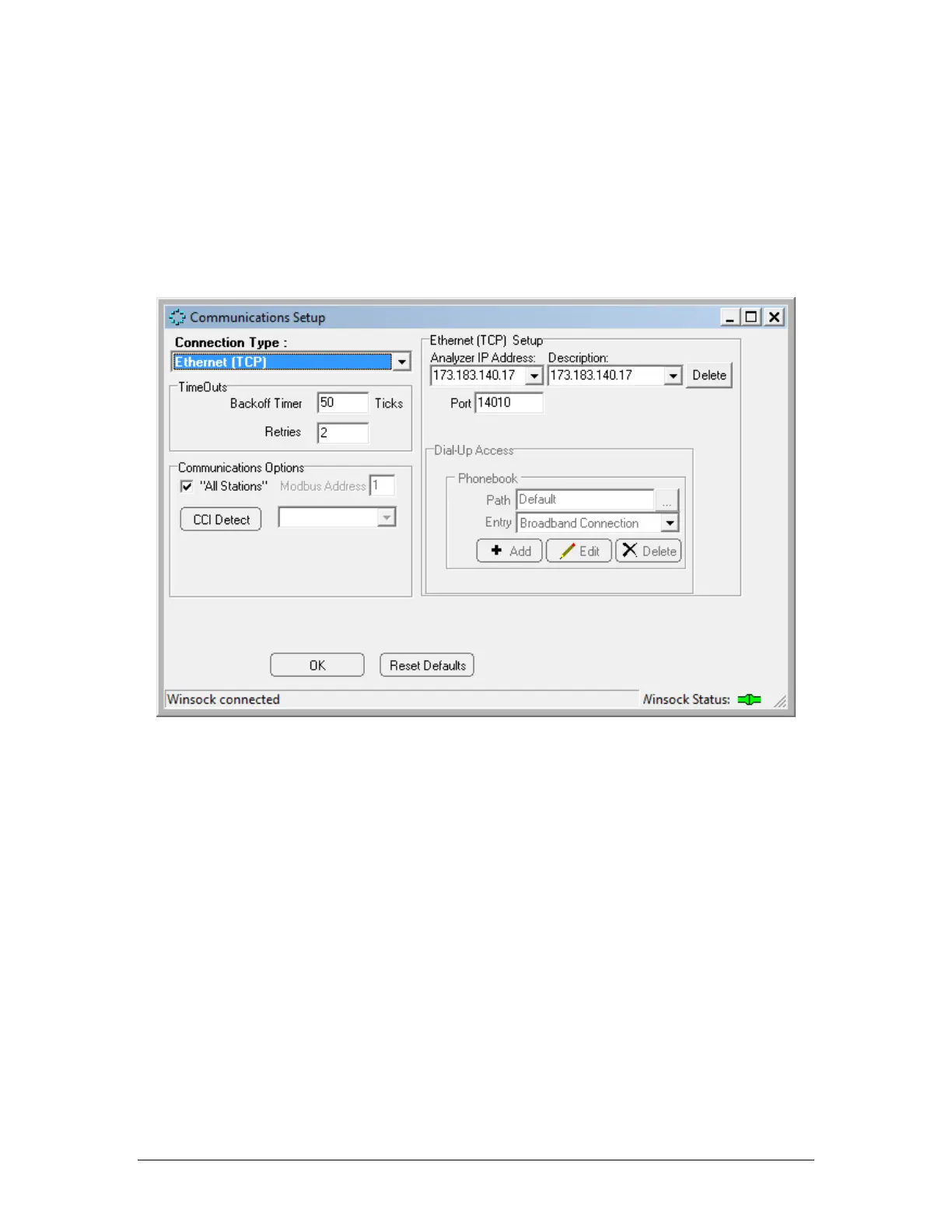
If the Ethernet option is selected for the connection type, the Communications Setup dialog
box window will appear as in Figure 3-8: Communications Setup Dialog Box
Figure 3-10: Communications Setup Window (Ethernet (TCP))
The user can set-up a list of IP addresses along with a description for each in the Analyzer IP
Address region of the Ethernet (TCP) Setups field.
The Communications Options field is used to set the Modbus Address field to the desired
Modbus address (valid range from 1 to 255). As an alternative, put a checkmark in the All
Stations checkbox, which will cause the analyzer to poll all possible Modbus addresses.
The Timeouts field provides two options - Backoff Timer and Retries. The Backoff timer tells
the application program how much time, in ticks (one tick = 55 milliseconds), to wait for a
response from the analyzer before retrying to contact the analyzer. If the communication link
between the analyzer and the computer is slow or unreliable, perhaps because of a long
distance between the computer and the analyzer it may be necessary to increase these
numbers to allow for a successful communications link. Leave all other configuration
parameters at their default settings.



 To Next Page