Revision 1 71 9/10/2019
Discrete Inputs (Dry Contact) - shows the current status of the four dry discrete inputs on
the electronics board. These discrete inputs can be such things as low-pressure switches,
temperature switches or on/off switches used to initiate specific runs. A red circle beside a
discrete input label indicates that the particular discrete input has been triggered, while a
green circle indicates that the particular discrete input has not been triggered. Setting up
discrete inputs is described in Section 5.11.
Discrete Inputs (Wet Contact) - shows the current status of the four wet discrete inputs on
the electronics board. These discrete inputs can be such things as remote calibration etc. A
red circle beside a discrete input label indicates that the particular discrete input has been
triggered, while a green circle indicates that the particular discrete input has not been
triggered. Setting up discrete inputs is described in Section 5.12.
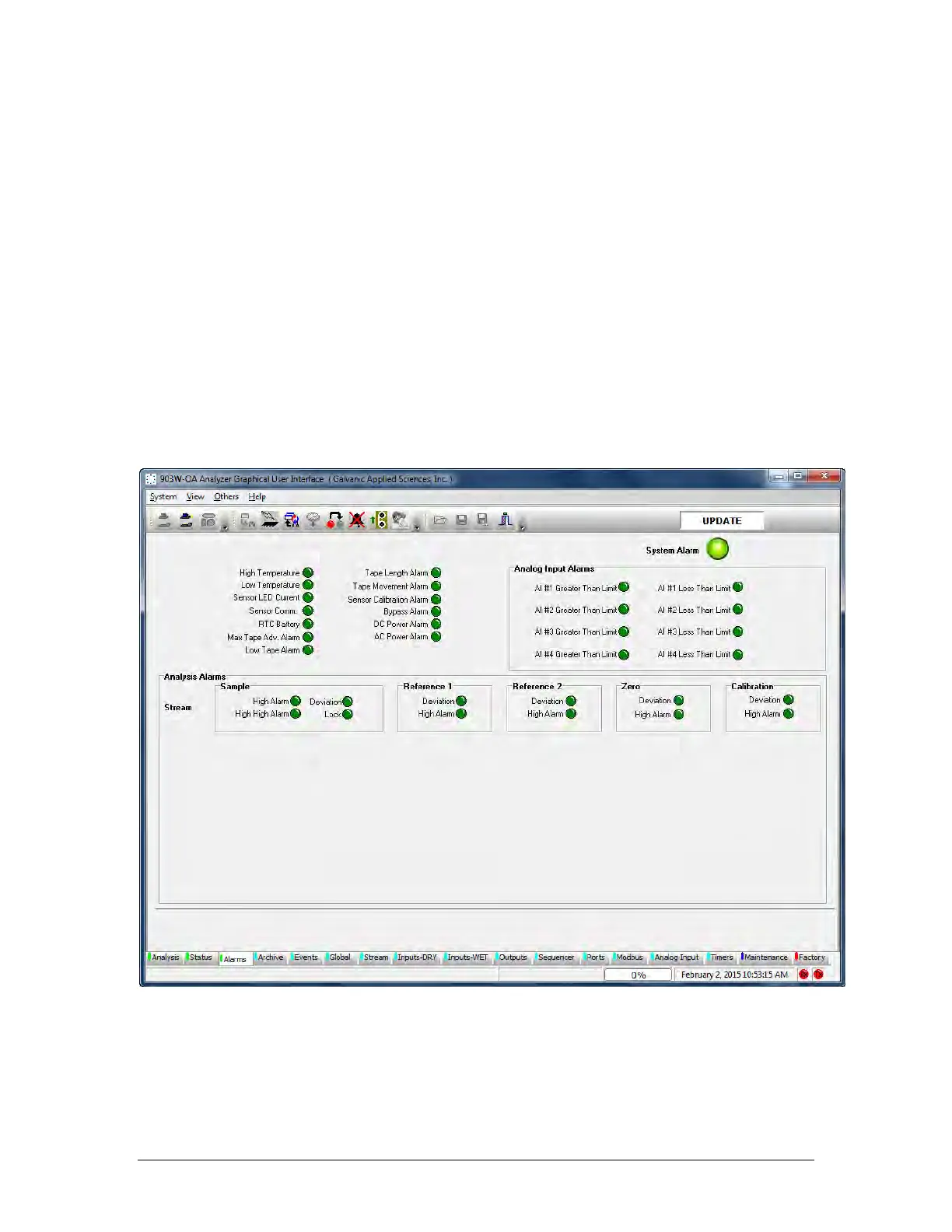
5.6 Alarms Tab
The Alarms tab allows the user to view the status of the analyzer alarms. Alarms such as the
pressure switch alarms will be presented on the analyzer status tab under the Discrete Input
(Dry Contact) area and on the analyzer display alarm LED.
Figure 5-9: Alarm Tab
The Alarms Tab is divided into 3 sections:
• Global Alarms (Section 6.5.1)
• Analog Input Alarms (Section 6.5.2)
• Analysis Alarms (Section 6.5.3)



 To Next Page