Revision 1 41 9/10/2019
3.6 Connecting Gas to Analyzer
3.6.1 Connecting Gas to the Analyzer
To connect gas to the system:
a) Attach sample gas lines to the sample inlet, zero gas, calibration gas and reference gas
ports on the analyzer.
b) If the analyzer is equipped with a sample system, set the pressure regulator to 15 psig. If
the analyzer is not equipped with a sample system, ensure that the sample gas is clean
and is regulated to a pressure of 15 psig before connecting it to the system.
3.6.2 Leak Testing of the Compression Head
To ensure that repeatable data is obtained, it is essential to have a good seal between the
compression head, the tape, and the sample chamber. To test the seal, Galvanic
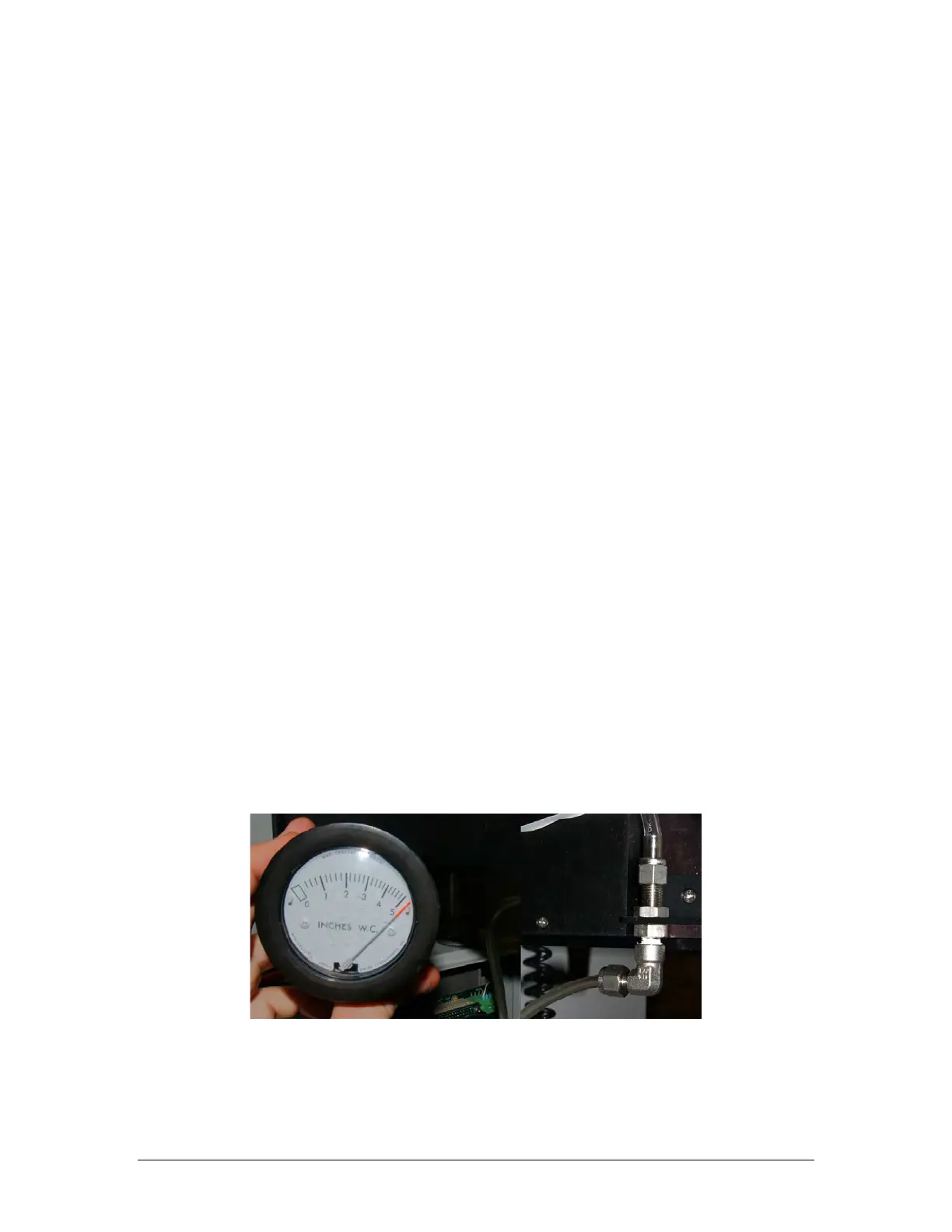
recommends the use of a Dwyer Minhelic II gauge, available from Galvanic Applied
Sciences. The gauge measures a range of pressure from 0 to 5 inches of water column.
The following procedure is used to leak-check the analysis compression head and to ensure
that a proper seal is obtained:
a) Make sure the flow indicated on the chassis rotameter is approximately 2.0 before
following this procedure.
b) Place the system in Bypass mode via the hand held keypad before carrying out this
procedure.
c) Remove the vent line from the elbow at the base of the chassis and attach the Minihelic
to the elbow, as shown in Figure 3-21.
Figure 3-21: Minihelic Indicating a Good Seal (L); Connected to Vent Elbow (R)



 To Next Page