190-01115-01 G3X™/G3X Touch™ Avionics Installation Manual
Rev. AV Page I-8
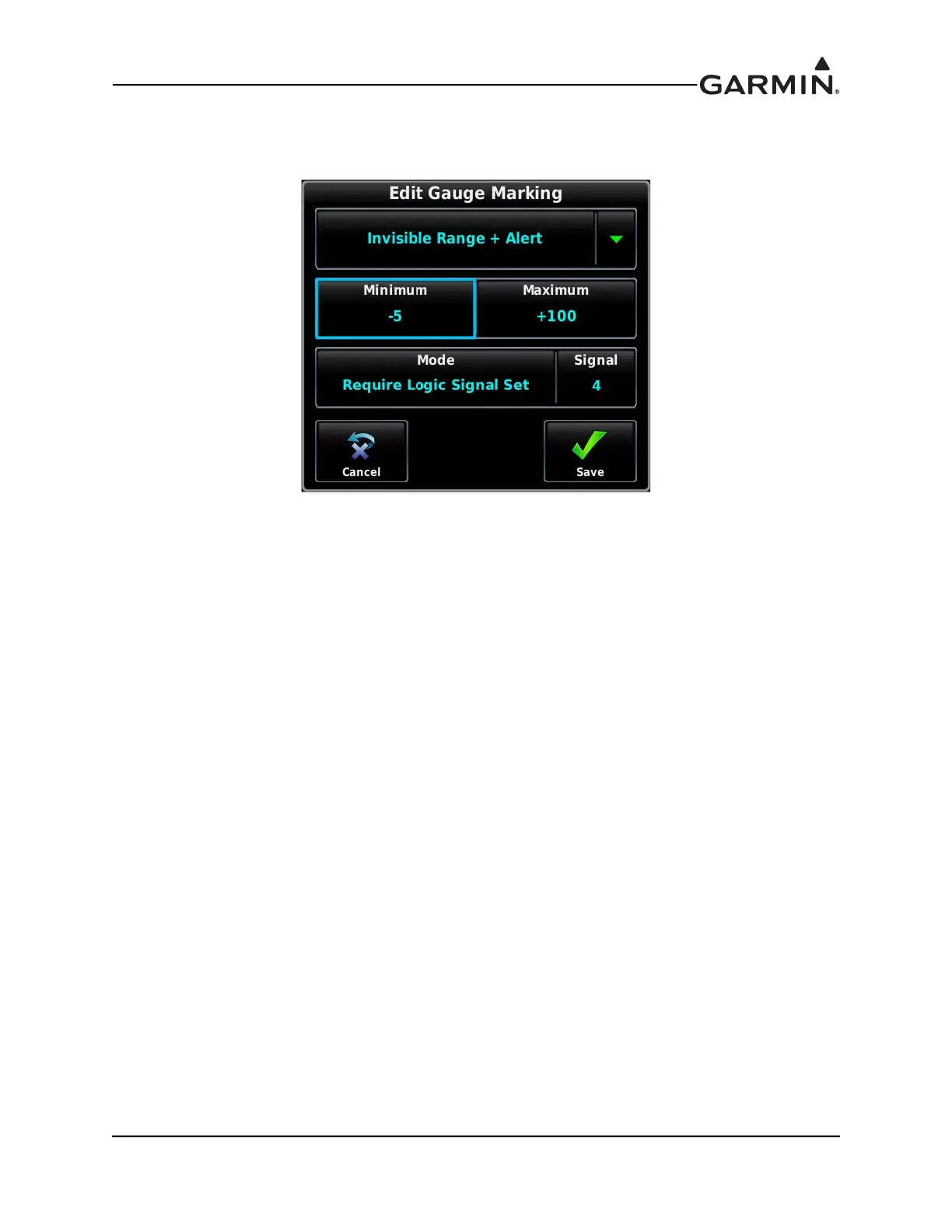
d) Add an additional new Gauge marking, and set the gauge marking type to “Invisible Range
+ Alert”.
Figure I-10 Edit Gauge Marking
i. Set the Minimum to -5
ii. Set the Maximum to +100
iii. Change the Mode from Normal to Require Logic Signal Set
iv. Select the same Logic Signal selected in Step 1c of this procedure (Logic Signal 4 for
this example)
v. Touch Save
e) Touch Save again to return to the Engine and Airframe Menu.
3. From the Engine and Airframe Menu, select the “Settings” tab at the top of the menu.
4. Select “Logic Signals”
5. Highlight the Logic Signal that was selected in Step 1c of this procedure. (Logic Signal 4 in this
example)


 To Next Page