4.33 Push Handles
Chapter 4: Procedures
4 - 56 Affinity® Four Birthing Bed Service Manual (195826 REV 2)
Figure 4-36. Line Manager
REPLACEMENT
Do the removal procedure in reverse order.
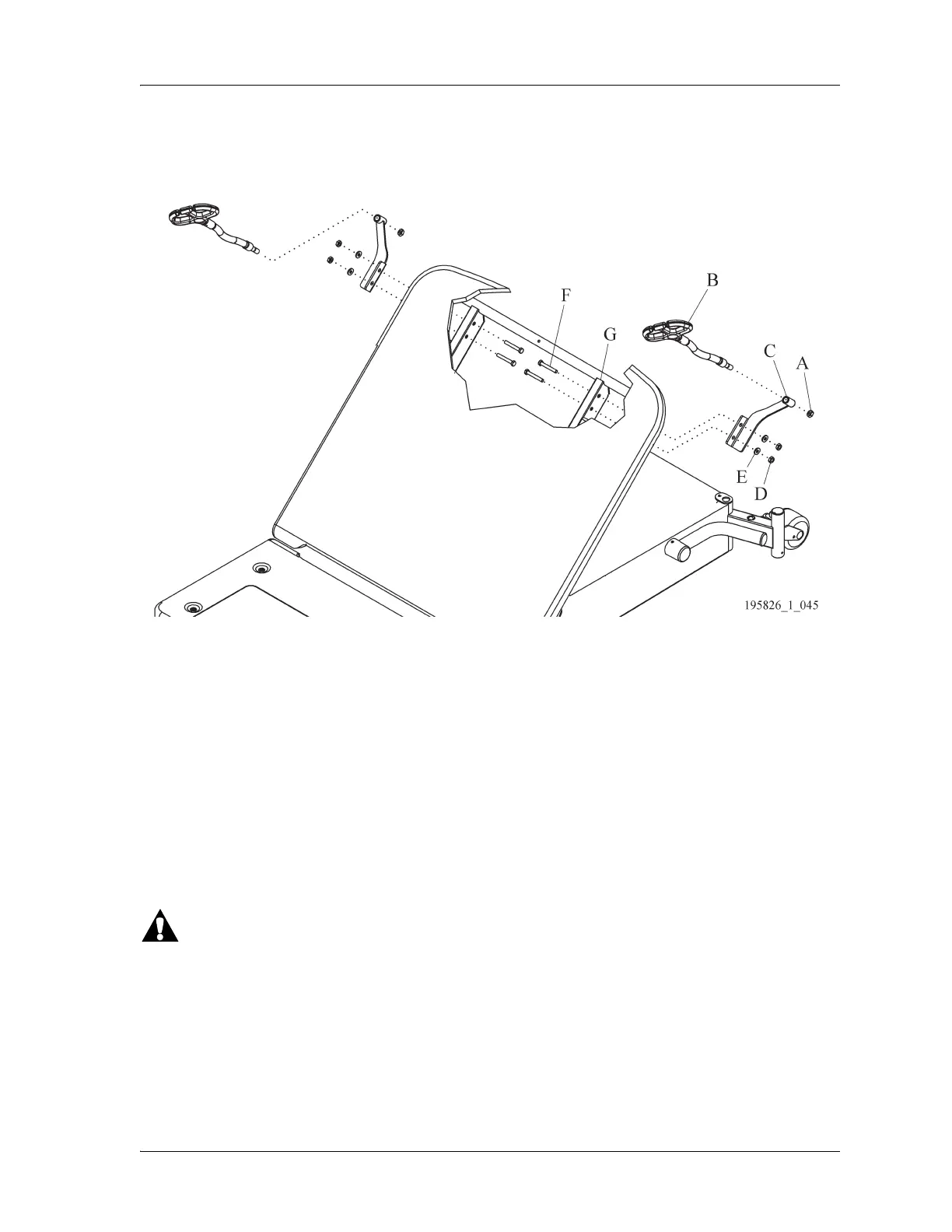
4.33 Push Handles
Tools: 7/16” wrench T25 Torx® screwdriver
The push handles are only compatible with the standard headboard. They are not compatible with the
Liberty Hill™ and Freedom Hill™ headboards.
REMOVAL
1. Set the brakes.
Failure to unplug the bed could cause injury or equipment damage.
2. Unplug the bed.
3. Put the siderail lockout switch at the head end of the bed in the locked position.
4. Remove the nut (A) from the bolt (B) (see Figure 4-37 on page 4-57).
5. Remove the bolt (B) that attaches the handle (C) to the bed (D).
6. Remove the handle (C).














 To Next Page