Test Equipment
Chapter 2: Troubleshooting
2 - 2 Affinity® Four Birthing Bed Service Manual (195826 REV 2)
TEST EQUIPMENT
You will need a digital or analog multimeter (VOM) with fine tip probes to troubleshoot the bed.
See your VOM owner’s manual for complete and detailed information regarding the operation of your
VOM. Failure to do so could cause personal injury or equipment damage.
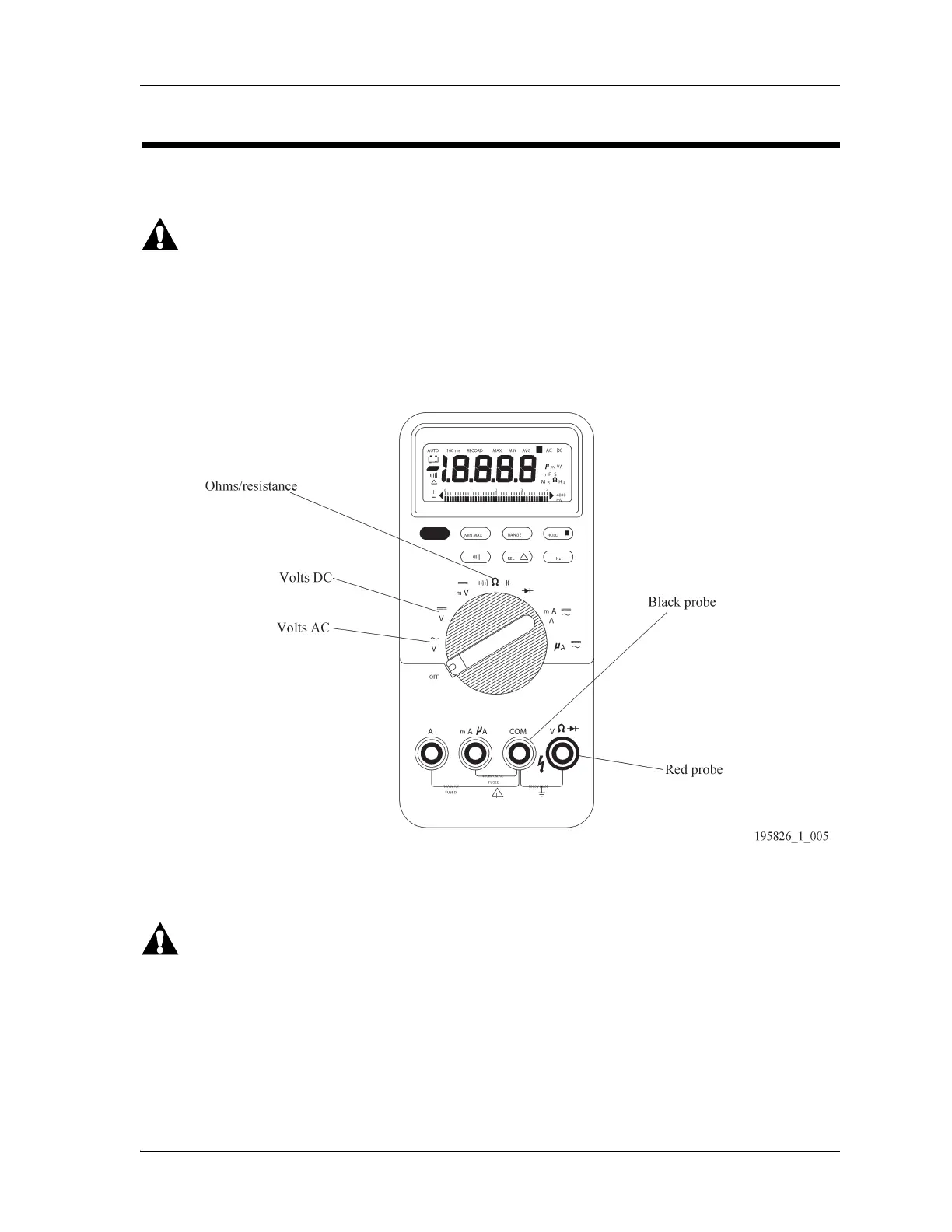
Figure 2-1 on page 2-2 represents a common digital VOM. The three basic electrical functions that you
will test are alternating current (AC), direct current (DC), and ohms/resistance.
Figure 2-1. VOM
Figure 2-1 on page 2-2 shows the correct connection for the fine tip probes. The red probe plugs into
the port marked “V ” The black probe plugs into the port marked “COM.” The troubleshooting repair
analysis procedure (RAP) identifies where on the bed to connect the red probe and black probe.
Unplug the bed from its power source and disconnect the battery backup before checking
ohms/resistance measurements. Failure to disconnect line voltage to the bed can damage the VOM and
cause equipment damage or personal injury.














 To Next Page